Microsoft announced on December 4, 2025 that commercial pricing for most Microsoft 365 suites will increase on July 1, 2026. For the majority of organisations this is the most significant licensing cost change since 2022. Increases range from around 5% to 33% depending on the plan, and for frontline worker SKUs the combined effect of price increases and the removal of EA volume discounts can push effective costs considerably higher.
The planning window is open now. If your renewal falls in the second half of 2026, the decisions you make in the next few months determine whether you absorb that increase in full — or arrive at the table with a clear picture of what you actually use and a case for right-sizing before the new rates apply.
This article gives you a PowerShell-based audit workflow to build that picture: unused licences, stale accounts, last sign-in activity, and a cost-impact report you can take into a renewal conversation.
What's Changing and Why It Matters
Microsoft's stated rationale is that the increases reflect capabilities now bundled into core plans that previously required separate licences: Defender for Office 365 Plan 1 into E3, expanded Intune capabilities across E3 and E5, Copilot Chat, and Security Copilot for E5. Whether that represents proportionate value depends entirely on whether your organisation was going to use those capabilities anyway.
For many SMB and mid-market environments, the headline percentage is only part of the picture. In November 2025, Microsoft moved Online Services pricing to a single list price across Levels A–D — see the official licensing announcement. Previous volume-level differentiation no longer applies in the same way; any discount must be negotiated. The combined effect of this change and the July price increase can be considerably higher than the published percentage increases suggest, particularly for frontline SKUs.
Published price changes — July 1, 2026
USD list prices per user/month, suites including Teams. Source: Microsoft 365 Blog, December 4, 2025 · Microsoft Licensing packaging details. Regional pricing differs.
Prerequisites
Install-Module Microsoft.Graph -Scope CurrentUser.Step 1 — Licence inventory: what you own vs what you use
This script retrieves every SKU in the tenant — licences purchased, assigned, and unassigned. Unassigned licences are paid seats with no user. They will cost more after July 1 and deliver nothing.
Connect-MgGraph -Scopes "Organization.Read.All", "Directory.Read.All"

# SKU friendly-name map for the most common plans
$skuNames = @{
    "SPE_E3"                   = "Microsoft 365 E3"
    "SPE_E5"                   = "Microsoft 365 E5"
    "ENTERPRISEPACK"           = "Office 365 E3"
    "O365_BUSINESS_PREMIUM"    = "M365 Business Standard"
    "O365_BUSINESS_ESSENTIALS" = "M365 Business Basic"
    "SPB"                      = "M365 Business Premium"
    "DESKLESSPACK"             = "Microsoft 365 F1"
    "SPE_F1"                   = "Microsoft 365 F3"    # SPE_F1 is the original SKU for what was renamed from F1 to F3 in April 2020
}

$report = Get-MgSubscribedSku | ForEach-Object {
    $name       = $skuNames[$_.SkuPartNumber] ?? $_.SkuPartNumber
    $purchased  = $_.PrepaidUnits.Enabled
    $assigned   = $_.ConsumedUnits
    $unassigned = $purchased - $assigned
    $pct        = if ($purchased -gt 0) { [math]::Round($assigned / $purchased * 100, 1) } else { 0 }

    [PSCustomObject]@{
        Plan       = $name
        Purchased  = $purchased
        Assigned   = $assigned
        Unassigned = $unassigned
        PctUsed    = "$pct%"
        Status     = if ($unassigned -gt 0) { "Review" } else { "OK" }
    }
}

$report | Sort-Object Unassigned -Descending | Format-Table -AutoSize
$report | Export-Csv ".\LicenceInventory_$(Get-Date -Format 'yyyyMMdd').csv" -NoTypeInformation
Write-Host "Unassigned total: $(($report | Measure-Object Unassigned -Sum).Sum)"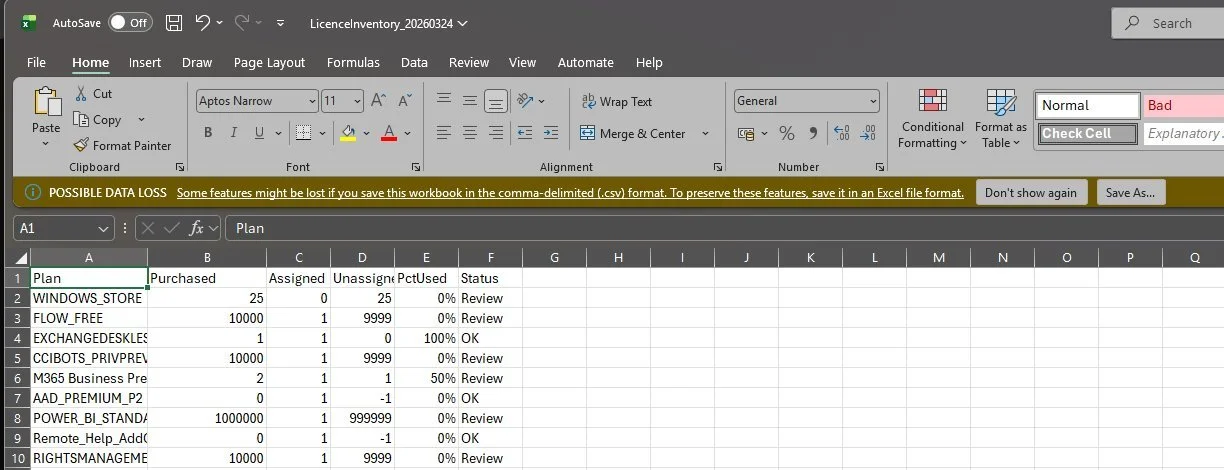
Sample output from a lab tenant — LicenceInventory_20260324.csv open in Excel. Note: the Graph API returns all subscribed SKUs including free and virtual licences (FLOW_FREE, POWER_BI_STANDARD, CCIBOTS_PRIVPREV, RIGHTSMANAGEMENT) with inflated "purchased" counts. These are not paid seats — focus on the rows where the Plan name matches a known paid SKU and Unassigned > 0. In this example, M365 Business Premium has 1 unassigned seat (50% utilisation) — a direct candidate for removal at renewal.
Unassigned > 0 consistently across two monthly runs is a direct reduction opportunity at renewal.Step 2 — Stale accounts: assigned but not used
Harder to spot than unassigned licences are those assigned to accounts nobody has used in months — leavers not deprovisioned, test accounts, users on extended leave. This script flags every licensed user who has not signed in within a configurable threshold.
Connect-MgGraph -Scopes "User.Read.All", "AuditLog.Read.All", "Directory.Read.All"

$staleDays = 90   # adjust to match your policy
$staleDate = (Get-Date).AddDays(-$staleDays)

$users = Get-MgUser -All `
    -Filter           "assignedLicenses/`$count ne 0" `
    -CountVariable    ignored `
    -ConsistencyLevel eventual `
    -Property         "Id,DisplayName,UserPrincipalName,AccountEnabled,AssignedLicenses,SignInActivity,Department,CreatedDateTime"

# Note: SignInActivity requires AuditLog.Read.All and is only returned
# when explicitly requested via -Property. Verify availability in your tenant.

$staleReport = foreach ($u in $users) {
    $last    = $u.SignInActivity.LastSignInDateTime
    $isStale = (-not $last) -or ([datetime]$last -lt $staleDate)

    [PSCustomObject]@{
        DisplayName    = $u.DisplayName
        UPN            = $u.UserPrincipalName
        Department     = $u.Department
        AccountEnabled = $u.AccountEnabled
        LicenceCount   = ($u.AssignedLicenses | Measure-Object).Count
        LastSignIn     = if ($last) { [datetime]$last } else { "No data" }
        DaysSince      = if ($last) { [math]::Round(((Get-Date) - [datetime]$last).TotalDays) } else { "Unknown" }
        IsStale        = $isStale
        Recommendation = if (-not $u.AccountEnabled) { "Disabled — remove licence" }
                         elseif ($isStale)            { "Review — no activity in $staleDays days" }
                         else                            { "Active" }
    }
}

Write-Host "Licensed users: $($users.Count)"
Write-Host "Stale: $(($staleReport | Where-Object IsStale).Count)"
Write-Host "Disabled with licences: $(($staleReport | Where-Object { -not $_.AccountEnabled }).Count)"

# Disabled accounts — immediate action, no HR check needed
$staleReport | Where-Object { -not $_.AccountEnabled } |
    Export-Csv ".\DisabledWithLicences_$(Get-Date -Format 'yyyyMMdd').csv" -NoTypeInformation

# Stale accounts — validate with HR before acting
$staleReport | Where-Object IsStale | Sort-Object DaysSince -Descending |
Export-Csv ".\StaleAccounts_$(Get-Date -Format 'yyyyMMdd').csv" -NoTypeInformationStep 3 — Cost-impact model: quantify the exposure
This script translates the inventory into numbers: current annual spend at list price, projected post-July spend, and the saving potential from removing unassigned seats. Use as a directional basis for your renewal conversation, not as a final invoice forecast.
# USD list prices (with Teams). Source: Microsoft 365 Blog, Dec 4 2025.
$prices = @{
    "SPE_E3"                   = @{ Now = 36.00; New = 39.00 }
    "SPE_E5"                   = @{ Now = 57.00; New = 60.00 }
    "ENTERPRISEPACK"           = @{ Now = 23.00; New = 26.00 }
    "O365_BUSINESS_ESSENTIALS" = @{ Now = 6.00;  New = 7.00  }
    "O365_BUSINESS_PREMIUM"    = @{ Now = 12.50; New = 14.00 }
    "SPB"                      = @{ Now = 22.00; New = 22.00 }
    "DESKLESSPACK"             = @{ Now = 2.25;  New = 3.00  }
    "SPE_F1"                   = @{ Now = 8.00;  New = 10.00 }  # SPE_F1 = M365 F3 (renamed from F1 in April 2020 — confirm in your LicenceInventory CSV)
}

Connect-MgGraph -Scopes "Organization.Read.All", "Directory.Read.All"

$model = Get-MgSubscribedSku | ForEach-Object {
    $p = $prices[$_.SkuPartNumber]; if (-not $p) { return }
    $seats = $_.ConsumedUnits
    $unassigned = $_.PrepaidUnits.Enabled - $seats
    [PSCustomObject]@{
        Plan          = $_.SkuPartNumber
        Seats         = $seats
        CurrentAnnual = [math]::Round($seats * $p.Now * 12, 2)
        NewAnnual     = [math]::Round($seats * $p.New * 12, 2)
        PctIncrease   = [math]::Round(($p.New - $p.Now) / $p.Now * 100, 1)
        WasteNewPrice = [math]::Round($unassigned * $p.New * 12, 2)
    }
}

$cur   = ($model | Measure-Object CurrentAnnual -Sum).Sum
$new   = ($model | Measure-Object NewAnnual     -Sum).Sum
$waste = ($model | Measure-Object WasteNewPrice -Sum).Sum

Write-Host "Current annual (list):          `$$([math]::Round($cur,  2))"
Write-Host "Projected annual post-July:     `$$([math]::Round($new,  2))"
Write-Host "Annual increase at list:         `$$([math]::Round($new - $cur, 2))"
Write-Host "Saving potential (unassigned):  `$$([math]::Round($waste, 2))"
Write-Host "Directional only — verify actual costs with your agreement."

$model | Export-Csv ".\CostImpact_$(Get-Date -Format 'yyyyMMdd').csv" -NoTypeInformation
What the output looks like — real tenant data
The script exports a CSV and prints a summary to the console. The screenshot below shows the CostImpact CSV open in Excel from a real run. In this tenant, only SPB (M365 Business Premium) matched the price table — the script correctly skips SKUs not in the $prices map, which is expected behaviour if your tenant uses different plan combinations. Add your own SKU part numbers and prices to the $prices hashtable to cover your full licence mix.
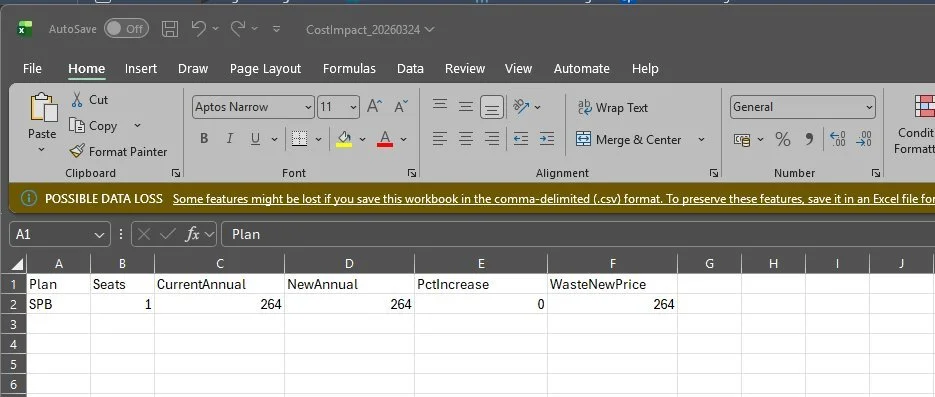
Real output — CostImpact_20260324.csv open in Excel. SPB (M365 Business Premium, $22→$22, unchanged) is the only matching SKU in this tenant. WasteNewPrice = $264 — one unassigned Business Premium seat at $22 × 12. To get results for all your paid plans, extend the $prices hashtable with your tenant's SKU part numbers (visible in the LicenceInventory CSV, column B).
SkuPartNumber. If your tenant uses SKUs not in the default $prices map (e.g. ENTERPRISEPACK, O365_BUSINESS_PREMIUM), add them manually. The SKU part numbers for all your subscriptions are visible in column B of the LicenceInventory CSV from Step 1.Step 4 — Automate the monthly audit
Running this once gives you a snapshot. Running it monthly gives you a trend — and means you arrive at renewal with data showing whether the situation improved or worsened over time. For unattended runs you need an Entra ID app registration with application permissions and certificate-based authentication.
# App registration permissions (application, not delegated):
#   Organization.Read.All, Directory.Read.All, AuditLog.Read.All

Connect-MgGraph `
    -TenantId              "your-tenant-id" `
    -ClientId              "your-app-client-id" `
    -CertificateThumbprint "your-cert-thumbprint"

$action   = New-ScheduledTaskAction -Execute "pwsh.exe" `
                -Argument "-NonInteractive -File C:\Scripts\M365-LicenceAudit.ps1"
$trigger  = New-ScheduledTaskTrigger -Monthly -DaysOfMonth 1 -At "07:00"
$settings = New-ScheduledTaskSettingsSet -RunOnlyIfNetworkAvailable -StartWhenAvailable

Register-ScheduledTask `
    -TaskName    "M365 Monthly Licence Audit" `
    -Action      $action `
    -Trigger     $trigger `
    -Settings    $settings `
-RunLevel HighestWhat to do with the data
DisabledWithLicences export requires no further investigation. A disabled account cannot authenticate. Remove these now.