A green DKIM status is a useful starting point. In this audit, it appeared alongside two conflicting DMARC records. This guide shows how to find that kind of gap: inventory your senders, inspect DNS, understand alignment and decide what evidence you need before enforcement.
What you will be able to verify
- Whether the DNS baseline is coherent before touching policy.
- Whether a legitimate message passes DMARC through an aligned SPF or DKIM result.
- Which evidence should support a move from monitoring to enforcement.
- Why a sender's DMARC policy and a recipient's handling of a message are separate decisions.
- 1InventoryIdentify every sending service.
- 2AuditCheck records and signing.
- 3ObserveCollect headers and reports.
- 4EnforceAdvance against exit criteria.
- 5MaintainWatch changes and regressions.
1. Define the pilot and its owners
Start with a sending domain you control. A dedicated subdomain such as lab.contoso.com can keep initial testing away from production mail, provided its addresses, sending service and recipient accounts are deliberately configured. A successful subdomain pilot does not validate the parent domain's other senders.
Prepare an approved sender, an external mailbox you own, and access to the relevant DNS zone. Establish the permission model before the session: Defender portal permissions, Exchange Online permissions and DNS-provider access are separate.
Permissions to prepare
The table distinguishes an audit from a configuration change. For the Unified RBAC rows, Core security settings is under Authorization and settings → Security settings. Use those rows only when Unified RBAC is active for the Defender for Office 365 workload.
| Task and permission model | To inspect | To change |
|---|---|---|
| Public DNS queries | No Microsoft 365 role or local administrator session | Queries cannot change records |
| DNS-provider zone | Provider access to view the target zone | Provider permission to edit that zone's TXT and CNAME records |
| DKIM in Defender — Unified RBAC active | Core security settings (read) | Core security settings (manage) |
| Anti-phishing in Defender — Unified RBAC active | Core security settings (read) | Core security settings (manage) |
| Anti-phishing — Exchange Online role groups | Security Reader or View-Only Organization Management | Security Administrator or Organization Management |
| Add a new Microsoft 365 domain | Not needed for an existing-domain audit | Domain Name Administrator, plus separate DNS access for verification |
| Headers and aggregate-report mailbox | Access to the test recipient's mailbox and the approved report mailbox | Mailbox access does not grant DNS or policy-editing rights |
Unified RBAC applies to the Defender portal, not Exchange Online PowerShell. For tenants using the older permission model, verify access to Email authentication settings separately: Microsoft's ARC guidance notes that the Microsoft Entra Security Administrator role alone cannot access that page. Do not confuse it with the Exchange Online role group of the same name. Have the permissions owner confirm the existing delegation before the pilot; avoid assigning Global Administrator simply to work around a missing page.
Basic anti-spoofing features are available to cloud mailboxes; advanced impersonation protection requires Defender for Office 365. Microsoft's Unified RBAC reference used here applies to Defender for Office 365 Plan 2. Confirm your subscription and active permission model rather than assuming every tenant has the same controls.
If the pilot domain is new, use Microsoft 365 admin center → Settings → Domains → Add domain and complete ownership verification. Review the proposed DNS records manually. Adding a test domain is not a reason to replace production MX records or authorize an automatic DNS cutover. Configure a valid test sender address before attempting delivery.
| Sending stream | Record for each stream | Evidence to collect |
|---|---|---|
| Exchange Online | Visible From domain, envelope sender, DKIM signing domain | Fresh external message and received headers |
| Marketing, CRM and ticketing | Business owner, vendor, custom DKIM and return-path configuration | A real workflow from each service, including scheduled campaigns |
| Applications, devices and relays | Connection path, source, sender identity and frequency | Representative operational mail, including low-volume jobs |
| Forwarding and mailing lists | Intermediary, message changes and ARC handling | Received result after the actual forwarding path |
Agree who can approve DNS changes, who owns report review, who can assess delivery failures, and who can reverse a change. Record the previous values and TTLs before editing anything.
2. Understand what DMARC actually evaluates
DMARC connects authentication to the domain people see in the From address. SPF authenticates the envelope sender domain; DKIM authenticates a signing domain in the signature's d= value. An authentication pass must also align with the visible From domain. One aligned pass—SPF or DKIM—is sufficient for DMARC.
| Received authentication | Alignment | DMARC consequence |
|---|---|---|
| SPF passes for vendor.example; DKIM passes with d=lab.contoso.com | DKIM aligns | Can pass through DKIM |
| SPF and DKIM pass only for vendor.example | Neither aligns with lab.contoso.com | Authentication passes alone are insufficient |
| SPF passes for bounce.lab.contoso.com | Relaxed alignment can match the same organizational domain; strict alignment requires an exact domain match | Depends on the published SPF alignment mode and the other result |
| SPF fails after forwarding; the original aligned DKIM signature survives | DKIM still aligns | Can still pass through DKIM |
Do not introduce strict adkim=s or aspf=s merely because they sound stronger. First determine whether legitimate services rely on subdomain alignment. DMARC also does not prevent display-name impersonation, lookalike domains or misuse of a compromised legitimate account; the broader anti-phishing controls still matter.
3. Audit DNS before trusting the dashboard
Query the exact sending domain, then compare the authoritative answer with a recursive resolver. Keep each TXT resource record separate. A long TXT record can contain several character strings that belong together; that is different from two independent DMARC records.
# Windows PowerShell: read-only examples
Resolve-DnsName contoso.com -Type NS -DnsOnly
Resolve-DnsName lab.contoso.com -Type TXT -Server 1.1.1.1 -DnsOnly
Resolve-DnsName _dmarc.lab.contoso.com -Type TXT -Server 1.1.1.1 -DnsOnly
Resolve-DnsName selector1._domainkey.lab.contoso.com -Type CNAME -DnsOnly
Resolve-DnsName selector2._domainkey.lab.contoso.com -Type CNAME -DnsOnly
For SPF, count only records beginning with v=spf1; unrelated TXT records are normal. There must be one SPF policy at that name, and its full evaluation must stay within the SPF limit of 10 DNS-querying terms, including nested evaluations. For a domain sending exclusively through Microsoft 365, Microsoft's example is v=spf1 include:spf.protection.outlook.com -all. A mixed sender inventory needs a design that covers those senders without creating a second SPF record. SPF is not automatically inherited by every subdomain.
A real finding from this audit
The DNS provider, both authoritative name servers and the recursive resolver confirmed two DMARC TXT records at the same name. One requested monitoring; the other requested quarantine and strict alignment. This is a configuration defect, not a staged rollout. Receivers should not be expected to choose the stricter record or combine them.
# Anonymized extract of two separate records observed
Record A: v=DMARC1; p=none; rua=mailto:[redacted]
Record B: v=DMARC1; p=quarantine; rua=mailto:[redacted];
          ruf=mailto:[redacted]; sp=quarantine; adkim=s; aspf=s;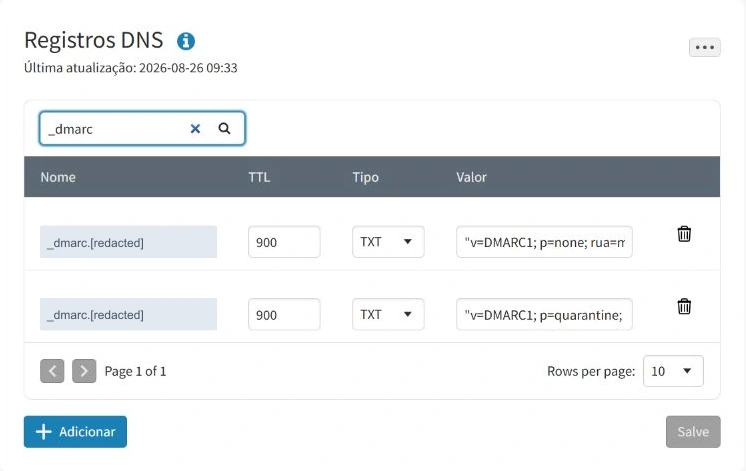
The correct next step is to agree one intended policy and its reporting destinations, preserve the original evidence, then replace the duplicate set through a controlled change. Do not arbitrarily delete the record that looks older, discard an approved reporting destination, or add a third record. Re-query every authoritative server and a recursive resolver after the change.
Get the PowerShell script and usage guide
The script records separate TXT answers, flags duplicate SPF/DMARC candidates, and queries two DKIM selectors. It changes no DNS or tenant settings. It is a baseline collector, not a complete SPF or DMARC validator.
4. Confirm DKIM, then prove it on a message
In Microsoft Defender, follow Email & collaboration → Policies & rules → Threat policies → Email authentication settings → DKIM. Select the exact sending domain. In this tenant the portal showed Valid and Enabled.
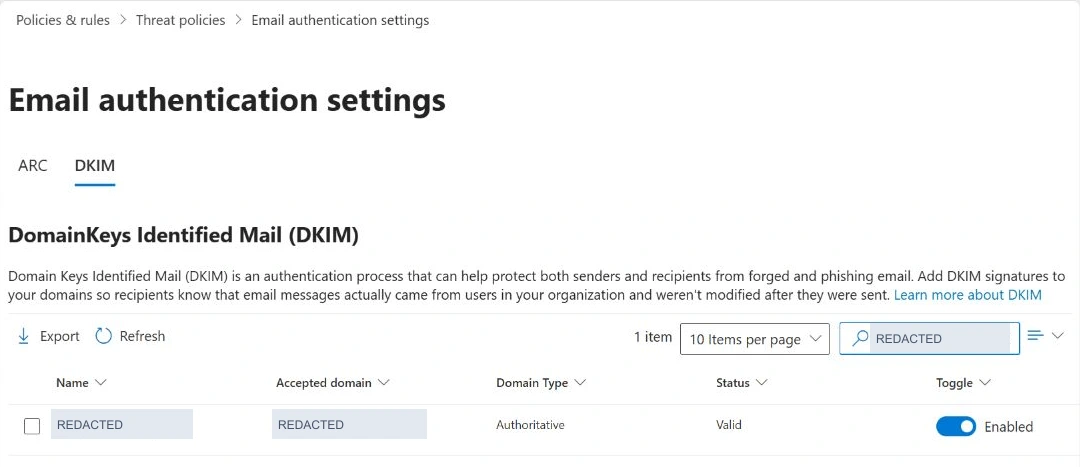
For a new domain, follow the portal's setup flow to obtain both CNAME destinations. Publish the exact generated values, verify their DNS resolution, then enable signing and re-open the domain to check its status. Creating the configuration can initially surface a missing-CNAME state; treat that as a setup dependency, not a reason to invent the target values.
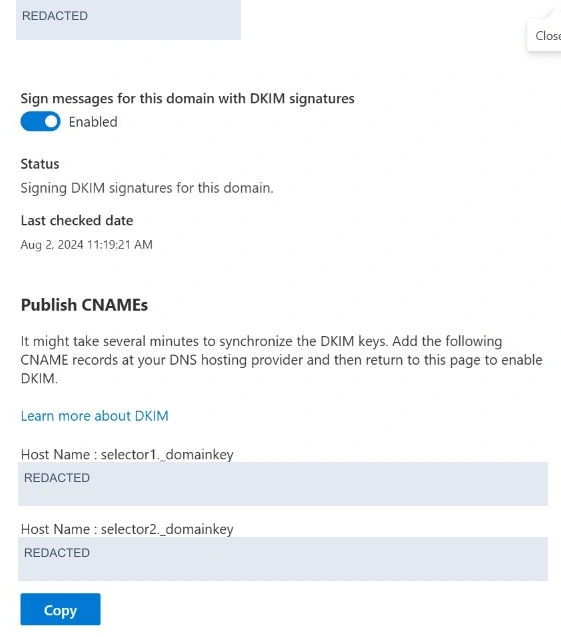
Microsoft introduced a new CNAME target format for new custom domains in May 2025. Existing domains can retain the older onmicrosoft.com format shown in this tenant. Copying a target from another tenant or an older walkthrough is unsafe. Keep both published selectors; do not rotate keys merely to reproduce this guide.
5. Establish one monitoring record for the pilot
For a new pilot with an approved, working report mailbox, a minimal example is:
Name:  _dmarc.lab.contoso.com
Type:  TXT
Value: v=DMARC1; p=none; rua=mailto:dmarc-reports@lab.contoso.com
Replace every example value. In a DNS panel managing the contoso.com zone, a relative name may be _dmarc.lab; panels accepting fully qualified names may expect the complete name instead. Verify the resulting public owner name to catch accidental duplicated suffixes. Check parent-domain policy and sp inheritance before creating a subdomain exception. An existing production enforcement policy should not be reset to p=none as a routine setup step.
Make sure the report recipient exists and is accessible to the review team. A report destination outside the sending domain can require authorization published by that destination's owner. An external analytics service should provide its required record. Do not assume that adding its address to rua completes the arrangement.
p=none requests monitoring for DMARC failures. It does not force inbox delivery or switch off a receiver's other protections. This example omits failure-report destinations: Microsoft 365 sends aggregate reports under its documented conditions, not DMARC forensic reports.
6. Validate fresh mail from every legitimate stream
- Send a new, harmless message from the approved pilot address to an external mailbox you control. Use a unique subject and record the UTC time. Repeat using each application in the sender inventory; an Outlook test covers only that sending path.
- At the receiving mailbox, open the original message details. In new Outlook, use More actions → View → View message details; in classic Outlook use File → Properties → Internet headers.
- Inspect the receiving service's
Authentication-Results, visible From, envelope sender and DKIM signature. Recordheader.from,smtp.mailfromandheader.dwhere present. With multiple authentication headers, identify the trusted receiving boundary rather than accepting a header inserted earlier in the route. - Keep the original headers privately. Record which aligned mechanism produced DMARC pass and the actual delivery result. Remove addresses, message identifiers and unnecessary IP details from public evidence.
# Synthetic interpretation example — not a captured tenant message
From: Pilot <pilot@lab.contoso.com>
Authentication-Results: receiver.example;
  spf=pass smtp.mailfrom=lab.contoso.com;
  dkim=pass header.d=lab.contoso.com;
  dmarc=pass header.from=lab.contoso.com;
The acceptance criterion is an aligned authentication pass on the real path and acceptable delivery. A compauth=pass result is not a substitute for checking DMARC. Likewise, dmarc=bestguesspass should not be treated as proof that a valid DMARC policy was published.
If delivery is unclear, an authorized operator can use Exchange admin center → Mail flow → Message trace → Start a trace, narrowing by time, sender and recipient. Trace helps locate handling and delivery events; it does not replace the recipient's authentication evidence. Use the trace result to investigate the route and the received headers to assess authentication.
7. Use reports to find the senders you missed
Aggregate reports connect observed sources and volumes to authentication outcomes. Review the report period, published policy, source IP, message count, evaluated disposition, aligned SPF/DKIM results and authentication domains together. Group by sending service and owner, not simply “pass” versus “fail.” A high overall pass rate can hide a small but critical application.
Classify each source as an approved sender, an intermediary, unexplained traffic or an unauthorized source. For an approved service that fails, investigate its signing domain and envelope return path before changing policy. For unknown traffic, establish ownership before adding any authorization. Reports are receiver observations; they do not by themselves prove that every reported message was delivered to an inbox.
Worked example: authentication passes, alignment fails
This illustrative XML record excerpt represents 12 messages from a vendor service using lab.contoso.com in the visible From address. The scenario assumes a published quarantine policy. It demonstrates how to read a report; it is not a report collected from the tenant.
<record>
  <row>
    <source_ip>192.0.2.44</source_ip>
    <count>12</count>
    <policy_evaluated>
      <disposition>quarantine</disposition>
      <dkim>fail</dkim>
      <spf>fail</spf>
    </policy_evaluated>
  </row>
  <identifiers>
    <envelope_from>bounce.vendor.example</envelope_from>
    <header_from>lab.contoso.com</header_from>
  </identifiers>
  <auth_results>
    <dkim>
      <domain>vendor.example</domain>
      <selector>vendor1</selector>
      <result>pass</result>
    </dkim>
    <spf>
      <domain>bounce.vendor.example</domain>
      <scope>mfrom</scope>
      <result>pass</result>
    </spf>
  </auth_results>
</record>| XML field | Interpretation |
|---|---|
auth_results/spf/result = pass | The source is authorized for bounce.vendor.example. That domain does not align with lab.contoso.com. |
auth_results/dkim/result = pass | The signature verifies for vendor.example. Its signing domain also does not align with the visible From domain. |
policy_evaluated/spf = failpolicy_evaluated/dkim = fail | Neither authenticated identity supplies an aligned pass, so these messages fail DMARC even though both raw authentication checks passed. |
disposition = quarantinecount = 12 | The receiver reports quarantine for this group of 12 messages. This field does not identify a particular user's folder or prove that every receiver would act identically. |
Next action: confirm that the vendor is an approved sender. If it is, configure custom DKIM signing with an aligned domain, or an aligned custom MAIL FROM domain with valid SPF. Then send a fresh test and check the receiving headers; later reports should confirm the corrected path. Adding a vendor to an unrelated SPF record does not by itself fix this alignment failure.
Allow for delayed and incomplete reporting. Not every receiver sends reports, and the absence of a report is not a successful test. Microsoft's own aggregate-report behavior also depends on its documented routing conditions, including direct Microsoft 365 MX delivery. Check both report delivery and the reporting period covered before claiming visibility.
8. Separate your DNS policy from recipient handling
Your public DMARC record states how you ask receivers to handle mail claiming your domain. Your Microsoft 365 anti-phishing policy controls how your tenant handles relevant incoming mail. Inspect both, but do not confuse a change to one with a change to the other.
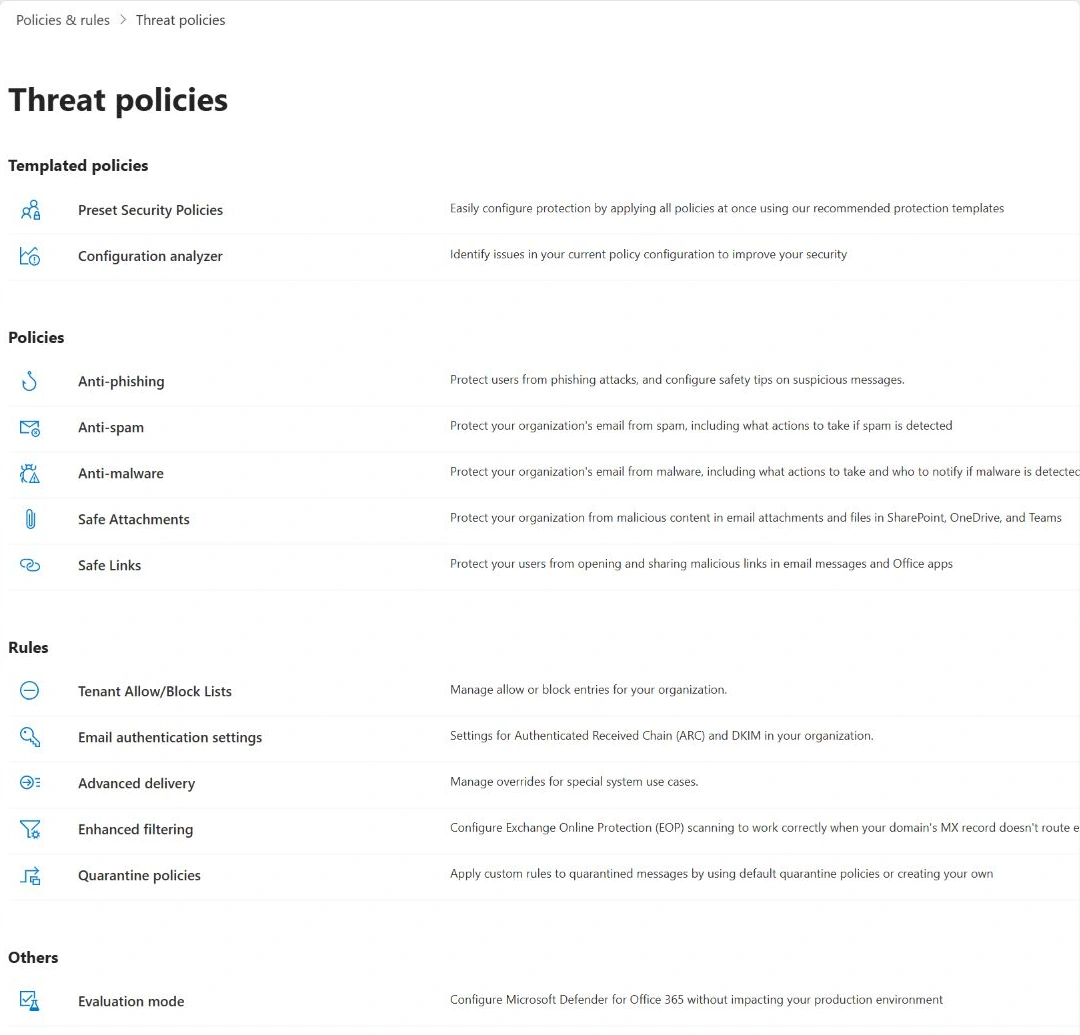
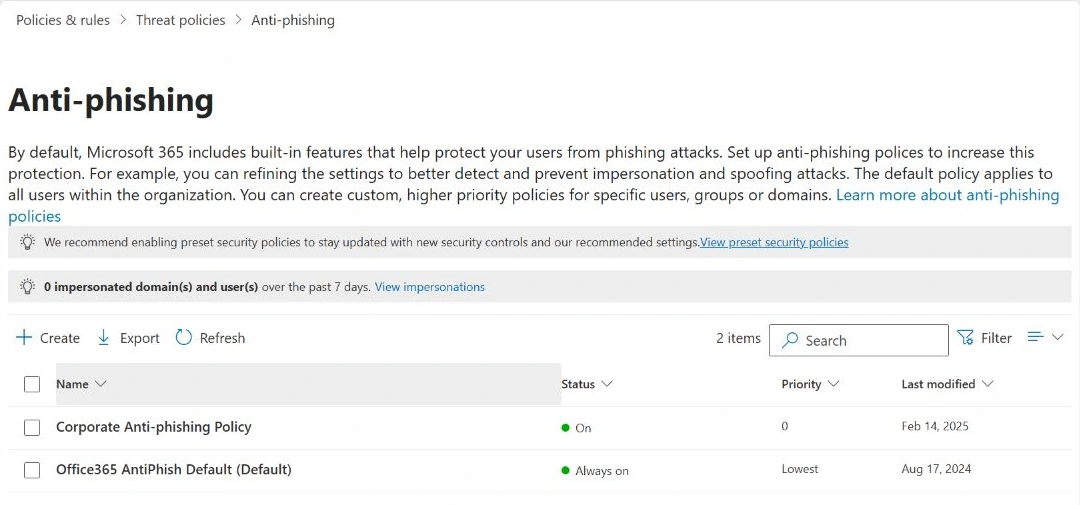
Open Threat policies → Anti-phishing. Check the applicable policy's recipient scope, exclusions, priority and preset-policy membership. A custom priority of zero is highest among custom policies, but does not automatically override applicable preset security policies. Policy order and scope determine which settings apply.
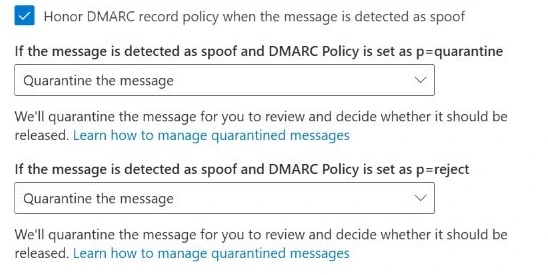
Open the policy's Actions section and inspect Honor DMARC record policy when the message is detected as spoof, together with spoof intelligence and the configured failure actions. In this tenant, both the p=quarantine and p=reject branches were set to Quarantine the message. Microsoft supports quarantine as an option for the reject branch.
If a third-party gateway sits in front of Microsoft 365, review Enhanced Filtering for Connectors and trusted ARC handling for the actual route. Do not add broad allow rules to make the test pass. Authentication context, policy exceptions and other protection decisions can explain a result that differs from the simple DNS expectation.
9. Advance through explicit acceptance gates
Use the following matrix as a change plan. Keep the same controlled sending streams and recipients across stages so that a new result can be compared with a useful baseline.
| Stage | Action | Required evidence before advancing |
|---|---|---|
| Baseline | Resolve duplicate or invalid policy records; confirm DNS and DKIM | One intended DMARC policy at the owner name, coherent authoritative/recursive answers, original values retained |
| Monitoring | Use the approved pilot policy with p=none | Fresh aligned mail from every approved stream; working aggregate reporting; representative operations covered |
| Quarantine | Change the same pilot record to p=quarantine | Approved mail continues correctly; a controlled DMARC-failing test produces the expected recipient outcome or a documented override |
| Reject | Change the same record to p=reject only after review | Legitimate paths remain healthy; controlled failure handling matches the selected recipient policy; operations accepts the residual risk |
| Rollback rehearsal | Restore the approved previous pilot value in a planned window | DNS convergence and fresh-message results confirm the intended behavior; record the delay and any residual quarantine |
For a negative test, use only a domain, sender and receiving mailbox you control, through an approved test service. Keep the visible From domain fixed and deliberately arrange for both aligned authentication mechanisms to fail. If either aligned mechanism passes, the message is not a valid DMARC-failure control. Do not impersonate an unrelated domain or disable production DKIM to manufacture a failure.
Record the policy value, DNS answer and TTL, message time, receiving authentication results, delivery or quarantine outcome, and any override reason. Compare a legitimate positive control sent at the same stage. If the expected failure behavior cannot be explained, pause promotion; changing the expected result after the fact destroys the usefulness of the test.
10. Troubleshoot and plan a reversible change
| Observation | Next check |
|---|---|
| DKIM enabled, but received mail has no aligned DKIM pass | Exact From domain, active selector DNS, actual sending service and signature/body changes in transit |
| SPF passes while DMARC fails | Envelope sender alignment; look for a separate aligned DKIM pass |
| DMARC permerror or inconsistent interpretation | Separate DMARC records, syntax and authoritative/recursive answers |
| A service fails only after forwarding | SPF path change, whether DKIM survived, and receiver ARC evaluation |
| No aggregate reports | rua destination, mailbox/service delivery, external reporting authorization, receiver coverage and report dates |
| p=reject results in quarantine or delivery | Actual DMARC result, recipient policy and scope, exceptions, routing and receiver discretion |
Before enforcement, save the exact prior record and TTL and define who can restore it. Roll back the intended policy through the same approved DNS change process; do not delete unrelated TXT records or weaken other controls. Recheck authoritative and recursive responses and test with newly sent messages after convergence. A DNS rollback is not instantaneous and cannot recover mail already rejected. Quarantined messages require their own review and handling.
After rollout, keep an owner for sender onboarding, report review, selector changes, vendor migrations and incident response. A new marketing platform can invalidate yesterday's successful baseline.
What this tenant audit established
| Check | Observed result | Meaning |
|---|---|---|
| Public SPF | One Microsoft 365 SPF record returned | DNS observation; not a complete sender inventory |
| DKIM | Two selector CNAMEs present; portal Valid and Enabled | Configuration confirmed; fresh external signing not tested |
| DMARC | Two distinct records returned by both authoritative servers and a recursive resolver | Production configuration issue awaiting an approved correction |
| Incoming anti-phishing actions | Honor DMARC on; quarantine selected for both enforcement branches | Configured behavior inspected; no negative delivery test performed |
| Aggregate report evidence | No current-period report validated in this audit | No claim of complete sender coverage |
| Enforcement and rollback | Acceptance procedure documented | Execution and message-level evidence remain separate work |
The most useful outcome of this audit was finding a problem that the DKIM dashboard could not reveal. Before promoting DMARC, make the DNS unambiguous, prove the legitimate sending paths, and agree how the receiving systems should handle a controlled failure.
Microsoft references
Technical guidance checked on 30 October 2026. Portal labels and supported behavior can change; use these sources when repeating the procedure.
- Email authentication in Microsoft 365
- Set up SPF for your domain
- Set up DKIM for your custom domain
- Set up DMARC for your domain
- Troubleshoot email authentication
- Message headers in Microsoft 365
- View internet message headers in Outlook
- Anti-phishing policies in Microsoft 365
- Policy order and precedence
- Configure anti-phishing policies: prerequisites and permissions
- Unified RBAC permissions for Defender for Office 365
- Enhanced Filtering for Connectors
- Configure trusted ARC sealers
- Email authentication operations guide
- Message trace in the modern Exchange admin center
- Add a domain to Microsoft 365
- Resolve-DnsName reference