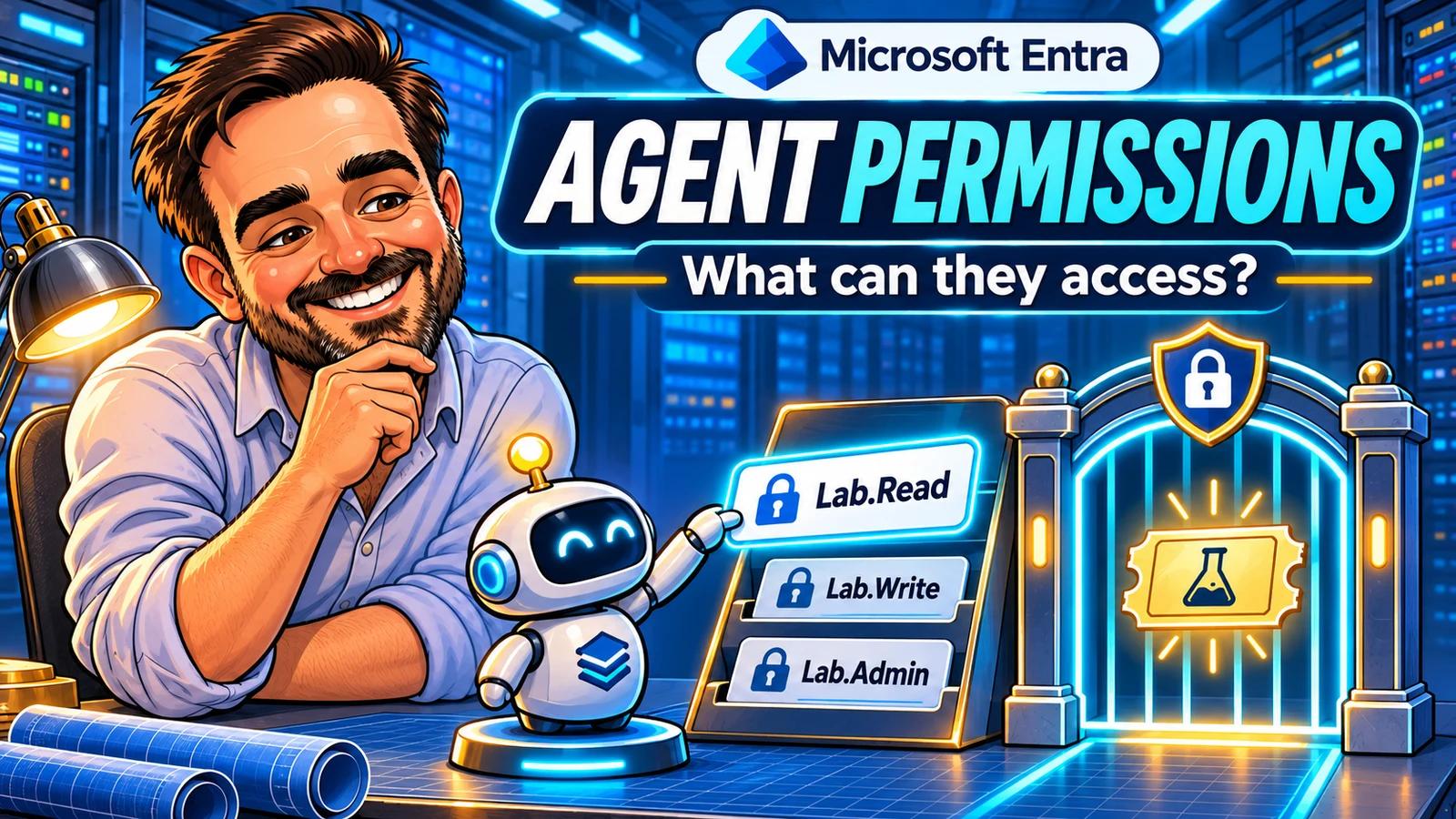
An agent appears in Entra. Its owner is known. Its permission list looks reassuringly short. Before closing the review, there is one more question to answer: what can that identity actually access when it runs?
After checking who can create agent blueprints, this guide follows the access itself: from the blueprint's declared requirements, through the tenant's consent, to the token an agent uses against a resource.
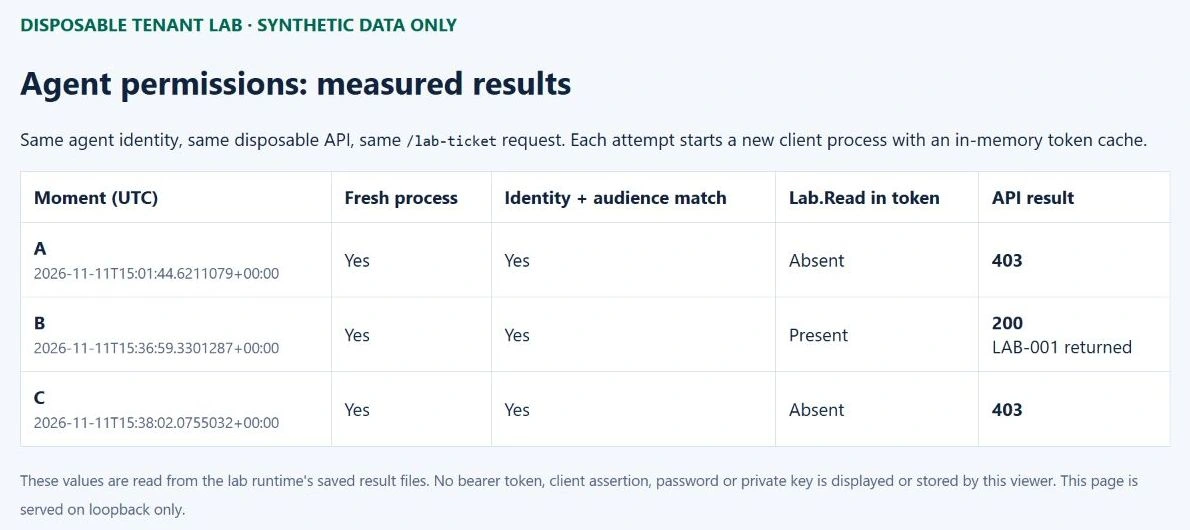
Lab result: The same child identity and synthetic API returned 403 before consent, 200 with inherited Lab.Read and 403 after revocation. Cleanup was verified.
This exercise uses one disposable blueprint, its agent identity and an API returning one fictitious ticket. It does not measure access to Microsoft 365 content or prove the security of every Copilot agent in the tenant.
1. Know which question you are answering
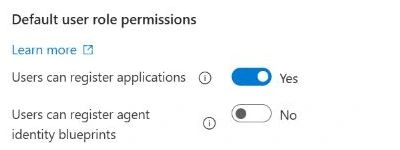
The default-user setting Users can register agent identity blueprints controls a creation capability. Setting it to No does not revoke existing consent or remove data permissions. Keep the creation review and the access review connected, but record their results separately.
| What you found | What it tells you | Next check |
|---|---|---|
A permission in requiredResourceAccess | The blueprint declares a requirement. | Find the actual consent or application-role assignment. |
| An inheritance configuration | The blueprint specifies which permissions are eligible for inheritance. | Check the corresponding grant on its principal. |
| A grant on the blueprint principal | The tenant has authorized that principal for a resource. | Check inheritance and every affected child identity. |
| A direct grant on an agent identity | That agent has its own assignment. | Review it independently of parent-level grants. |
| A successful API request | The resource accepted this identity and token for this operation at this time. | Record the resource, operation and authorization path. |
Requested permissions, inheritance configuration and granted permissions are separate records. The Microsoft inheritance model combines eligible inherited permissions with direct grants during token issuance. A list containing only the child's direct grants is therefore not a complete access review.
2. Define a small, reversible lab
Use a tenant you administer, an account allowed to manage the test objects and a resource containing synthetic data. Record the licensing requirements for any additional service you introduce. This lab uses Entra identity functionality and a local custom API; it does not establish entitlement to paid Agent 365, Defender or Microsoft 365 agent capabilities.
Our administrative session uses Global Administrator for this isolated exercise. That is an observation about the lab, not the role to assign to an agent. For production delegation, consult the supported Agent ID roles and the API's least-privileged delegated permissions. A directory role and a Graph client's OAuth permissions are two separate prerequisites.
Workstation: Windows, PowerShell 7, the current serviced .NET 10 LTS SDK, and access to Microsoft identity endpoints, Microsoft Graph and NuGet. The supplied endpoint configuration is for Microsoft's global public cloud. The original tenant measurements below used .NET 8 and Microsoft.Identity.Web 4.18.0. .NET 8 reached end of support on 10 November 2026. The public package now targets .NET 10; its local validation is recorded separately from those original tenant results.
This guide uses the portal to create the objects and a small Graph helper for the certificate, callback and inheritance. The following table separates those actions. The agent itself receives only the synthetic API role during moment B.
| Operation | Operator authorization for this route | Graph client scopes |
|---|---|---|
| Create blueprint and child in Entra | Agent ID Administrator; our lab used Global Administrator. Assign the operator as owner and sponsor. | No Graph PowerShell creation call in this route. |
| Create the API, edit its manifest and grant its application role | Cloud Application Administrator or Application Administrator; our lab used Global Administrator. This is a custom API, not a Microsoft Graph application permission. | These steps use the portal and admin-consent UI. |
| Attach certificate / register callback | Agent ID Administrator for certificate management, with access to the disposable blueprint. | Application.Read.All for checks, plus AgentIdentityBlueprint.AddRemoveCreds.All / AgentIdentityBlueprint.UpdateAuthProperties.All respectively. |
| Configure inheritance | Blueprint owner, or Agent ID Administrator. | Application.Read.All and AgentIdentityBlueprint.Create. |
| Read the blueprint and its inheritance | Blueprint owner; for nonowners, the typed Graph endpoints document Agent ID Administrator. Directory Readers alone is not a documented guarantee for these endpoints. | The helper uses Application.Read.All, a supported higher permission than AgentIdentityBlueprint.Read.All. |
| Read delegated grants on the lab principals | A supported role such as Directory Readers, or the already authorized lab administrator. This requirement is separate from blueprint access. | Directory.Read.All. The complete inventory uses this plus Application.Read.All; all its requests are GETs. |
| Remove temporary management consent | An already authorized consent administrator, such as Cloud Application Administrator or Application Administrator. | The cleanup helper needs the two read scopes and an already approved DelegatedPermissionGrant.ReadWrite.All scope, or the supported higher Directory.ReadWrite.All. It never requests consent itself. |
Use an existing authorized management client and arrange the cleanup session before granting the three temporary AgentIdentityBlueprint scopes. The read and cleanup authorizations are prerequisites, not permissions to add silently during cleanup. If they are unavailable, arrange them under your normal process before starting and document their separate lifecycle. The three lab scopes are not a universal provisioning recipe: creating the principal or child through Graph instead of the portal requires the permissions documented for those separate operations. Capture existing consent first so cleanup can distinguish additions from pre-existing access.
- Blueprint:
TSC Agent Permissions Lab, with a dedicated owner and sponsor. - Agent: one identity associated with that blueprint.
- Resource: a single-tenant API exposing the application role
Lab.Read. - Data: ticket
LAB-001, statusSynthetic example, no customer information. - Authentication: a certificate on the disposable blueprint, valid for one day. The private key remains on the test workstation.
- Authorization: grant
Lab.Readto the blueprint principal, allow role inheritance for this API only, and leave the child without a direct role assignment.
The API runs on loopback on the same workstation as the client. It is configured to validate the token signature, issuer, tenant, audience, expiry, caller identity and required role. This avoids giving the agent mailbox, file or directory-reading permissions just to demonstrate access. Use HTTPS and a suitable hosting and credential design when adapting an API for production.
Keep a private record of the blueprint application ID, blueprint principal object ID, child application/object IDs, resource application ID, resource principal ID and role ID. Do not interchange an application ID with the service principal ID used in a grant. Capture the actual identifiers from your tenant.
3. Create and inspect the blueprint and child
- In Entra ID → Agents → Agent blueprints → New agent blueprint, create a uniquely named disposable blueprint. On Owners & Sponsors, select your authorized lab operator as both owner and sponsor, review and create. This portal wizard also creates the blueprint principal.
- Go to Agents → Agent identities → New agent identity. Select that exact blueprint, give the child a distinct lab name, confirm owner and sponsor, and create it.
- Record both objects' application and object IDs and the blueprint principal's object ID from their overview pages. Verify the child appears under the intended blueprint's Linked agent identities. Do not grant it any direct permission.
Keep the registration setting at No; this workflow uses an authorized administrator. Once the two objects exist, inspect them:
- Open Microsoft Entra admin center → Entra ID → Agents → Agent blueprints.
- Open the intended blueprint. Record its owner, sponsor, status and identifiers.
- Open Granted permissions. Inspect Admin consent, User consent and Entra roles, where available.
- Open Linked agent identities, then the test identity and its Granted permissions.
- Review credentials and ownership on the blueprint as well as grants on the child. Control of the parent's credentials affects its ability to authenticate on behalf of associated agents.
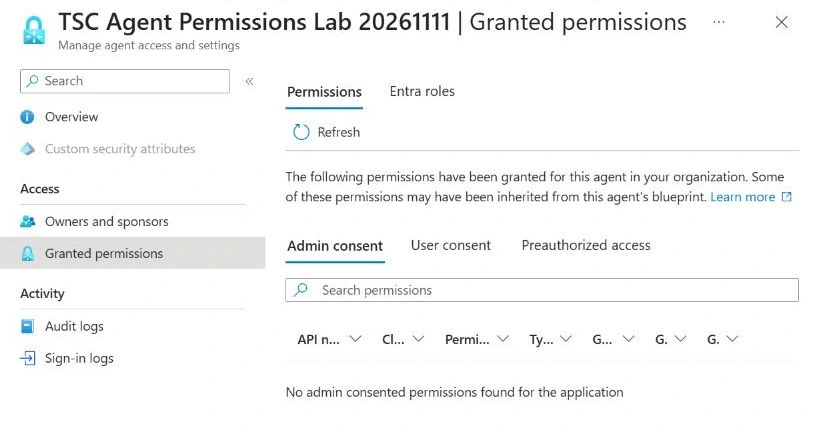
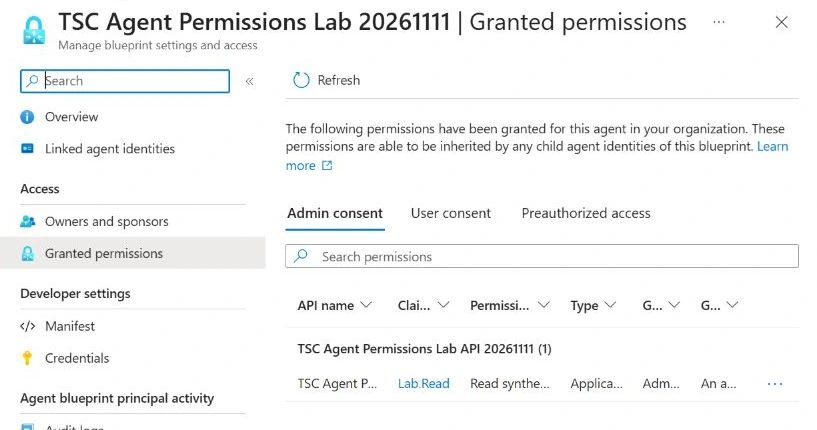
The Microsoft concept documentation warns that inherited permissions are not represented as direct grants on child identities and that inspecting the child alone can miss runtime access. Our portal also exposes a Grant source column and an inheritance notice. Record what your tenant actually displays; use the grant records and runtime result to resolve uncertainty.
The blueprint principal already showed AgentIdentity.CreateAsManager as an implicit Microsoft Graph permission. The portal identifies this as automatically granted and not independently revocable. “No lab grant” therefore means no Lab.Read assignment for our resource; it does not mean that the blueprint has no platform permissions.
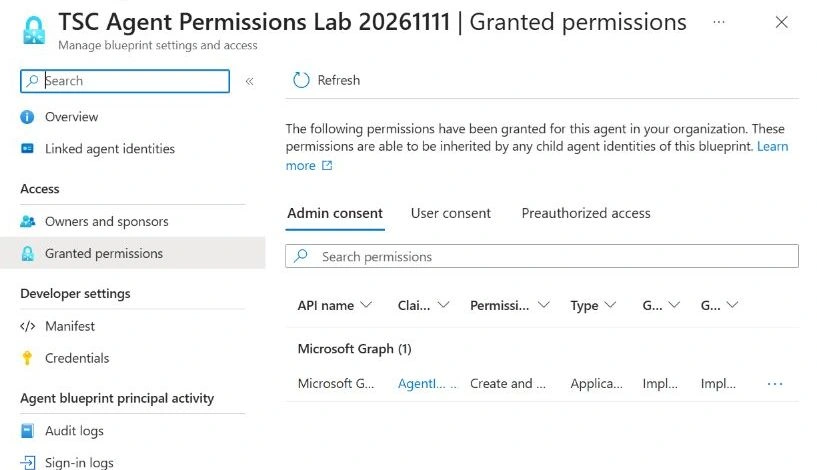
For an API review, retrieve the relevant application-role assignments and delegated grants. Review delegated grant consentType, principalId and the full space-separated scope value. For an application-role assignment, resolve its resourceId and appRoleId against the resource service principal. A display name alone is not a reliable identifier.
Broader access can also come from Entra roles, groups, Azure RBAC or resource-specific authorization. Include those in an operational assessment. The three-moment lab below deliberately tests only one application role on one custom API.
4. Prepare the permission path
4.1 Register the synthetic resource
- Open Entra ID → App registrations → New registration. Give the API a unique lab name, select Accounts in this organizational directory only, leave its redirect URI empty and register.
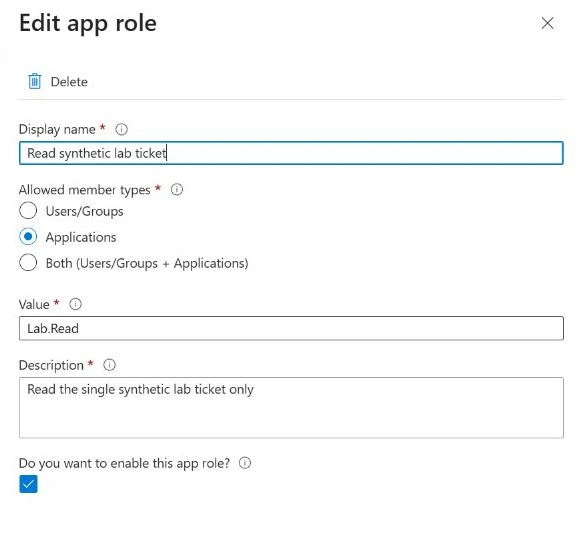
- Open App roles → Create app role. Set display name to Read synthetic lab ticket, allowed member types to Applications, value to
Lab.Read, description to Read the fictitious LAB-001 ticket only, and enable the role. Record its role ID. - In Expose an API, set the Application ID URI to
api://RESOURCE_APP_ID, replacing the placeholder with this API's application ID. This app-only test does not need a delegated scope. - In the API's Manifest, find the existing
apiobject and setrequestedAccessTokenVersionto2. Preserve its other properties and save. Reopen the manifest to verify the value. - Record the API registration's application ID and object ID. Follow Managed application in local directory to its enterprise application and record that service principal's object ID. Do not use the registration object ID as the resource principal ID.
4.2 Fill in the object map
Download and extract the lab package, then copy lab-config.example.json to lab-config.json. Replace its identifier placeholders using this map. The later certificate command fills in CertificateSubject. Keep the configuration and evidence private.
| Object | Configuration fields | Source |
|---|---|---|
| Directory | TenantId | Entra overview → Tenant ID. |
| Blueprint application | BlueprintAppId, BlueprintObjectId | Blueprint overview; record application ID and object ID separately. |
| Blueprint principal | BlueprintPrincipalId | Tenant-local principal's object ID. |
| Child identity | AgentAppId, AgentObjectId | Agent identity overview; verify its parent blueprint. |
| Resource API | ResourceAppId, ResourceObjectId, ResourcePrincipalId | App registration application/object IDs, then enterprise application object ID. |
| Resource role | LabRoleId | The ID of the enabled Lab.Read app role. |
4.3 Create the one-day certificate and configure the blueprint
Run this once in PowerShell 7 on the workstation that will run the client. It creates a unique, non-exportable private key in your current user's certificate store and exports only the public certificate:
$c = Get-Content .\lab-config.json -Raw | ConvertFrom-Json
$subject = 'CN=AgentPermissionLab-' + [guid]::NewGuid().ToString('N')
$cert = New-SelfSignedCertificate -Type Custom -Subject $subject -KeyAlgorithm RSA -KeyLength 2048 -KeySpec Signature -KeyUsage DigitalSignature -KeyExportPolicy NonExportable -CertStoreLocation 'Cert:\CurrentUser\My' -NotAfter (Get-Date).AddDays(1)
Export-Certificate -Cert $cert -FilePath .\lab-blueprint-public.cer | Out-Null
$cert | Select-Object Thumbprint,Subject,NotAfter | ConvertTo-Json | Set-Content .\local-certificate.json
$c.CertificateSubject = $subject
$c | ConvertTo-Json -Depth 10 | Set-Content .\lab-config.json
Install the official Graph authentication module if needed. First use the management client's already approved read access to capture its Microsoft Graph delegated grants, including both tenant-wide and per-user records. The helper requires an existing client and refuses to overwrite a baseline. Do this before adding the three temporary scopes; do not recreate the baseline afterwards:
Install-Module Microsoft.Graph.Authentication -Scope CurrentUser
Connect-MgGraph -TenantId $c.TenantId -ContextScope Process -Scopes 'Application.Read.All','Directory.Read.All' -NoWelcome
$managementClientAppId = (Get-MgContext).ClientId
$managementClientAppId | Set-Content .\management-client-app-id.txt
.\Manage-LabManagementConsent.ps1 -Mode Capture -ClientAppId $managementClientAppId
# Stop if capture failed. Keep management-consent-before.json private.
Check the selected account, tenant and client. Read access must already be approved; an unexpected consent prompt is a separate prerequisite to resolve. CONSENT-CLEANUP.txt in the package explains the baseline and the required cleanup authorization. Then connect with the management permissions approved for this disposable lab. These scopes authorize the operator's tooling; they are not permissions of the agent:
Connect-MgGraph -TenantId $c.TenantId -ContextScope Process -Scopes 'Application.Read.All','Directory.Read.All','AgentIdentityBlueprint.Create','AgentIdentityBlueprint.AddRemoveCreds.All','AgentIdentityBlueprint.UpdateAuthProperties.All' -NoWelcome
.\Configure-LabBlueprint.ps1 -Stage Certificate
.\Configure-LabBlueprint.ps1 -Stage Callback
Check the account and tenant during sign-in. Each configuration stage displays its target and asks for confirmation. The helper checks the parent/child/resource mapping, refuses to overwrite existing credentials or redirects and verifies the result. Keep its returned certificate key ID with your cleanup record. The callback is exactly http://localhost:52150/callback.
Now open the blueprint's Manifest. On this new disposable blueprint only, set requiredResourceAccess to the following array, substituting the API application ID and its Lab.Read role ID. Preserve the rest of the manifest:
"requiredResourceAccess": [
  {
    "resourceAppId": "RESOURCE_APP_ID",
    "resourceAccess": [{ "id": "LAB_READ_ROLE_ID", "type": "Role" }]
  }
]
Save and reopen to verify that no other resource permission is declared. This declares a requirement; it does not grant access. In our original setup, a Graph update of this property returned a management 403. Saving this specific declaration through Manifest succeeded. That setup error is separate from the API's deliberate 403 results below.
Run .\Configure-LabBlueprint.ps1 -Stage Inheritance. It checks the declaration and creates only the following inheritance entry, then reads it back:
POST /v1.0/applications/BLUEPRINT_OBJECT_ID/microsoft.graph.agentIdentityBlueprint/inheritablePermissions
{
  "resourceAppId": "RESOURCE_APP_ID",
  "inheritableScopes": {
    "@odata.type": "#microsoft.graph.noScopes",
    "kind": "none"
  },
  "inheritableRoles": {
    "@odata.type": "#microsoft.graph.allAllowedRoles",
    "kind": "allAllowed"
  }
}
AllAllowed is resource-scoped, not role-scoped. Here the resource exposes only one lab role. If additional roles for this resource are later granted to the blueprint principal, they can become eligible for inheritance too. Do not copy this setting to Microsoft Graph or a production API without reviewing that wider effect.
The Microsoft SDK supports the agent identity token exchange. The client authenticates the blueprint using the local certificate and requests a resource token for its associated child. It must not accidentally test a token issued to the parent itself.
Use Microsoft.Identity.Web.AgentIdentities and the documented WithAgentIdentity flow. Start a separate client process for each measurement with an in-memory cache. Before the tenant test, verify that the API rejects requests without a bearer token and with an invalid token.
For this autonomous flow, validate the child's application ID in azp and its object ID in oid, alongside the resource audience and role. The parent blueprint identifier is useful for attribution; do not use it as a shortcut that authorizes every child.
4.4 Build the runtime and verify the inventory
The package contains C# source, pinned Microsoft SDK dependencies with a dependency lock file, the configuration template, the bounded setup helper and the read-only inventory helper. Confirm dotnet --version selects a .NET 10 SDK, then build:
dotnet restore --locked-mode
dotnet build --no-restore
dotnet .\bin\Debug\net10.0\AgentPermissionLab.dll serve .\lab-config.json
Keep that window open. In a second PowerShell window in the same folder, run check-api, then one separate probe invocation at each measured state:
dotnet .\bin\Debug\net10.0\AgentPermissionLab.dll check-api .\lab-config.json
dotnet .\bin\Debug\net10.0\AgentPermissionLab.dll probe .\lab-config.json A
# After the parent grant is verified, run the same command with B.
# After that exact grant is removed and verified absent, run it with C.
The runtime does not configure permissions or clean up your tenant. It writes only sanitized test results to your configured evidence folder. Stop the API with Ctrl+C when the test is complete.
In the authorized Graph PowerShell session, run the inventory before each probe, changing A to B or C at the corresponding stage:
.\Read-AgentLabInventory.ps1 -ConfigPath .\lab-config.json -Label A
$LASTEXITCODE
The inventory helper never signs in or requests consent itself. In a separate session, use Connect-MgGraph -TenantId YOUR_TENANT_ID -ContextScope Process -Scopes 'Application.Read.All','Directory.Read.All' with an operator authorized for every endpoint in the table above. The documented blueprint-owner route must also satisfy the role requirements for delegated-grant queries; a nonowner needs the supported Agent ID authorization. Directory Readers alone does not establish access to the typed blueprint and inheritance endpoints. Reuse the already authorized lab operator with read scopes rather than assigning a new administrative role just to run this helper. It follows pagination, verifies the configured identities and resolves Lab.Read against the resource's app-role catalogue. These are the core reads, repeated for the parent and child where appropriate:
GET /v1.0/servicePrincipals/PRINCIPAL_OBJECT_ID/appRoleAssignments
GET /v1.0/servicePrincipals/PRINCIPAL_OBJECT_ID/oauth2PermissionGrants
GET /v1.0/servicePrincipals/RESOURCE_PRINCIPAL_ID?$select=id,appId,appRoles
GET /v1.0/applications/BLUEPRINT_OBJECT_ID/microsoft.graph.agentIdentityBlueprint/inheritablePermissions
Use principalId, resourceId and appRoleId together to identify the assignment. The report retains delegated consentType, principalId and scope values. Other resources' roles are marked for separate resolution; this helper is scoped to the configured lab API.
| Private inventory checkpoint | A | B | C |
|---|---|---|---|
| Complete query and matching identities | True | True | True |
| Parent Lab.Read assignment count | 0 | 1 | 0 |
| Direct child role assignments | 0 | 0 | 0 |
| Delegated grant records on parent, child and resource | 0 each | 0 each | 0 each |
| Declared API role, token version and inheritance match | True | True | True |
These are the expected lab checkpoints, separately corroborated by our saved tenant inventories. A failed query, including a 403 or 429, produces an incomplete section and null summary counts, never a successful empty result. Resolve authorization failures; for throttling, wait according to the service's retry guidance. Recent grant changes can take time to appear. Preserve intermediate reports and rerun once the relevant condition changes. A matching inventory still needs the runtime test.
5. Moment A — establish the no-grant baseline
Confirm that neither the blueprint principal nor the child has Lab.Read for the resource. The blueprint may already declare the permission and have inheritance configured; neither is consent.
Request a fresh token for the child and attempt GET /lab-ticket. Record the UTC time, whether token issuance succeeded, whether the API was called and the HTTP result. A token-issuance error and an API 403 are different outcomes: do not label both “the API blocked the request”.
Success criterion: the synthetic ticket is not returned, and the observation is consistent with the recorded grant state. A configuration, certificate or audience error must be fixed before treating this as evidence about permissions.
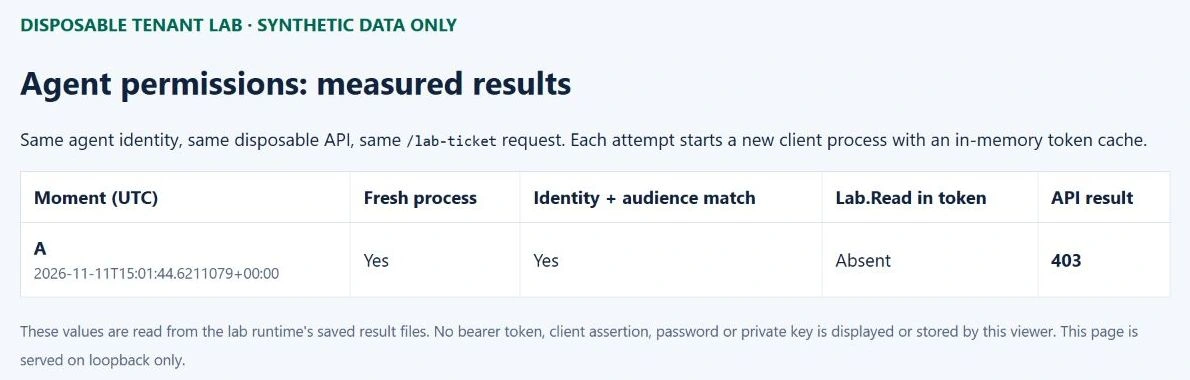
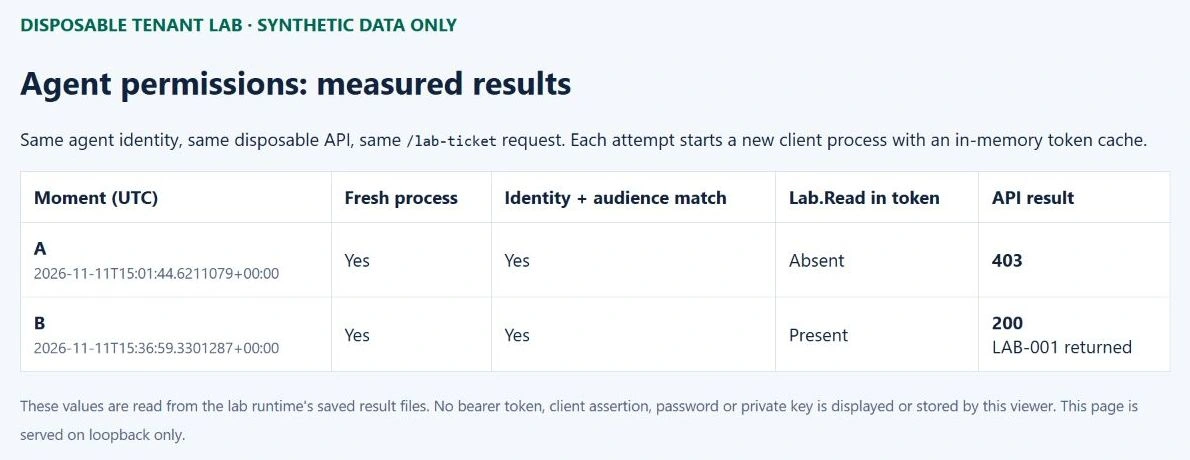
Observed, 11 November 2026 at 15:01:44 UTC: a fresh client process obtained a token for the intended child and audience. Lab.Read was absent. The API returned 403 and did not return LAB-001. A separate grant inventory confirmed zero parent Lab.Read assignments and zero direct child roles.
6. Moment B — grant the parent and test the child
Use the consent flow below to create exactly one application-role assignment: principal = the blueprint principal, resource = the synthetic API's service principal, role = Lab.Read. Record its ID from the subsequent inventory. Keep the child without a direct assignment; do not create a second assignment before following this flow.
Our lab used the documented tenant-specific admin consent endpoint, with the blueprint as client_id and api://RESOURCE_APP_ID/.default as the scope. Register the exact local callback URI on the blueprint and validate the returned state. Before opening the request, verify that requiredResourceAccess declares only the intended API role; .default is not a guarantee that a consent screen contains only what you expected.
The Microsoft flow displayed two stages in our tenant: the blueprint's synthetic-ticket permission and a sign-in/profile label, followed by profile and maintain-access labels for the resource app. We reviewed and explicitly approved both stages for the disposable objects. The subsequent Graph inventory showed one parent Lab.Read role assignment, no direct child role assignments and no oauth2PermissionGrants entries for the parent, child or resource principal. Document both the displayed request and the persisted grant records; do not infer one solely from the other.
https://login.microsoftonline.com/TENANT_ID/v2.0/adminconsent
  ?client_id=BLUEPRINT_APP_ID
  &scope=api%3A%2F%2FRESOURCE_APP_ID%2F.default
  &redirect_uri=URL_ENCODED_REGISTERED_CALLBACK
  &state=RANDOM_STATE_TO_VALIDATE
The lines above show the request parameters, not a ready-to-click URL. The downloadable runtime includes a consent mode: register exactly http://localhost:52150/callback on the disposable blueprint, then run the command below. Open the printed URL yourself and review both screens. The helper validates a random state value and never approves permissions or stores tokens. A successful callback is not sufficient evidence: verify the actual role assignment on the blueprint principal before running moment B.
dotnet .\bin\Debug\net10.0\AgentPermissionLab.dll consent .\lab-config.jsonRefresh the parent's and child's permission pages. Record any Grant source shown. Then start a fresh client process and repeat the same request with the same child and API. The API must validate the token before returning LAB-001.
Success criterion: the API returns 200 with the synthetic ticket; the token includes Lab.Read; the caller is the intended child; and the grant inventory shows the parent assignment with no direct child grant. Together these observations support the inherited access path.
Observed, 11 November 2026 at 15:36:59 UTC: the parent had one Lab.Read assignment and the child had zero direct role assignments. A new client process received a token containing Lab.Read for the intended child and audience. The API returned 200 and LAB-001.
Do not upload the token to a public decoder or include it in a screenshot. The lab diagnostics inspect only the token issued for our own custom API and retain non-secret observations such as role presence and issuance/expiry times. This diagnostic is not a client authorization decision: the API independently validates the signature and claims. In normal client code, treat access tokens as opaque, particularly tokens issued for APIs you do not control.
7. Moment C — remove the exact grant and retest
Check every affected child before revoking a parent grant. Removal can affect all agents inheriting that permission from this blueprint, including agents outside the current test. Identify their owners and dependencies first. Direct grants on a child are independent and may still provide access. Our disposable blueprint has only one child, so the change stays within this lab.
Identify the recorded parent assignment again. Verify its principal, resource and role before deleting it. Refresh the inventory to confirm that the assignment is gone and that no independent child grant supplies the same permission.
In the portal, open the blueprint's Granted permissions → Admin consent, find the synthetic API's Lab.Read row, and choose Context menu → Revoke permission → Yes, revoke. Confirm the API and permission in the dialog. The grant inventory must show that the recorded assignment is absent before interpreting the next runtime result.
Start another client process to request a new token and repeat the API request. Record the deletion time, token issuance time and actual response. Allow for propagation and preserve any intermediate outcome instead of replacing it with an expected result.
Success criterion: the removed grant is absent and a fresh authorization attempt no longer returns the ticket through this path. If the request still succeeds, check other grants, inherited paths and token freshness before concluding that revocation failed.
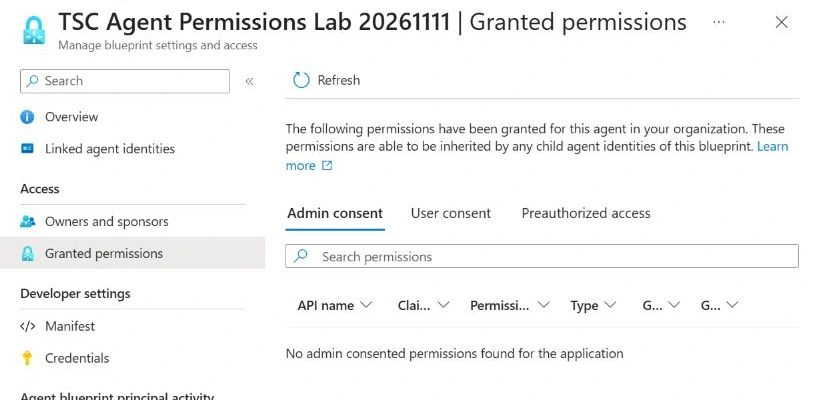
Observed, 11 November 2026 at 15:38:02 UTC: the exact parent grant was absent and the child still had no direct role assignment. A new client process received a token without Lab.Read. The same API returned 403; the synthetic ticket was no longer available through this path.
Removing a grant does not promise the immediate invalidation of every already-issued access token. A resource can continue accepting a previously valid token until its applicable lifetime or enforcement controls end that access. Keep “grant removed”, “new token no longer carries access” and “all existing sessions stopped” as separate claims. This exercise does not establish the last one.
8. Diagnose the result before widening permissions
Check the process result as well as the JSON. The .NET 10 probe returns exit code 0 only when the observation matches the requested moment, 1 for an execution/evidence failure, 2 for invalid arguments or configuration, and 3 for a completed request with an unexpected outcome. A correct A/C denial is an expected result, not an execution error. Always correlate a zero exit code with the independent grant inventory.
The report records when the token was acquired separately from the token's own issuance claim. Use the request/acquisition timestamps and new-process evidence when establishing the sequence; keep the claim values as diagnostics.
| Observation | Check first |
|---|---|
| No token issued | Blueprint credential validity, child/parent association, tenant and resource identifiers, token-exchange flow, and the recorded Entra error code. |
| API 401 | Signature, issuer, audience, token version and lifetime. This is not proof that the role is missing. |
| API 403 | Required role and caller restrictions after authentication succeeds. Compare parent grants, inheritance and direct child grants. |
| Portal list is empty but the request succeeds | Verify the caller, inherited grants, cached token and any resource-side authorization. An empty list alone is insufficient. |
| Grant removed but access continues | Token issuance/expiry, new-process cache isolation, propagation and alternative authorization paths. |
| Graph denies a management operation | The administrator's role and the management client's delegated scope. Do not give the lab agent administrative permissions to fix an operator problem. |
9. Close the test and retain a useful record
Remove the lab grant, the blueprint credential and the disposable identity objects. Verify the active blueprint and agent inventories separately: do not rely only on a parent deletion toast. Remove the resource API application and its service principal, stop the local API and remove the dedicated local certificate. If temporary permissions were added to the management client, remove only those additions while preserving its pre-existing consent.
Microsoft documents background cascade deletion after removing a blueprint. In our cleanup, the child still appeared active after the parent was removed. We opened that exact identity, chose Delete and verified it separately. The portal described these as recoverable deletions with a 30-day restoration window; “cleaned up” here means absent from the active inventories, not permanently purged from the recycle bin.
Recheck the tenant's blueprint-registration setting. Our intended final state is No. Retain a sanitized test record with timestamps, the exact permission path, the three outcomes and cleanup evidence.
Use local-certificate.json to identify the dedicated local certificate. Inspect Get-Item -LiteralPath ('Cert:\CurrentUser\My\' + $metadata.Thumbprint) after loading that file into $metadata; verify its subject before removing that exact certificate with Remove-Item -LiteralPath. Do not remove other certificates. Stop the consent helper as well as the API. Keep the authorized cleanup session available for the management-consent steps below; Disconnect-MgGraph alone does not revoke that consent.
The package's SETUP.txt includes the guarded local certificate-removal commands. For management consent, first distinguish AllPrincipals from Principal. In Enterprise applications → the recorded management client → Permissions, the portal can revoke admin-consented permissions. Microsoft explicitly states that the User consent tab does not support revocation; per-user consent requires Microsoft Graph or PowerShell.
The supplied Manage-LabManagementConsent.ps1 handles either consent type for one explicit grant at a time. In an already authorized cleanup session, list the current records and prepare a plan for the exact grant. For a per-user record, supply that user's object ID, not an email address:
$managementClientAppId = (Get-Content .\management-client-app-id.txt -Raw).Trim()
.\Manage-LabManagementConsent.ps1 -Mode List -ClientAppId $managementClientAppId
$target = @{
  ClientAppId = $managementClientAppId
  GrantId = 'EXACT_GRANT_ID_FROM_LIST'
  ConsentType = 'Principal'
  PrincipalId = 'EXACT_USER_OBJECT_ID_FROM_LIST'
}
.\Manage-LabManagementConsent.ps1 -Mode Plan @target
.\Manage-LabManagementConsent.ps1 -Mode Restore @target -WhatIf
# After reviewing the identities, removeScopes and keepScopes:
.\Manage-LabManagementConsent.ps1 -Mode Restore @target
For an AllPrincipals record, set ConsentType = 'AllPrincipals' and omit PrincipalId. Review every relevant record; the helper does not perform bulk revocation. It removes only the three named AgentIdentityBlueprint scopes that were absent from the baseline, preserves all other current scopes and asks for confirmation. A scope already present before the lab is retained. An existing grant is updated with PATCH /oauth2PermissionGrants/{id}; only a newly created grant containing nothing except removable lab scopes can be deleted. Never delete a shared grant wholesale.
The helper checks tenant, client, Microsoft Graph resource, grant ID, consent type and user, rereads the grant before writing and verifies the result. A missing baseline permission or a changed grant stops the operation. Coordinate a window without other consent changes: a final reread is not an atomic concurrency guarantee. Re-list afterwards and review any preservedAdditionalScopes separately; their preservation does not mean they were part of the original baseline. A plan, -WhatIf or a cancelled confirmation makes no tenant change and is not proof of cleanup. See CONSENT-CLEANUP.txt for the complete sequence and failure handling. Disconnect the Graph session after verified cleanup.
Cleanup verified on 11 November 2026: the blueprint, blueprint principal, child identity, resource application and resource service principal were absent from the active Graph inventory. The blueprint credential and local certificate were removed, the local API was stopped, and both existing management-consent records matched their pre-lab scope sets. No temporary AgentIdentityBlueprint scopes remained. The registration setting remained No.
Updated package validation, 11 November 2026: the source builds on .NET 10 SDK 10.0.404 with runtime and ASP.NET Core authentication packages 10.0.15. Local checks verified API rejection of missing/invalid tokens, callback guards, nonzero failure codes and observation decisions. Local Graph fixtures verified inventory pagination, denied/incomplete responses, setup safeguards and management-consent cleanup for both administrator and per-user grants. Cleanup checks covered baseline preservation, unrelated scopes, exact identity checks, changed-grant refusal, readback and WhatIf. These checks did not recreate tenant objects or repeat the original .NET 8 A/B/C measurements.
| Check | Observed status | Evidence |
|---|---|---|
| Initial child permission view | Observed | No admin-consented permissions shown. |
| Blueprint declaration and inheritance | Verified | Synthetic API only; delegated scope inheritance disabled. |
| Moment A: no grant | Observed: 403 | Correct child and audience, Lab.Read absent, no ticket returned. |
| Moment B: inherited access | Observed: 200 | Parent Lab.Read grant; zero direct child roles; correct child; LAB-001 returned. |
| Moment C: grant removed | Observed: 403 | Grant absent; new client process; Lab.Read absent; no ticket returned. |
| Cleanup | Verified | Five objects absent; credential and certificate removed; management consent restored; registration remains No. |
| Updated download | Locally validated on .NET 10 | Build and guard checks; Graph helper fixtures. Original tenant evidence retains .NET 8 provenance. |
| Demonstrated scope | Verified within this lab | Measured custom-API inheritance and fresh-process revocation; no claim about every Copilot agent or existing tokens. |
Download the agent access review worksheet. It provides the object map, permission-path checks, expected evidence and cleanup record for repeating this assessment.
The practical outcome is an access decision you can explain: which identity called which resource, where its permission came from, who controls that path, and what changed after removal. That is a much stronger review record than a screenshot of an empty permission list.
Microsoft references
- Inheritable permissions and required resource access.
- Configure inheritable permissions for agent identity blueprints.
- Microsoft Graph: create inheritablePermission.
- Autonomous agent app OAuth flow.
- Daemon applications and agent identities with Microsoft.Identity.Web.
- Grant agents access to resources.
- Authorization in Microsoft Entra Agent ID.
- Create an agent identity blueprint.
- Microsoft identity platform access tokens.
- Token claims reference for agent identities.
- The Microsoft identity platform admin consent endpoint.
- Delete agent identities.
- Create the child agent identity in the portal.
- Read application-role assignments and replication considerations.
- Read delegated permission grants.
- Microsoft Graph application manifest reference.
- .NET support lifecycle.
- Read a blueprint: delegated operator requirements.
- Read inheritance: permissions and owner/nonowner requirements.
- Review and revoke enterprise-application permissions.
- Update an exact delegated grant's scope list.
- Delete a delegated grant when no permissions must be retained.