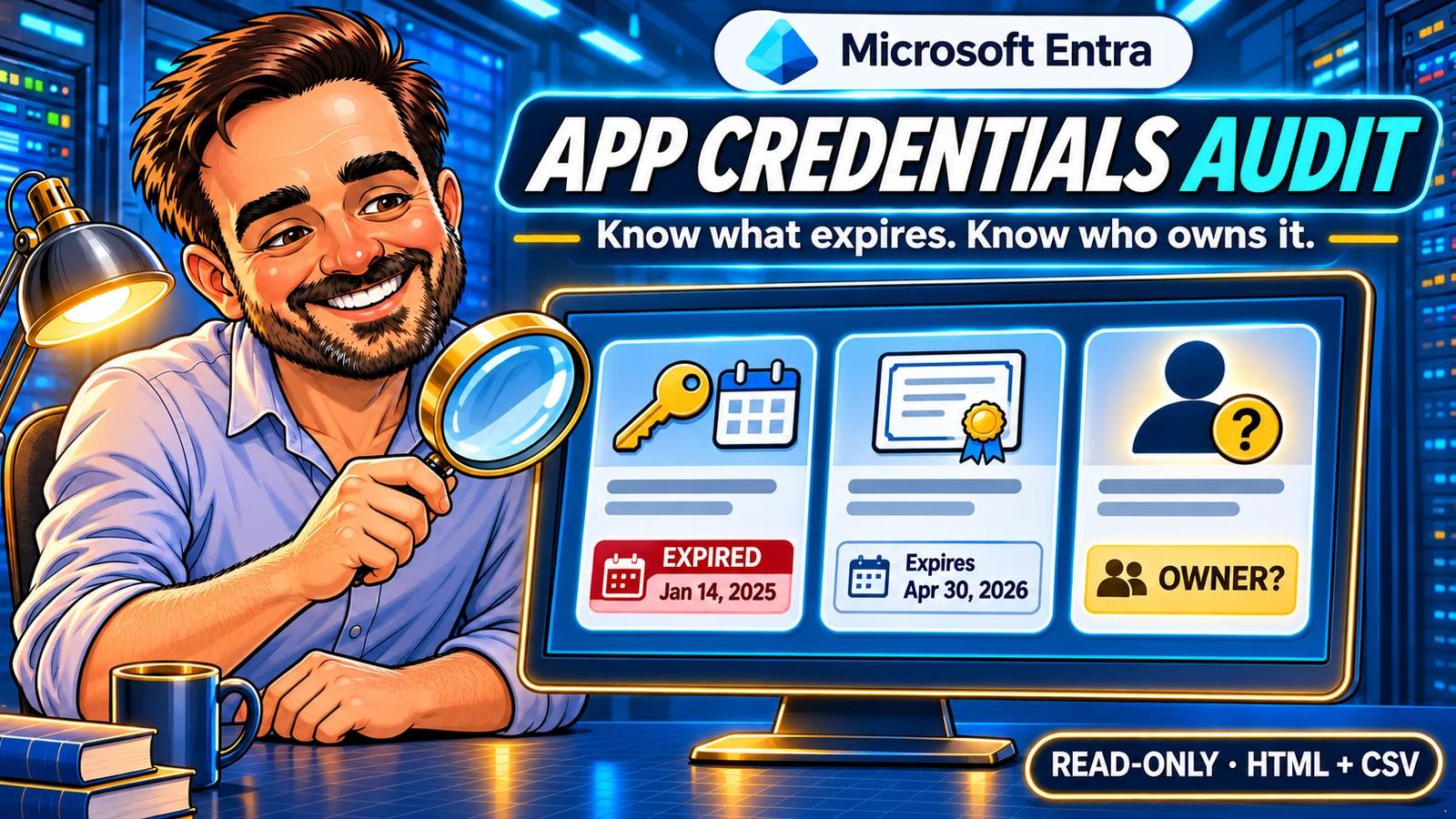
An integration stops working. The certificate expired last month. The person who set it up has moved teams, and nobody is sure who owns the application. You can start that conversation before the outage.
I built this small PowerShell tool to turn app-registration credential metadata and ownership into a review queue I could actually work through. You get an HTML report to read, CSV files to investigate and a coverage record that tells you what the script could actually check.
Verified tenant run. On 12 November 2026, the read-only inventory returned 24 app registrations and 16 stored credentials, with all 25 collection reads complete. The CSV files were reconciled and three registrations were checked in Entra. The walkthrough below shows the findings, the portal comparisons and the limits of that test.
1. Choose the right inventory
The scope is ordinary app registrations in your tenant: stored client-secret and key/certificate metadata, plus the owners of those registrations. It is a useful starting point for renewal planning and ownership conversations.
| You need to answer | This tool's answer |
|---|---|
| Which stored credentials have expired or expire soon? | Credential identifiers, UTC dates and separate 7-, 30- and 60-day windows. |
| Which app registrations have no owner or only one? | A confirmed owner count only when the full owner query succeeds. |
| Did every query succeed? | An explicit coverage table; missing evidence stays incomplete. |
| Is an application broken, unused or compromised? | Not assessed. Expiry and ownership metadata cannot establish those conclusions. |
| Are all workload identities covered? | No. Service-principal-only credentials, SAML signing certificates, managed identities, federation and credentials held in other tenants are outside this version. |
Microsoft Graph can also return agent identity blueprints in its applications collection. This version lists explicit derived object types as excluded instead of quietly treating them as ordinary registrations. It does not inspect permissions, sign-in activity or owner account status.
2. Prepare the connection and package
Use PowerShell 7.4 or newer and the official Microsoft.Graph.Authentication module, version 2.37.0 or newer. The initial release supports the Global cloud and a delegated work or school account. It does not support unattended app-only runs.
The minimum Graph permission for these reads is Application.Read.All. Consent and the signed-in user's access are separate requirements. Use an account allowed to read the selected applications; Global Administrator is not a prerequisite. Do not add directory-wide permissions merely to fill in an owner's display name.
Download v1.0.0 from GitHub · Release notes and checksum · Source and instructions
Download the named ZIP under the release's Assets. GitHub hosts the source and versioned package; the script does not upload tenant reports to GitHub or download updates during an audit.
Extract the package and review the two PowerShell files. Open PowerShell 7 in the extracted folder containing Get-EntraAppCredentialAudit.ps1 and EntraAppCredentialAudit.psm1, or use Set-Location to move to that folder before running the commands below. They use ./ to refer to the current folder. The files have a Tiago Carvalho attribution header and an MIT licence. They are not digitally signed. Follow your organisation's script approval and signing process. The hash manifest checks file integrity; it is not a substitute for publisher authentication.
Install-Module Microsoft.Graph.Authentication -Scope CurrentUser -MinimumVersion 2.37.0
Import-Module Microsoft.Graph.Authentication

$tenantId = '<your-tenant-guid>'
Connect-MgGraph -TenantId $tenantId -Scopes 'Application.Read.All' `
    -ContextScope Process -NoWelcome

Get-MgContext | Select-Object TenantId, Account, AuthType, Environment
Install the module only if needed. Connect and run the collector in the same PowerShell window. Review any consent prompt before accepting it. The collector itself never installs a module, signs in, grants permissions or changes the tenant.
3. Start with one application
Open Entra admin center → Entra ID → App registrations → All applications. Select an application you can independently inspect and open Overview. Copy the Object ID. The Application (client) ID is a different identifier; the enterprise application's Object ID is different again.
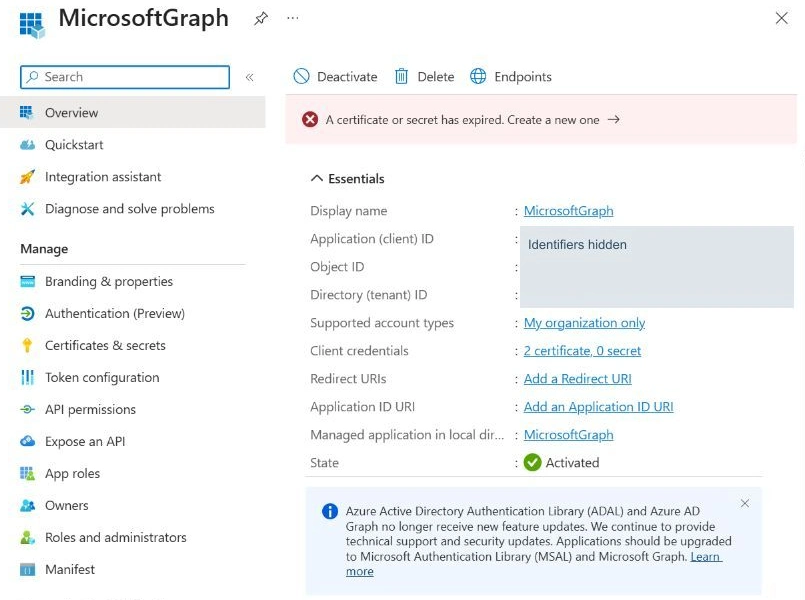
The local registration used for this comparison is named MicrosoftGraph. This is its display name, not an assertion that it is the Microsoft Graph service or the official PowerShell client. The portal shows two certificates and zero client secrets.
$appObjectId = '<app-registration-object-guid>'

./Get-EntraAppCredentialAudit.ps1 -ExpectedTenantId $tenantId `
    -ApplicationObjectId $appObjectId -OutputPath ./PilotAudit
The expected-tenant check runs before any inventory request. Every run needs a new output folder, so an earlier report cannot be overwritten. A selected object that is not returned is recorded as incomplete coverage rather than a successful empty result.
4. Read coverage before the findings
Open PilotAudit/report.html locally. Start with Query coverage, then review applications and credentials. The report is self-contained and does not require hosting, an account or external scripts.
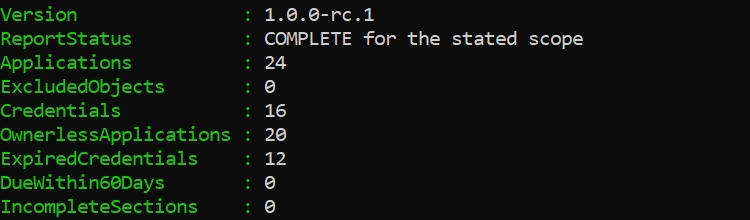
The real tenant run used collector 1.0.0-rc.1 with -AllApplications, PowerShell 7.7.0 and Microsoft.Graph.Authentication 2.39.0. It requested Application.Read.All using an existing administrative account and existing consent. This confirms execution in that environment; the documented minimum permissions were not separately tested with a restricted non-admin account. Version 1.0.0 adds the nested-error correction described below; its regression checks were performed offline.
| Observed result | Count | How to read it |
|---|---|---|
| App registrations | 24 | All returned registrations were ordinary application objects; no derived types were excluded. |
| Stored credentials | 16 | 13 client secrets and 3 certificates across 14 registrations. |
| Expired credentials | 12 | 10 secrets and 2 certificates. These are review findings, not 12 proven outages. |
| Future expiry within 60 days | 0 | The 4 unexpired credentials all end beyond 60 days. This does not cancel the expired findings. |
| Registrations with zero owners | 20 | Complete owner queries returned no assigned owners. The other 4 registrations each had one. |
| No stored password/key credentials | 10 | Informational: the authentication design needs separate review. |
| Collection coverage | 25 complete; 0 incomplete | One application-list read and 24 owner-collection reads. |
| File | Use it for |
|---|---|
applications.csv | The review queue: owner state, stored credential counts and reasons for follow-up. |
credentials.csv | Individual Key IDs, types, validity dates and expiry windows. |
owners.csv | Owner IDs and types, names when readable, and whether the owner collection was complete. |
coverage.csv | Successful, incomplete and unattempted reads, including safe error categories. |
COMPLETE describes the stated reads. It is not a security score. PARTIAL means the returned rows can be useful, but the inventory has gaps. An owner query that fails is Unknown, never NoOwner.
Dates use UTC. A credential whose end time has passed is Expired; future expiry windows are disjoint. The 30-day bucket contains more than 7 and up to 30 days; the 60-day bucket contains more than 30 and up to 60. A separate validity field identifies future start dates, invalid ranges and missing dates. The displayed day count is rounded up; the status uses the exact timestamp.
Neither a second valid credential nor a certificate with a future start date proves the workload is using it. Likewise, an application with no stored password or key credentials may be perfectly legitimate. Confirm the authentication design before opening a remediation ticket.
5. Compare the evidence in Entra
Stay in the same app registration and open Certificates & secrets. Select the relevant tab. Match the report's Key ID with the Certificate ID or Secret ID and compare the end date. Allow for the portal's date display and the report's UTC timestamps. Do not copy a secret value.
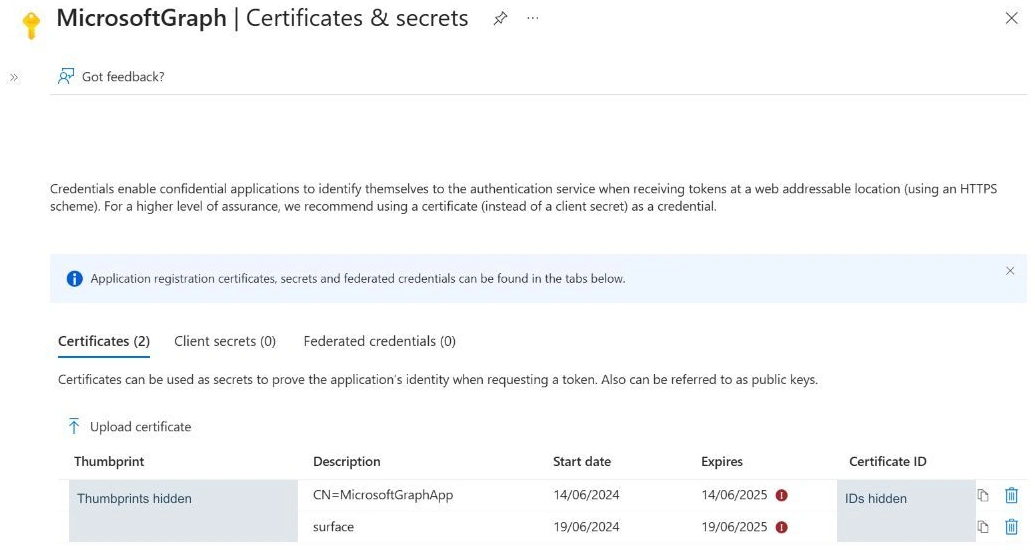
The two certificate IDs and expiry dates matched the CSV: 14 June 2025 and 19 June 2025. Both were correctly classified as Expired. Workload use and service availability were not tested.
Next open Owners under the app registration. Compare the returned identities with owners.csv. Do not use the Owners page under Enterprise applications for this check: that is the service principal.
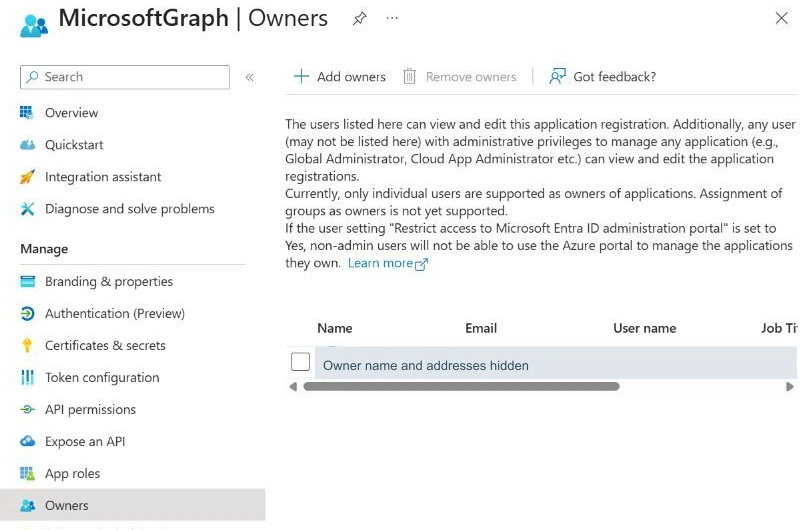
The one user owner shown here matched the report's SingleOwner result. Microsoft recommends at least two owners. Treat a single owner as a continuity question: who can take responsibility if that person is unavailable? Owner access is privileged, so the follow-up needs a considered assignment, not an automatic bulk fix.
The Graph relationship can contain users or service principals. Under minimum permissions, a returned owner may have an ID and object type but no readable name. The script counts that owner and labels the details as limited. An empty name does not turn it into an ownerless application.
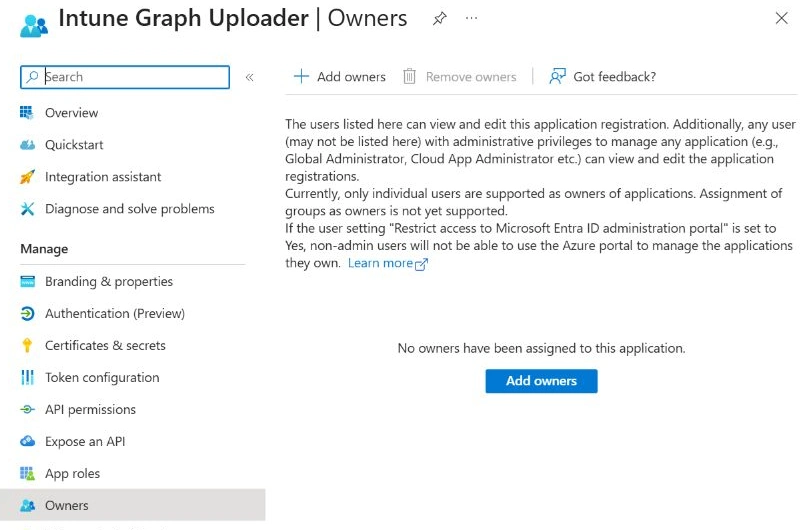
A second registration, Intune Graph Uploader, showed no assigned owners in Entra and NoOwner in the report. Its client-secret ID and expiry date, 22 November 2025, also matched. As a control, a certificate on a third registration ended on 2 December 2029 and correctly appeared as Beyond60Days with WithinValidityDates.
These are three sampled portal comparisons. The totals for all 24 registrations come from the Graph inventory and reconciliation of its CSV files; they are not a claim that every registration was inspected manually.
6. Expand the audit and turn findings into work
Once the pilot matches the portal, collect the tenant's app registrations into a separate folder:
./Get-EntraAppCredentialAudit.ps1 -ExpectedTenantId $tenantId `
    -AllApplications -OutputPath ./AllAppsAudit

Disconnect-MgGraph
Keep the report private: it contains application identifiers and owner information. The exporter excludes secret values, password hints, certificate bytes, tokens and raw server error messages. Spreadsheet-like formula text is escaped in CSV output, and application-supplied text is encoded in HTML.
| Finding | Useful next action |
|---|---|
| Expires within 7 days | Find the accountable team, establish whether the credential is used, and agree a tested renewal plan. |
| Expired credential | Check the workload and any replacement before deciding whether to remove the stale credential. |
| No owner | Identify the business and technical owners; follow the approved ownership assignment process. |
| Single owner | Review continuity and select an appropriate backup owner. |
| Unknown or incomplete | Resolve the read gap and rerun before treating the result as definitive. |
A useful renewal ticket records the application Object ID, credential Key ID, expiry in UTC, responsible team, change window and a workload-specific acceptance test. Where supported, consider managed identity or workload identity federation; if a stored credential is necessary, assess a certificate rather than automatically choosing another client secret.
After an approved change, rerun into a new folder and compare the identifiers and dates. A new credential in Entra is only one milestone. The workload must use it successfully before you retire the old one.
7. Handle failures without hiding them
403 / AccessDenied: check consent and the signed-in user's access. 401: reconnect and retry into a new folder. SelectedApplicationNotReturned: check the app-registration Object ID and whether the object still exists.
429 / Throttled: the SDK performs its normal retries. If it still returns throttling, this collector stops remaining requests and preserves a partial report. Wait according to the service's guidance; do not loop the script. Selecting application keyCredentials has a documented tenant limit of 150 requests per minute. Owner queries are sequential and all returned pages are followed.
Authentication window error: if Graph reports that a window handle must be configured, use a normal interactive PowerShell 7 window. That resolved the launch issue for this tenant test without changing permissions or tenant controls.
The CSV coverage record keeps safe error categories instead of raw responses. Retain the timestamp and scope for an administrator-led investigation. Avoid publishing tenant reports or diagnostic payloads in GitHub issues.
8. What has been verified
| Check | Evidence in this revision |
|---|---|
| Portal credential comparison | Matching IDs and dates for two expired certificates, one expired client secret and one unexpired certificate across three registrations. |
| Portal owner comparison | One registration with a user owner and another with no assigned owners matched their report states. |
| Offline behaviour | 57 checks passed for version 1.0.0, including exact date boundaries, incomplete and limited owner reads, pagination, GET-only collection, wrong-tenant checks and HTML/CSV output. Nested 401/429/503 errors now stop later requests. Direct and wrapped HTTP 429 exceptions from the installed SDK also passed a separate offline check. |
| Authenticated collector run | Completed at approximately 15:08 UTC on 12 November 2026: 24 registrations, 16 credentials, 20 registrations without assigned owners and no incomplete sections. |
| CSV reconciliation | All application credential/owner counts, coverage rows, UTC expiry classifications and summary totals agreed. |
| Test boundaries | The live run fit on one application-list page. Multi-page results, throttling, denied reads and limited owner details were tested offline, not deliberately induced in the tenant. Restricted non-admin access and minimum-version compatibility were not live-tested. The live inventory was not rerun after the final error-handling correction; successful-collection and report logic is unchanged. |
| Changes to applications or credentials | None performed by this audit or the portal comparison. |
The GitHub repository includes the offline tests, licence, changelog, security guidance and validation notes. Check the Actions tab for hosted validation results and the v1.0.0 release for the versioned download. Raw tenant reports remain private and are excluded from the package.
If you are building a repeatable administration routine, pair this inventory with the read-only Exchange Online forwarding audit. Each report answers a bounded question and records where the evidence stops.
Microsoft references
- List applications: permissions, paging and key credential throttling
- List owners: permissions and limited information
- Application resource: ownership and the two-owner recommendation
- Password credential metadata
- Key credential types and validity dates
- Microsoft Graph throttling guidance
- Security operations for applications
- Microsoft Graph PowerShell authentication
- Workload identity federation and supported scenarios
- Application objects and service principals
Documentation checked on 12 November 2026. Screenshots show the portal available in the test tenant; labels and layouts can change.