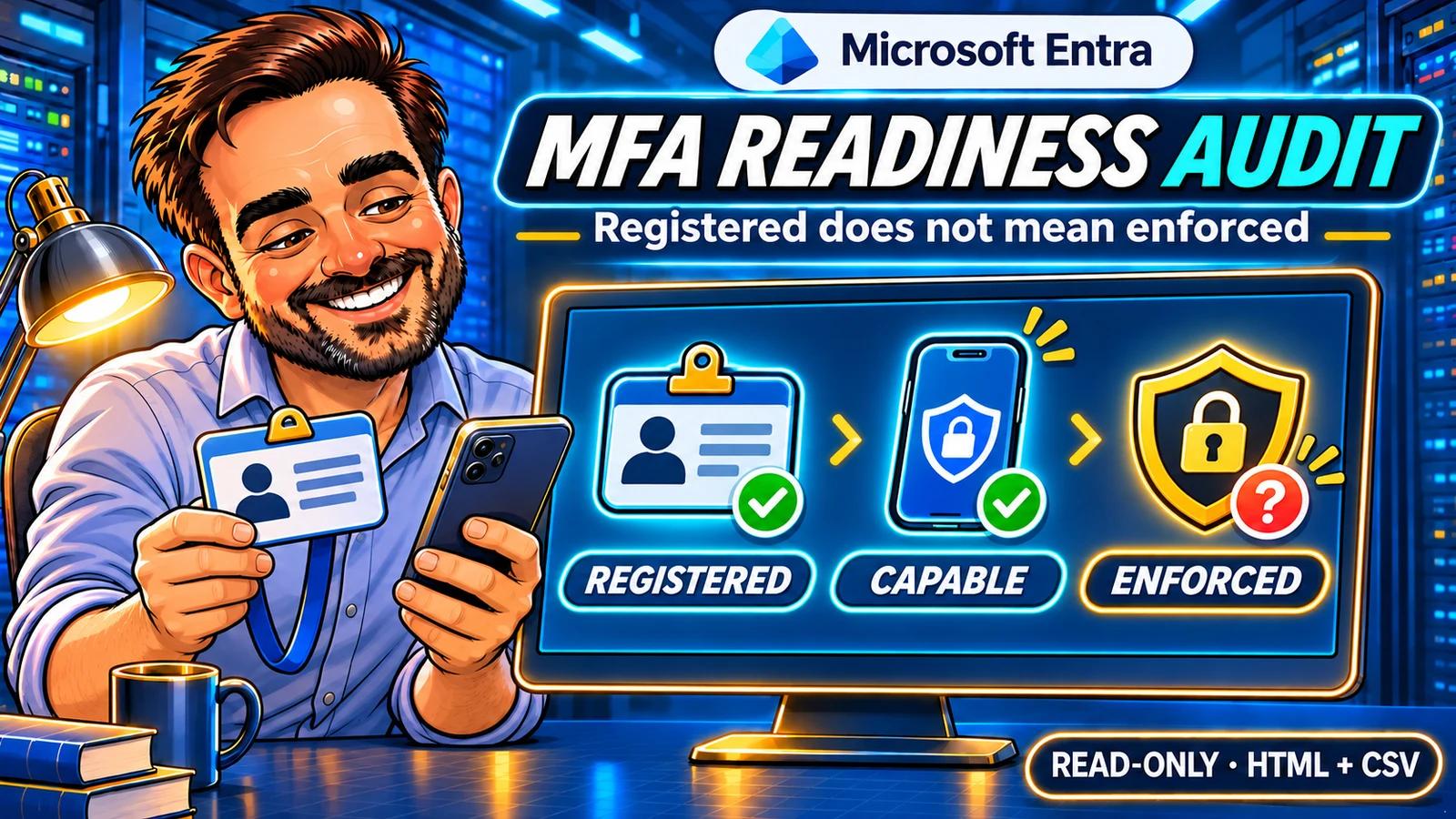
“Everyone has MFA, right?” It sounds like a simple question until you have to show the evidence. An Authenticator registration is useful, but it cannot tell you whether a particular sign-in was required to use MFA.
I built this PowerShell tool to give administrators a practical starting point: who has MFA registered, who is reported as capable of using it, and which rows need attention before you draw a conclusion. It produces a local HTML report and three CSV files that you can use to organise the follow-up.
Verified pilot. The read-only pilot completed on 15 November 2026 for two selected accounts. Both registration-report queries completed, with no missing or unknown rows. MFA capability, passwordless capability, method lists and the refresh timestamp were reconciled with Entra. This is a registration-readiness check, not proof of enforced MFA.
1. What this audit can answer
| Question | Answer from this collector |
|---|---|
| Is an MFA method registered? | The Microsoft registration report’s MfaRegistered value. |
| Is the user capable of MFA? | MfaCapable: a registered MFA method is allowed by the authentication methods policy. |
| Is a passwordless method available? | PasswordlessCapable, without claiming phishing resistance. |
| Which methods are registered? | Method names only; no phone numbers or personal recovery addresses. |
| Was MFA enforced or actually used? | Not assessed. This needs policy and sign-in evidence. |
The difference between registered and capable comes directly from the Microsoft report definitions. Neither flag is an effective Conditional Access assessment. The script writes Enforcement = NotAssessed for every user. [2]
The scope is deliberately narrow. It does not collect sign-in history, individual authentication-method details, SSPR, current role or PIM assignments, security defaults, per-user MFA state or Conditional Access policies. For application access, use the separate OAuth permissions audit.
2. Prepare a read-only connection
Use PowerShell 7.4 or newer, Microsoft.Graph.Authentication 2.37.0 or newer, and an approved work or school account. This release uses delegated access in the Microsoft Global cloud. Entra ID P1 or P2 is required for Authentication Methods Usage and insights. [3]
The API’s minimum permission is AuditLog.Read.All. It also requires a supported directory role: Reports Reader, Security Reader or Global Reader are read-only choices documented for the endpoint. Global Administrator is not a prerequisite. Consent and role membership are separate checks. [1]
Selecting two users limits the script’s queries, not the permission granted to the Graph client. Review any new consent request through your normal approval process.
Download v1.0.0 · ZIP · ZIP checksum · Release notes
The public GitHub repository contains the source, README, interpretation guide, validation record, MIT licence and offline tests. Download the versioned package above to keep the script and module together. There is no dependency on GitHub at runtime.
Compare the downloaded ZIP’s SHA-256 hash with the checksum file, extract the whole package and keep the .ps1 and .psm1 together. The author attribution is not a digital signature. A matching checksum checks integrity, not publisher identity.
Get-FileHash ./entra-mfa-readiness-audit-v1.0.0.zip -Algorithm SHA256

Install-Module Microsoft.Graph.Authentication -Scope CurrentUser -MinimumVersion 2.37.0
Import-Module Microsoft.Graph.Authentication

$tenantId = '<your-tenant-guid>'
Connect-MgGraph -TenantId $tenantId -Scopes 'AuditLog.Read.All' -ContextScope Process -NoWelcome
Get-MgContext | Select-Object Account, TenantId, AuthType, Environment, Scopes
3. Run a small pilot
Choose one normal account and one approved administrative account. Substitute their actual user principal names and your tenant GUID. Start in the extracted package folder:
try {
    ./Get-EntraMfaReadinessAudit.ps1 `
        -ExpectedTenantId $tenantId `
        -UserPrincipalName 'pilot@example.com','admin-pilot@example.com' `
        -OutputPath './MfaAudit-Pilot'
} finally {
    Disconnect-MgGraph
}
The output folder must be new. The collector checks the tenant, cloud, delegated session and permission before querying. It makes only GET requests and does not change authentication methods, account status or policies.
Open MfaAudit-Pilot/report.html. Keep the accompanying CSV and JSON files in the same folder so the report’s download links continue to work. The HTML is self-contained and can be read offline.
4. Read coverage before conclusions
| File | Use it for |
|---|---|
| coverage.csv | Check which selected-user queries completed, including page counts and safe failure categories. |
| users.csv | Compare registration, capability, method names, report age and data quality. |
| findings.csv | Work through the reason and next step for each review item. |
| summary.json | Record the script version, collection scope, timestamps and totals. |
Read Coverage first. If a query failed, the script retains successful observations but marks the run partial. A zero count from a failed read is not evidence that there are no users or no gaps.
NotReturned means a selected user was absent from the response. It does not mean the user has no MFA. Disabled and soft-deleted users are excluded from Microsoft’s registration report, and reporting delays can matter. AllReportedUsers therefore means all report rows, not every account in the directory. [1] [3]
ReportUpdatedUtc is the report refresh timestamp. It is not a method-registration date or last MFA sign-in. The default 48-hour review threshold is our triage choice, configurable with -MaxReportAgeHours. Microsoft says most users update within 36 hours, with some taking longer; 48 hours is not a Microsoft deadline. [3]
5. Compare the report with Entra
- Open Entra ID → Authentication methods → User registration details, under Monitoring in the authentication-methods navigation. The Activity page also provides registration summaries.
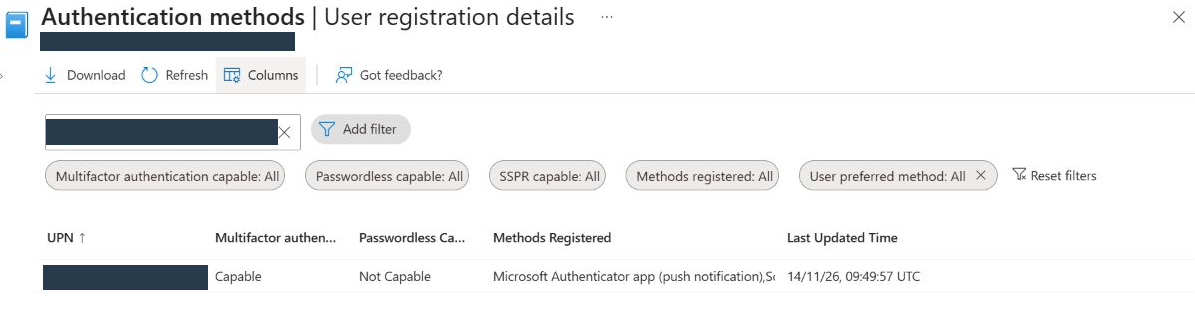
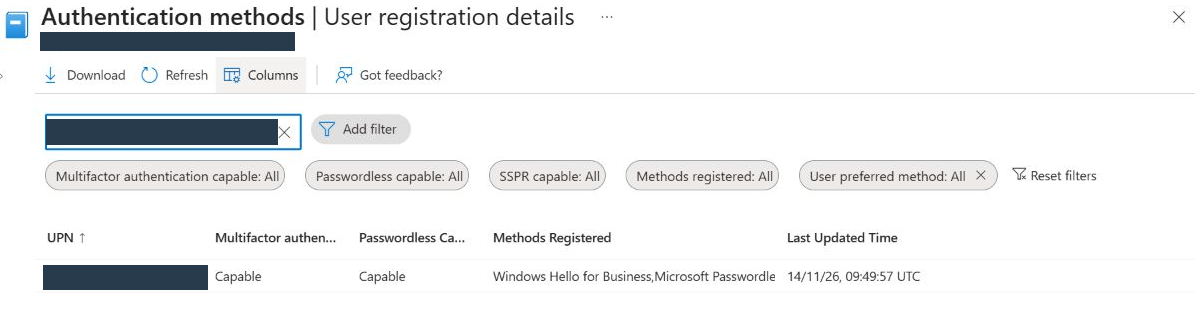
- Search for the exact UPN from the pilot. Compare MFA capability, passwordless capability and registered methods.
- Record the report’s last update and your collection time. If a method changed recently, allow for reporting delay before treating a mismatch as a script defect.
- Compare only the selected accounts. Whole-tenant dashboard totals will not match a two-user pilot.
The portal and the API can present different labels for the same method. Compare meaning as well as text. Preserve Microsoft’s original method values in the CSV, including new values the script does not classify.
What the pilot returned. The two selected accounts both returned MfaRegistered = Yes and MfaCapable = Yes. Pilot A returned PasswordlessCapable = No; pilot B returned Yes. Both source rows were refreshed on 14 November 2026 at 09:49:57 UTC, 33.4 hours before the run.
The portal confirmed the fields it exposes: capability, passwordless capability, method lists and refresh time. MfaRegistered and AdminReported remain API-reported values; this was not an independent live role assessment. The two VERIFY_ENFORCEMENT findings are follow-up prompts, not two detected failures.

6. Turn a finding into a useful next step
| Observed result | Next administrator action |
|---|---|
| Member: registered No / capable No | Check account purpose and the approved registration process. Give early attention to a reported administrator. |
| Member: registered Yes / capable No | Review Authentication methods → Policies and its user/group targeting. A registered method might not be allowed. |
| Registered Yes / capable Yes | Inspect enforcement separately. Capability is a starting point, not a closure reason. |
| Guest account | Check home-tenant authentication and cross-tenant trust before judging the local result. |
| Unknown, incomplete or old report | Resolve the evidence gap and rerun into a new folder before making account changes. |
AdminReported comes from the registration report. It is useful for prioritisation, but does not replace a current role and PIM review. The tool does not infer emergency-access or service-account purpose from a name.
For enforcement evidence, open a representative event under Entra ID → Monitoring & health → Sign-in logs. Inspect Authentication Details and Conditional Access, alongside the relevant policy or security-defaults configuration. A requirement can be satisfied by an existing claim; the absence of a fresh prompt is not proof of an MFA bypass. One successful sign-in also does not establish coverage for every app and condition. [5] [6]
Passwordless capability deserves its own interpretation: a passwordless method is not automatically phishing-resistant. Check the method and the required authentication strength for the scenario. [7]
7. Expand and keep the evidence
The pilot disconnects when it finishes. After reconciling the results, reconnect using the same approved read account and tenant before expanding:
Connect-MgGraph -TenantId $tenantId -Scopes 'AuditLog.Read.All' -ContextScope Process -NoWelcome
Get-MgContext | Select-Object Account, TenantId, AuthType, Environment, Scopes

try {
    ./Get-EntraMfaReadinessAudit.ps1 `
        -ExpectedTenantId $tenantId `
        -AllReportedUsers `
        -OutputPath './MfaAudit-All'
} finally {
    Disconnect-MgGraph
}
Keep a dated copy of the private report, script version, collection scope and follow-up decisions. Findings are review prompts; several can belong to one account. The findings total is not a count of vulnerable users.
Do not commit the reports to the public repository. Even without recovery contact details, usernames, IDs and authentication posture are security information. Publish only reviewed screenshots with identifiers hidden.
8. Troubleshoot the collection
| Symptom | What to check |
|---|---|
| The Microsoft sign-in window does not open | Use a normal PowerShell 7 window. Do not bypass a tenant’s authentication-flow restrictions. |
| 403 / AccessDenied | Check consent, supported read role and the reporting licence. Do not add write permissions to solve a read problem. |
| 401 / AuthenticationRequired | Reconnect to the expected tenant, confirm the context and use a new output folder. |
| 429 / Throttled or a final service error | The SDK handles normal retries. After a final error the collector stops further requests; retain the partial report and retry later. |
| SelectedUserNotReturned | Check the exact UPN, account state and reporting delay. Do not label the user unregistered from this alone. |
| The output folder already exists | Choose a new folder. Previous evidence is deliberately protected from overwrite. |
The collector does not export raw error messages or request headers. For a bug report, provide the version, safe error category and a synthetic example rather than a tenant report. [4]
9. Validation record
| Validation | Result |
|---|---|
| Microsoft definitions, licensing, permission and filters | Rechecked against the official documentation on 15 November 2026. |
| Offline collector tests | 57 checks passed on the final v1.0.0 package, including a fresh download from the public GitHub release. |
| Live selected-user pilot | Script v1.0.0-rc.1, PowerShell 7.7.0; 15 November 2026, 19:11:59–19:12:00 UTC. Two users, two complete query pages, zero unknown rows or incomplete sections. Version 1.0.0 changes the version label and documentation, with the same collection logic. |
| CSV and summary reconciliation | All counts match. Both users are registered and MFA capable; one is passwordless capable. Both follow-up rows retain Enforcement = NotAssessed. |
| Entra portal comparison | MFA capability, passwordless capability, registered method lists and refresh time matched for both selected accounts. |
| Report freshness | Both source rows refreshed on 14 November at 09:49:57 UTC, 33.4 hours before collection; within the chosen 48-hour review threshold. |
| Tenant-wide and dedicated read-role tests | Not run. The pilot used the existing administrative account. The report does not certify the whole tenant. |
| GitHub package | Public v1.0.0 release: 12 allowlisted files, 11 individual file hashes verified, and the downloaded ZIP matches the prepared package. No private tenant evidence is included. |
| GitHub Actions | 57 synthetic checks passed on both Windows and Ubuntu. View the validation run for the release commit. |
The useful outcome is a defensible review queue: the right accounts, the right evidence and a clear next action. Close an item when the follow-up supports the conclusion—not merely when a report column says Yes.
Microsoft references
- List userRegistrationDetails: permission, roles and filters
- Registration report property definitions
- Authentication Methods Activity: licensing, portal and reporting delay
- Microsoft Graph throttling guidance
- Authentication details in sign-in logs
- Conditional Access troubleshooting
- Authentication strengths