You recognise the application name. You are less certain why it can send mail, read files or change directory objects. Before removing anything, you need a reliable list and a way to check what each permission actually means.
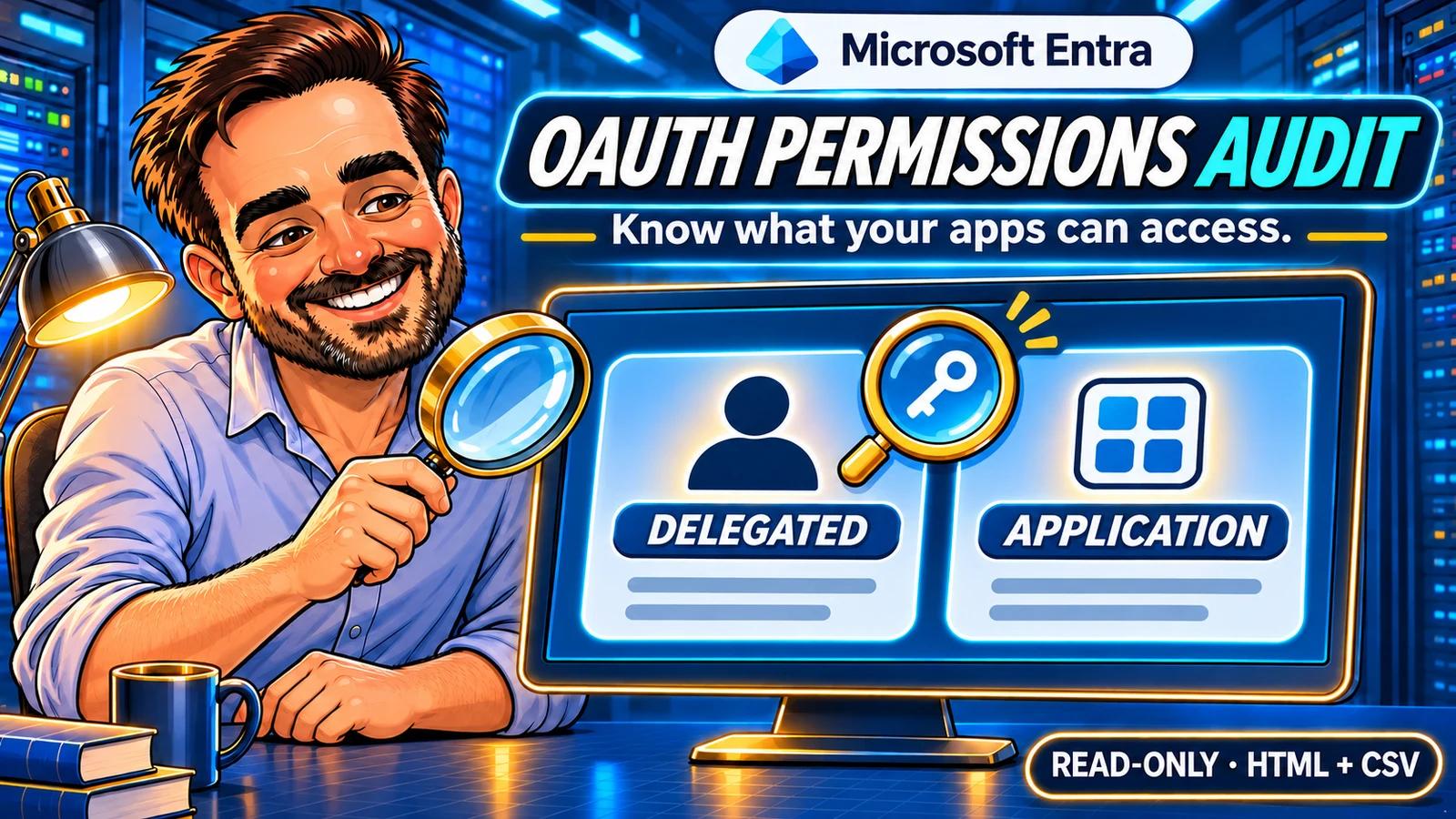
I built this PowerShell audit to turn granted permissions on enterprise applications into a list an administrator can check and act on. It separates delegated consent from application permissions, explains the reason behind each review priority and keeps failed queries visible. The useful outcome is a review queue you can discuss with the application owner.
Verified pilot. On 13 November 2026, the read-only collector returned four applications and 78 permission rows, with all 13 collection reads complete. CSV totals and sampled grants were reconciled with Entra. Two unresolved delegated claims remain visible for review.
1. Choose the right inventory
This tool starts with Enterprise applications, the tenant-local service principals. That is a different inventory from the credential and owner audit, which starts with locally registered applications.
| Question | What the collector provides |
|---|---|
| Which direct OAuth permissions are granted? | Delegated grants and application role assignments, with resource and permission identifiers. |
| Is consent for one user or all users? | The delegated consent scope and, when applicable, the user Object ID. |
| Which permissions deserve an early review? | Explicit rules for selected high-impact Microsoft Graph permissions. |
| Did the queries all succeed? | Coverage, paging and failure categories alongside the findings. |
| Has the app used the permission, or can it reach every resource? | Not determined by this inventory. Activity and effective access require separate evidence. |
The first version includes ordinary Application-type service principals, including Microsoft and third-party applications. Managed identities and explicit derived agent objects are listed as excluded. Microsoft Graph can return agent blueprint principals in the same collection, so silently counting every object as a conventional app would be misleading. [3]
Preauthorized access, requested permissions in an app-registration manifest, directory roles, Exchange application RBAC, Teams resource-specific consent and selected-site assignments are outside this collector. A report with no direct grants is not proof of no possible access.
2. Prepare a read-only connection
Use PowerShell 7.4 or newer and the official Microsoft.Graph.Authentication module, version 2.37.0 or newer. This release supports a delegated work or school account in the Global cloud.
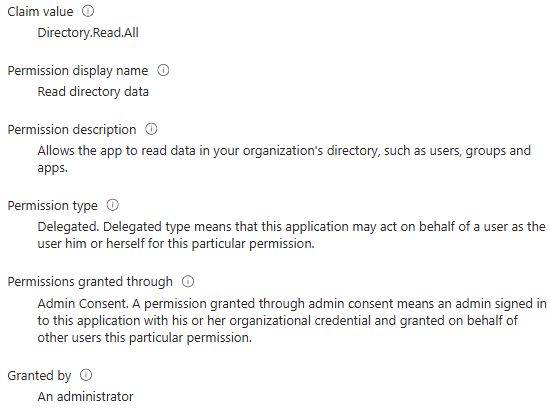
Directory.Read.All is the documented minimum read permission for listing delegated grants. It also supports the other reads used here. The signed-in account needs an appropriate directory role; Directory Readers is listed for these endpoints. Global Administrator is not required. The portal observations in this guide used an existing administrator session, so they do not constitute a least-privilege role test. [1] [2]
Consent and directory roles are separate requirements. Selecting one app limits this script's collection; it does not narrow the directory-wide permission granted to the Graph client. Review consent through your normal approval process.
Download the complete package · v1.0.0 · ZIP checksum
Browse the source on GitHub · Release notes · Report a bug
Download the named entra-app-permissions-audit-v1.0.0.zip asset from the release. Compare its SHA-256 checksum with the accompanying file, then extract the complete ZIP. Keep Get-EntraAppPermissionsAudit.ps1, EntraAppPermissionsAudit.psm1 and review-rules.json together. Open PowerShell in that folder. The package includes the README, licence, validation record and offline tests.
Install-Module Microsoft.Graph.Authentication -Scope CurrentUser -MinimumVersion 2.37.0
Import-Module Microsoft.Graph.Authentication

$tenantId = '<your-tenant-guid>'
Connect-MgGraph -TenantId $tenantId -Scopes 'Directory.Read.All' `
    -ContextScope Process -NoWelcome
Get-MgContext | Select-Object TenantId, Account, AuthType, Environment
Install only if the module is absent. Connect and run in the same PowerShell process. The collector itself does not install modules, authenticate or grant consent. The author header identifies Tiago Carvalho; the files are not digitally signed. Follow your organisation's script approval process. A matching SHA-256 hash detects a changed file but is not independent proof of publisher identity.
3. Run a small pilot
In the Entra admin center, open Entra ID → Enterprise apps → All applications → your application → Overview. Copy the enterprise application's Object ID. Do not use its Application (client) ID or the Object ID from App registrations.
$clientObjectId = '<enterprise-application-object-guid>'
./Get-EntraAppPermissionsAudit.ps1 -ExpectedTenantId $tenantId `
    -ServicePrincipalObjectId $clientObjectId -OutputPath ./PilotAudit
Use a new output folder every time. The expected tenant is checked before a tenant query, and an existing folder is never overwritten. For a small comparison group, supply an array of enterprise application Object IDs. Our pilot selected four existing applications and made no permission changes. It ran with PowerShell 7.7.0 and Microsoft.Graph.Authentication 2.39.0.
4. Read coverage before findings
Open PilotAudit/report.html. Start with Coverage, then read the application and permission tables. A status of COMPLETE for the stated reads means those collection reads succeeded. It does not mean every authorization path has been assessed.
| File | Use it for |
|---|---|
| report.html | Reading the results locally and navigating to coverage, applications and permissions. |
| applications.csv | Checking each client, its enabled state, query status and observed counts. |
| permissions.csv | Filtering permission type, resource, consent scope, priority and resolution. |
| coverage.csv | Finding failed or unattempted reads and distinguishing them from empty collections. |
| summary.json | Recording the version, UTC start/end, scope and counts. |
A PARTIAL result means the report has a gap. Keep it as evidence, resolve the cause and use a new folder for the next run. A final authentication, throttling or server failure stops further requests. Permission counts from partially returned collections are observations, not a complete total.
One delegated grant can contain several scopes and becomes several CSV rows. Application assignments stay one row each. Compare the CSV row counts with the corresponding summary fields; do not compare the number of permission rows with the number of applications.
Our run at 09:24 UTC on 13 November 2026 returned 76 delegated permission rows and two application assignments. All 13 collection reads completed. The following counts come from that report; the first two client names are omitted from this public summary.
| Pilot client | All-user delegated rows | Specific-user delegated rows | Application assignments |
|---|---|---|---|
| Mail-sending application A | 2 | 0 | 1 |
| Mail-sending application B | 1 | 0 | 1 |
| Profile-reader lab control | 0 | 0 | 0 |
| Microsoft Graph Command Line Tools | 46 | 27 | 0 |
| Total | 49 | 27 | 2 |
The two mail-sending samples matched their portal permissions. The profile-reader control returned two complete, empty permission collections. Microsoft Graph Command Line Tools showed 46 rows under Admin consent and 27 under User consent, matching the report's separate consent scopes. Five permission rows across three clients matched the supplied High rules; that is not a count of compromised applications.
5. Verify the permission in Entra
Return to the same enterprise application and open Permissions. Inspect both Admin consent and User consent, then select a claim value to open its details. Match the API, claim value, permission type and consent scope. [6]
In the tenant, one selected application exposed the most useful comparison: Mail.Send was present in both types. The claim name alone did not tell the whole story.
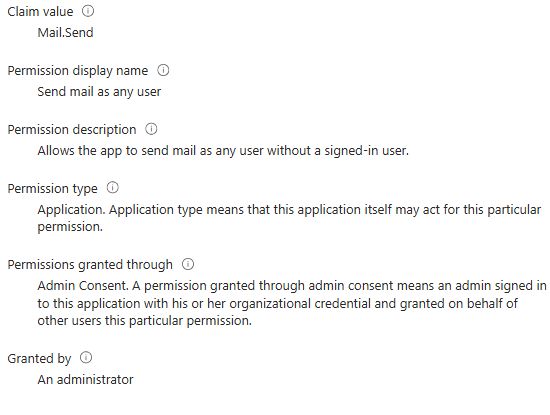
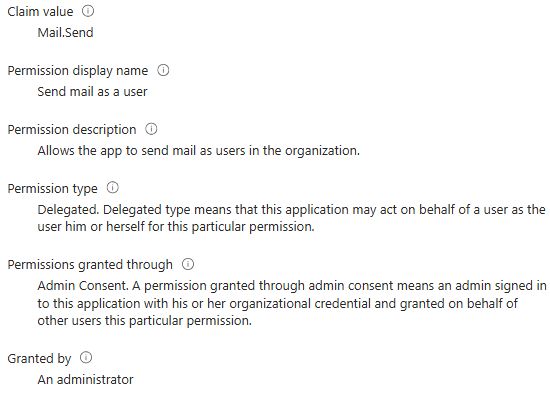
Admin consent is not another name for application permission. Delegated access acts on behalf of a user and is bounded by the user's rights. The audit maps AllPrincipals to all-user delegated consent and Principal to consent for a specific user. PrincipalUserId is that user, not the person who approved the grant. [4] [7]
A second control uses the existing profile-reader lab application. Both consent tabs currently report no permissions. Check both tabs before treating it as an empty direct-consent control, and keep preauthorized access outside that conclusion.
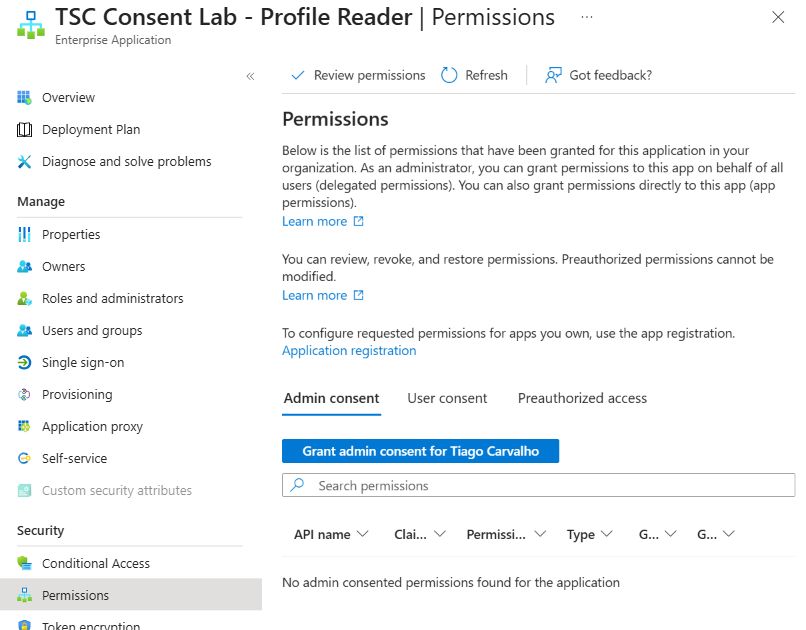
Public captures are cropped to exclude the signed-in account and tenant identifiers. The permission values and results shown are unchanged. If a recent grant or revocation disagrees with the report, allow for replication and compare the same Object ID again; do not resolve a mismatch by changing consent. [1] [2]
6. Turn findings into a review queue
The supplied rules highlight selected Microsoft Graph permissions involving directory changes, permission management, mail and broad file or site access. Each rule matches the resource application ID, permission kind and exact claim value. A custom API with a claim named Mail.Send is not automatically treated as Microsoft Graph.
| Label | How to respond |
|---|---|
| High | Confirm the owner, business need, data scope and whether the same task could use less access. This is a review priority, not a compromise verdict. |
| NotClassified | Read the permission definition and add context. Absence from the supplied rule set is not a low-risk rating. |
| Review | Inspect unresolved, disabled, default-access or inconsistent definitions. Preserve the original grant identifiers for reconciliation. |
A zero app-role GUID is kept as default access without a named role. Disabled applications and disabled permission definitions remain visible. The script does not use an enabled/disabled flag to silently discard a stored authorization. [5]
The pilot found a useful exception. Microsoft Graph Command Line Tools had Device.ReadWrite.All stored in two delegated grants: one for all users and one for a specific user. The collector could not match either to a delegated definition on the resource service principal, so it retained both as Unresolved with priority Review.
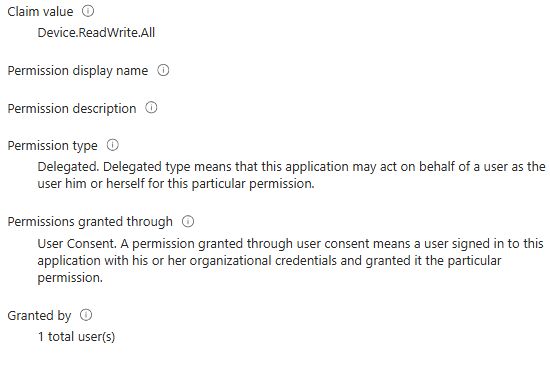
The current Microsoft reference lists Device.ReadWrite.All as an application permission, with no delegated entry. That supports keeping the stored delegated claims separate for investigation; it does not establish their effective access or justify automatic removal. The audit did not convert them into application permissions, drop them or revoke them. [8]
For each finding, record owner → business purpose → data scope → proposed change → approver → verification plan. A legitimate integration can need a powerful permission. Confirm that need before starting a separate, approved remediation task.
7. Expand and keep the evidence
./Get-EntraAppPermissionsAudit.ps1 -ExpectedTenantId $tenantId `
    -AllApplications -OutputPath ./TenantAudit
Disconnect-MgGraph
The all-applications option inventories all returned ordinary Application-type service principals. The portal's default Enterprise Applications filter can show a different population; compare scope and Object IDs before comparing totals. Larger tenants require more reads because each client has two permission collections. Resource definitions are cached to avoid repeating identical lookups.
The HTML report works without external scripts, fonts or a web service. Reports contain internal names and identifiers, including user Object IDs where consent is individual. Keep them private. The public GitHub package contains source, documentation and synthetic tests; tenant reports and private screenshots are excluded. The collector does not contact GitHub or download updates.
8. Troubleshoot without adding privileges
| Symptom | Check next |
|---|---|
| Window handle / WAM error | Use a normal interactive PowerShell 7 window. Keep your tenant authentication controls in place. |
| The script refuses the tenant or scope | Inspect Get-MgContext in the same process. Correct the connection rather than removing the check. |
| 403 / AccessDenied | Verify Graph consent and the signed-in account’s active role. A write permission is not a repair for a read-only audit. |
| 429 / throttled or 5xx | Keep the partial report and follow service/retry guidance. Avoid repeatedly launching full scans. |
| No direct grants returned | Check complete coverage, the correct client Object ID and both consent tabs. Review other authorization paths separately. |
| A permission is unresolved | Check the resource API and its definition; retain the row for review. Do not interpret an unresolved name as no grant. |
9. What this review has verified
| Evidence | Status |
|---|---|
| Microsoft endpoint permissions, identifiers and consent semantics | Reviewed against the official references below. |
| Offline tests | 51 passed; mocked Graph responses, not tenant results. |
| Release validation | GitHub Actions passed on Windows and Ubuntu. The public v1.0.0 ZIP matched its SHA-256 checksum and all 12 file hashes; its 51 offline checks passed after extraction. |
| Existing read permission and Mail.Send type comparison | Confirmed in the tenant portal; real captures included. |
| Empty direct-consent control | Both portal consent tabs checked. |
| Four-application collector run | Completed at 09:24 UTC on 13 November 2026: 13 complete reads, 78 permission rows, zero incomplete sections. |
| CSV totals and portal reconciliation | 18 reconciliation checks passed. Mail.Send samples, empty control and the 46/27 consent split matched the portal. |
| Two unresolved delegated claims | Retained as Review; portal evidence and current Microsoft permission reference checked. Effective access was not tested. |
| Release v1.0.0 | Versioned GitHub package with source, documentation, synthetic tests and SHA-256 checksums. The live pilot used rc.1; collection and reporting logic are unchanged. |
The collector is tested for this four-application pilot. Tenant-wide scale, sovereign clouds, unattended authentication and the excluded authorization paths are not covered by that claim. Use the validation record to distinguish live observations from synthetic tests, and check the GitHub Actions results for the version you download.
Microsoft references
- List delegated permission grants
- List app-role assignments granted to a service principal
- List service principals
- Delegated grant properties and consent scope
- App-role assignment properties
- Review permissions granted to enterprise applications
- Microsoft Graph permission types
- Microsoft Graph permissions reference
- Microsoft Graph throttling guidance
Microsoft documentation checked on 13 November 2026. The classification rules and review workflow are the author's implementation choices; Microsoft documentation defines the API behavior and permission semantics.