
A support engineer attaches a workbook to Copilot Chat. Later, the security team asks whether the file was used. The engineer can show the reply and its citation. What evidence can an administrator find independently in Microsoft Purview?
We asked the same question in two new chats under one work account. Only the second chat included a file. The short gap between them made the audit search manageable, and a uniquely named copy of the workbook gave us something specific to look for.
1. Set up an investigation you can reproduce
Before generating events, check the pilot account and the investigator separately. This exercise uses Microsoft 365 Copilot Chat in the browser, a local workbook upload and Purview Audit search.
- Copilot and storage: use an eligible Microsoft 365 work account with Copilot Chat available, file uploads allowed and a working OneDrive for Business. Open OneDrive once and confirm it is provisioned. Uploads are stored there. A Microsoft 365 Copilot add-on is not required for the direct file-upload capability described in Microsoft's Copilot Chat FAQ.
- Audit entitlement: verify the relevant user and organisation subscriptions. Audit (Standard) is included in plans such as Microsoft 365 Business Basic, Standard and Premium, and Microsoft 365 E3. This exercise does not depend on an Audit (Premium) feature. Copilot access, Audit licensing and investigator permissions are separate checks.
- Portal permission: the investigator needs View-Only Audit Logs, available through the Audit Reader role group. Its administrative scope must include the pilot user. Audit Reader allows searching and exporting; it does not allow enabling auditing.
Our environment: the pilot's Licenses and apps page showed Microsoft 365 Business Premium and no assigned Microsoft 365 Copilot add-on when checked on 3 November 2026. The 2 November run demonstrated working uploads, OneDrive storage and searchable Copilot events. To check your own account, open Microsoft 365 admin center → Users → Active users → select the user → Licenses and apps. Do not infer a purchased licence from a field such as LicenseType in an individual event.
Open Microsoft Purview → Solutions → Audit → Search. Confirm auditing is enabled before generating the test events. If the portal offers to start recording activity, have an authorised administrator resolve that prerequisite through your change process. Record the actual send times in UTC. Give each run a separate conversation and preserve its private conversation link.
Tickets table from our service desk lab. Rename your copy with your own date and run ID before uploading it.2. Produce two known interactions
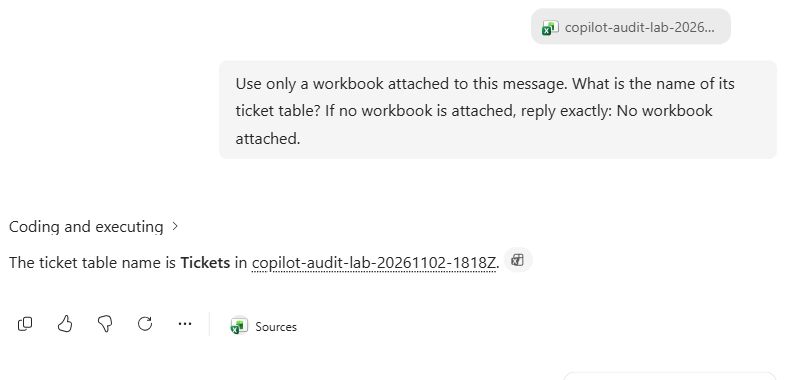
In the first new chat, leave the message free of attachments. In the second, choose Add and manage sources → Upload images and files, select the workbook and wait for its name to appear. Send exactly the same message in both chats.
Use only a workbook attached to this message. What is the name of its ticket table? If no workbook is attached, reply exactly: No workbook attached.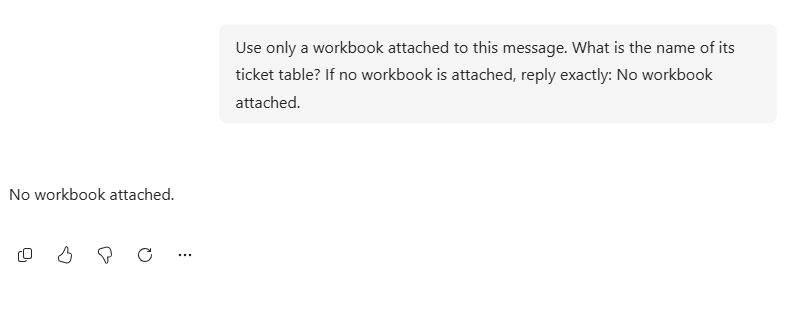
3. Search for the activity in Purview
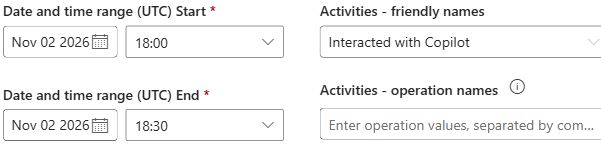
- On Audit → Search, select a UTC window that includes both send times. Our window was 2 November 2026, 18:00–18:30 UTC. Check both time boxes. An end time of 00:00 excludes the rest of that day.
- In Users, enter the pilot user's sign-in address and select the matching account from the suggestions. Filter on the person who used Copilot.
- In Activities – operation names, enter
CopilotInteraction. The equivalent friendly activity is Interacted with Copilot. Leave the keyword, object and workload filters empty for this first pass. Filtering by the workbook up front could exclude the control and any record that omitted the resource. - Give the search a recognisable name and select Search. Follow the job to Completed, then open the results. A zero shown while the job is queued or running is provisional. A completed job searches the records available at that time. To include events ingested later, submit a new search with the same criteria.
4. Read the event before drawing a conclusion
Open a result row to display Details. Check CreationTime, UserId and Operation, then scroll to CopilotEventData. Build a private comparison for each run:
- Match the conversation. Reopen the original Copilot chat and copy its address. In this web experience, the value after
/conversation/matchedCopilotEventData.ConversationId. Compare those values exactly.ThreadIdis a different identifier; do not substitute it for the conversation ID. - Match the file. Open the workbook citation in run B and retain its destination URL privately. Inspect every entry in
AccessedResourcesforAction,Name,TypeandSiteUrl. In our workbook entry, the destination URL andSiteUrlmatched exactly. - Check the document identifier. Our citation's URL contained
sourcedoc=%7B…%7D. Decode the percent escapes, remove the surrounding braces and compare the resulting GUID withlistItemUniqueId, ignoring letter case. A hyperlink entry may have extra query parameters. If your link has nosourcedocor the event omits the file ID, retain the evidence you do have and state the limit. - Preserve the record. Note the event
Id, UTC time, run label and matching fields. On the results page, select Export and save the CSV when the download is ready. Keep an unchanged original in your restricted investigation folder and analyse a copy. The CSV'sAuditDatacolumn contains the event JSON. Conversation links, user details and file URLs belong in that private record.
| Field | How to use it |
|---|---|
Id, CreationTime, UserId, Operation | Match the time window, pilot identity and type of activity. Capture the actual event time separately from the time the search finished. |
AppHost, ConversationId, ThreadId, Messages | Inspect the app and the identifiers actually supplied. If a ConversationId is present, compare it with the conversation link. Treat ThreadId as a separate value. Keep identifiers in the private investigation record. |
AccessedResources | Check each entry for a matching file name, URL or identifier. An entry for the test file supports an association with that event. An empty array or missing field leaves the association unresolved from that record alone. |
A resource reference alone does not tell you which cells appeared in the answer or whether the result was subsequently shared. Prompt and response content is a separate investigation through an appropriately authorised compliance workflow. For this exercise the two replies are already available from the controlled test account.
5. What the tenant showed
Both chat interactions completed. We submitted the first Purview query at 18:20 UTC, less than a minute after the second prompt. It completed in 4 minutes 42 seconds and returned zero results. At that point neither interaction was visible in the search.
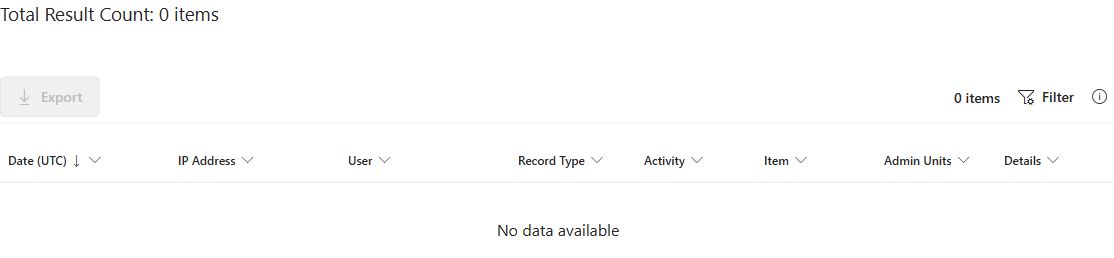
The search submitted at 18:33 UTC also completed with zero results. We ran the same search again at 18:54 UTC. It completed in 1 minute 29 seconds and returned two records. This gives us the timing of our observations. The exact instant each event became searchable is unknown.

| Run | Prompt sent (UTC) | Audit CreationTime (UTC) | What the event recorded |
|---|---|---|---|
| A · No file | 18:18:09 | 18:18:12 | AccessedResources: []. |
| B · Workbook attached | 18:19:50 | 18:20:02 | Two Read entries. One was a hyperlink. The other identified the named xlsx workbook. |
To identify each run, we compared its ConversationId with the identifier at the end of the original chat link. Both matched their respective conversations. Both events had operation CopilotInteraction, AppHost: Office and AppIdentity: Copilot.M365Copilot.WebChat. The app fields identified the same surface across both tests. The conversation IDs distinguished the runs.

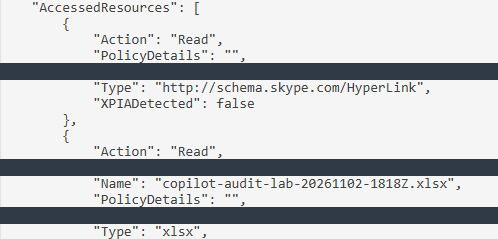
For the workbook entry, SiteUrl exactly matched the citation link in the chat, and listItemUniqueId matched the document identifier in that link. This supports a precise finding: Copilot recorded a read of this workbook in run B. Counting the hyperlink and workbook entries as two separate documents would overstate the evidence.
Optional diagnostic: compare an earlier known interaction
To check that this investigator could retrieve Copilot events for this user, we searched the independently documented Excel exercise from earlier the same day. We kept the account and activity filters and changed the window to 12:00–12:30 UTC. Purview returned two events. Both carried the conversation ID of the earlier lab. These are separate from the evening A/B run.
| Event time (UTC) | AppHost | AccessedResources |
|---|---|---|
| 12:00:39 | Office | One workbook entry named service-desk-queue.xlsx, with action Read. |
| 12:01:34 | Office | An empty array in the same conversation. |
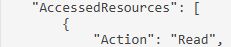

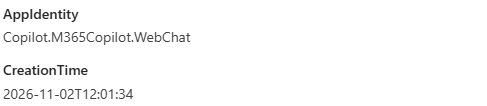
AppIdentity. Both records reported the more general AppHost value Office.Taking only the later event would have missed the recorded file read. Also, the earlier workbook was attached from cloud storage. In the evening test we uploaded a local copy. Differences in the records cannot be attributed solely to the attachment method.
If you have fewer records than expected
Check that the job completed, that both UTC times fall inside the window, and that the user chip represents the chat account. Check the investigator's administrative scope, the pilot user's entitlement and when auditing was turned on. If the test has just run, allow for ingestion and run a fresh query. Keep the same controls and record when each search finished. If you find the interaction but no matching file entry, keep that distinct from finding no interaction at all.
Optional admin query for examining the same event fields
Use an Exchange Online PowerShell session with the View-Only Audit Logs or Audit Logs role in Exchange. A Purview Audit Reader assignment alone does not establish access to the Exchange audit cmdlets. Install the Microsoft ExchangeOnlineManagement module if needed, connect with the investigator account and complete the normal sign-in. The pilot address filters the events; it need not be the investigator. This query is limited to a small lab window, with a maximum of 5,000 results.
# Run once if the module is not installed:
# Install-Module ExchangeOnlineManagement -Scope CurrentUser
Import-Module ExchangeOnlineManagement
$investigator = Read-Host "Investigator's sign-in address"
Connect-ExchangeOnline -UserPrincipalName $investigator

$pilot = Read-Host "Pilot user's sign-in address"
# Replace these with your own test interval, in UTC.
$start = [DateTimeOffset]::Parse("2026-11-02T18:00:00Z").UtcDateTime
$end   = [DateTimeOffset]::Parse("2026-11-02T18:30:00Z").UtcDateTime
$records = @(Search-UnifiedAuditLog -StartDate $start -EndDate $end `
    -UserIds $pilot -Operations CopilotInteraction -ResultSize 5000)

if ($records.Count -eq 5000) {
    Write-Warning "Result limit reached. Narrow the interval before drawing conclusions."
}

foreach ($record in $records) {
    $event = $record.AuditData | ConvertFrom-Json
    $data = $event.CopilotEventData
    $resourceProperty = $null
    if ($null -ne $data) {
        $resourceProperty = $data.PSObject.Properties['AccessedResources']
    }
    $resources = '<missing>'
    if ($null -ne $resourceProperty) {
        $resources = ConvertTo-Json -InputObject $resourceProperty.Value -Depth 12 -Compress
    }
    [pscustomobject]@{
        TimeUTC   = $event.CreationTime
        RecordId  = $event.Id
        Operation = $event.Operation
        AppHost   = $data.AppHost
        Chat      = $data.ConversationId
        Thread    = $data.ThreadId
        Resources = $resources
    }
}

Disconnect-ExchangeOnline -Confirm:$false
Resources preserves [] for an empty array, null for an explicit null and <missing> for an absent property. These are different source states. The tenant findings above came from the Purview portal. The formatter was checked locally against these cases; this optional live PowerShell query was not used for the tenant run.
Microsoft references
- Microsoft Copilot Chat FAQ: access and file uploads
- Microsoft Purview service description and licensing
- Get started with auditing: prerequisites and roles
- Search the audit log
- Export and analyse audit log records
- Audit logs for Copilot and AI applications
- Copilot interaction events and schema
- Purview considerations for Microsoft 365 Copilot
- Connect to Exchange Online PowerShell
- Search-UnifiedAuditLog cmdlet reference