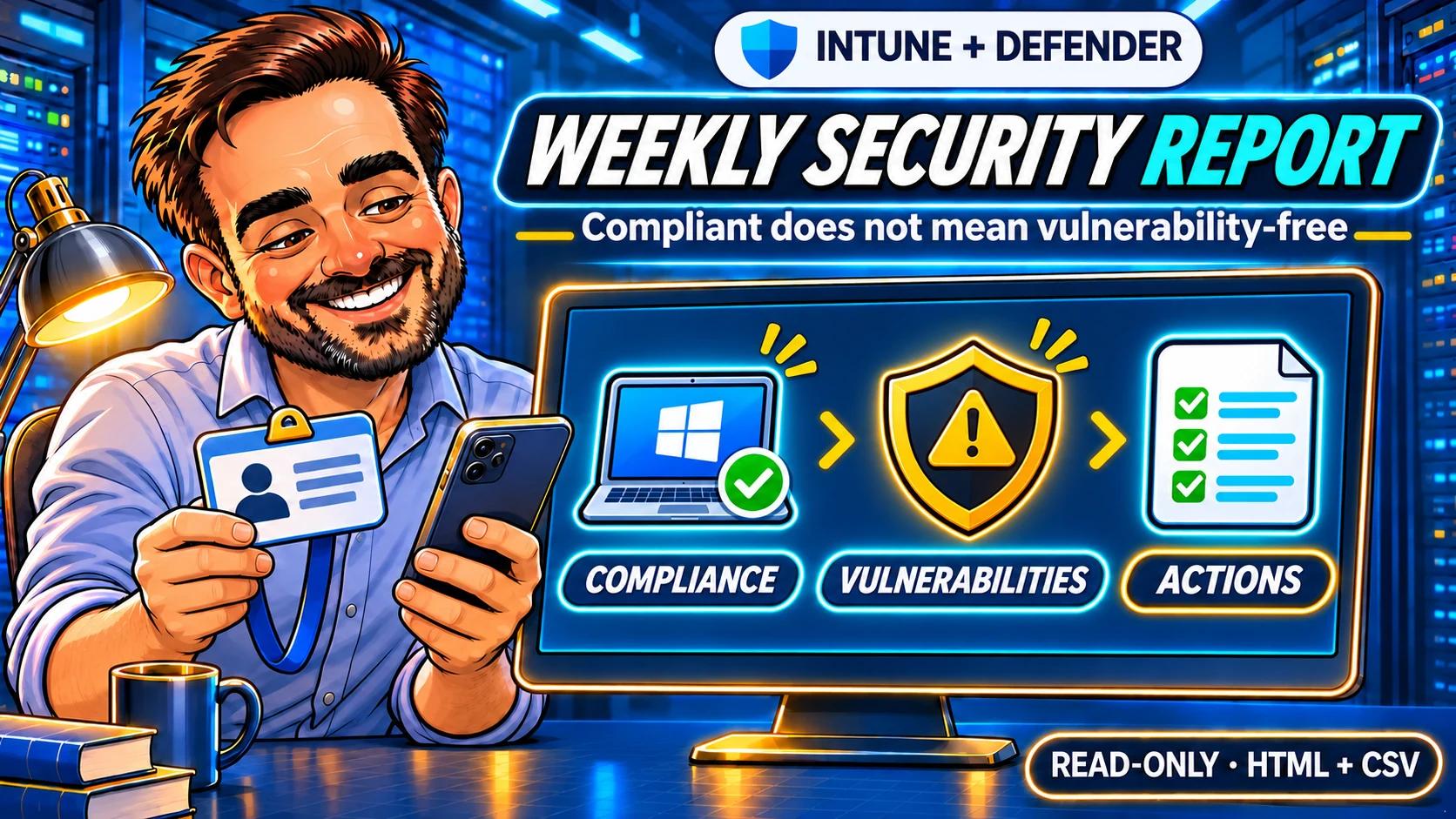
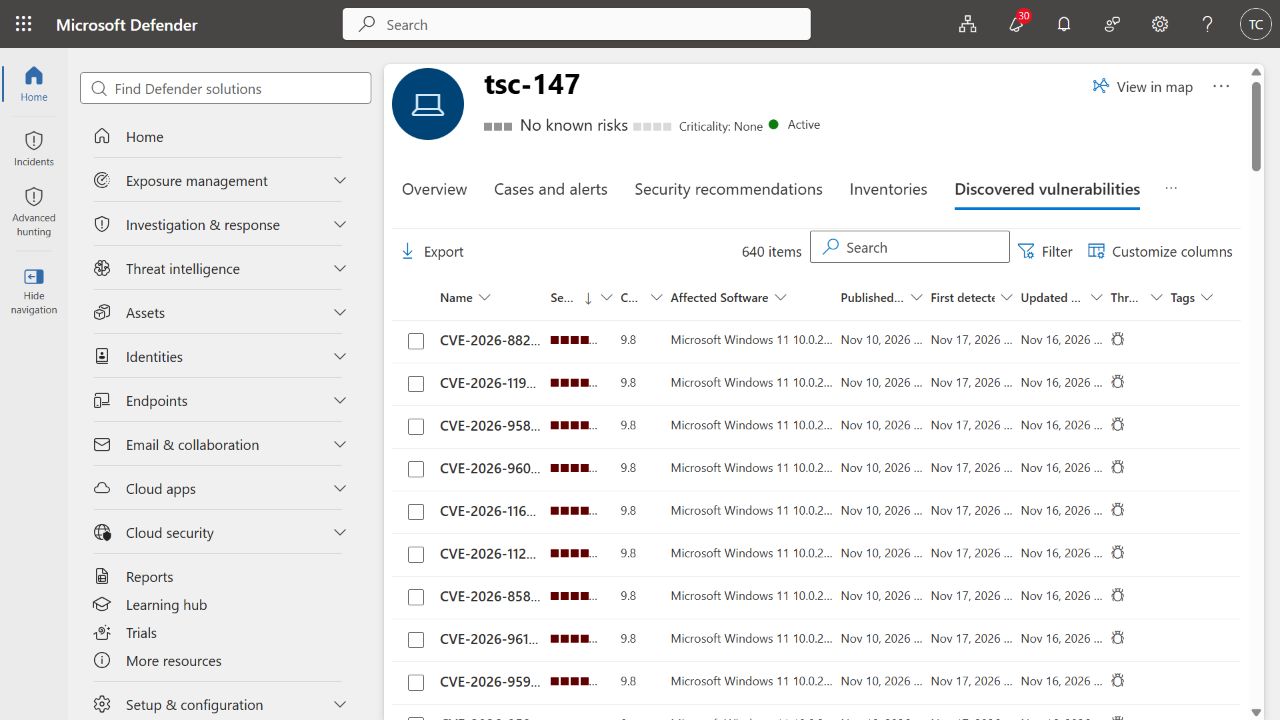
Our lab laptop was Compliant in Intune. Defender reported 640 distinct CVEs on it. Both results were valid: they answered different questions.
That is the problem this report helps an IT team work through. It brings device compliance, vulnerability findings, data age and follow-up actions into one local HTML report, with CSV files for the people who need to investigate. The collector only reads data. It does not patch devices or send the report to anyone.
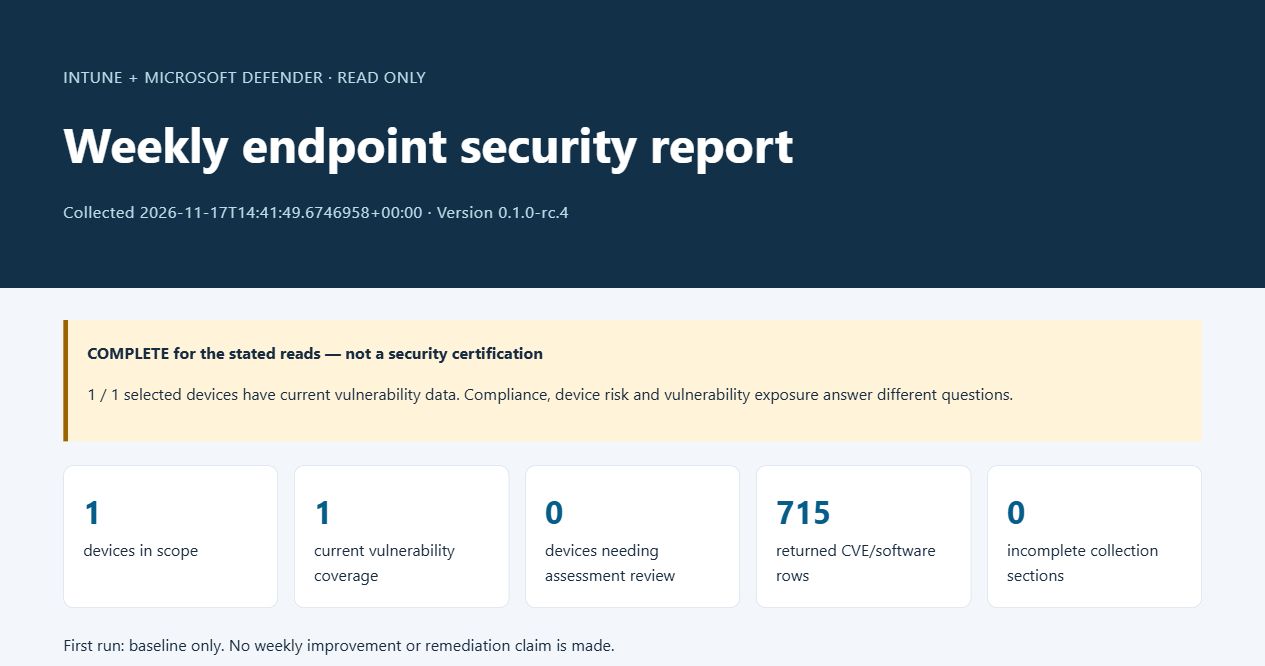
The 14:41 UTC certificate run on 17 November returned 715 CVE/software records representing 640 distinct CVEs. All five collection sections completed. Portal totals and selected findings matched. The weekly scheduling and delivery workflow has not been tested or enabled; the result below is a baseline, not a measured weekly improvement.
Download the public preview on GitHubExplore the synthetic report demoRead the package documentation · Source code · Release notes · ZIP checksum
1. Understand the three signals
Read those signals together with their timestamps. A recent Intune sync does not guarantee a fresh Defender assessment. The default 48-hour freshness threshold is this tool's configurable review rule, not a Microsoft scanning SLA.
Here, an “active vulnerability” means a finding returned in the current assessment. It does not mean an attacker is actively exploiting the device. A reported public exploit is useful prioritization context, not evidence of compromise.
2. Prepare access and one device
Start with one approved, enrolled Intune device that is onboarded to the licensed Defender service. Use its Intune managed-device ID, not its name or Entra device ID. The script reads the managed-device record and uses its Entra device ID to find the exact Defender match. It stops short of selecting a device when multiple matches exist.
Use PowerShell 7.4+ and Microsoft.Graph.Authentication 2.37.0+. Certificate execution additionally requires Windows and Az.Accounts 5.0.0+. The certificate and its private key must be accessible in CurrentUser\My under the Windows identity running the report. Local administrator rights are not required by the collector.
| Resource | Application read permissions | Purpose |
|---|---|---|
| Microsoft Graph | DeviceManagementManagedDevices.Read.AllDeviceManagementConfiguration.Read.All | Managed-device metadata and compliance policy states |
| WindowsDefenderATP | Machine.Read.AllVulnerability.Read.All | Matching machine, CVE/software findings and vulnerability context |
Application registration, certificate upload and admin consent are separate approved setup steps. The report does none of them. These application permissions allow reads across the tenant: selecting one device limits the collector's work, not the application's authorization.
First run: prepare the application and certificate
- In Entra App registrations, register a dedicated application for accounts in your directory only, with no redirect URI.
- Add exactly the four Application permissions in the table above. Remove an unused default delegated User.Read entry if present.
- Have an authorized administrator grant consent and confirm that all four permissions show Granted.
- Obtain an authentication certificate through your organization's process and upload only its public
.cerfile under Certificates & secrets → Certificates. Keep the matching private key inCurrentUser\Myunder the Windows identity that will run the report. This runner uses no client secret. - Copy the Directory (tenant) ID, Application (client) ID and certificate thumbprint into your private configuration. Add the Intune managed-device IDs as a JSON array.
The package's operation guide includes the setup checklist and Microsoft's application and certificate instructions. These are separate administrative setup steps; the collector remains read-only.
For an interactive pilot, the Graph scopes use the same names; Defender delegated scopes are Machine.Read and Vulnerability.Read, subject to user and device-group visibility. Defender for Business includes core vulnerability-management capabilities, but validate your own licensing and API access. This test uses no advanced hunting.
3. Run the report
Download and extract the package, inspect the scripts, and check its SHA-256 manifest. The author credit is not an Authenticode signature. Keep configuration, reports and certificates in private storage outside any repository.
Open PowerShell 7 in the extracted folder containing Get-EndpointSecurityReport.ps1. The ./ paths below refer to that folder. Replace this example with your actual extraction path:
Set-Location -LiteralPath 'C:\Tools\intune-defender-weekly-report'Start with an Intune-only check
Install the Microsoft modules from the PowerShell Gallery if they are not already available. Then connect to the expected tenant and use a new output directory for each run.
Install-Module Microsoft.Graph.Authentication -Scope CurrentUser -MinimumVersion 2.37.0
Connect-MgGraph -TenantId '<tenant-guid>' -ContextScope Process -NoWelcome -Scopes 'DeviceManagementManagedDevices.Read.All','DeviceManagementConfiguration.Read.All'
./Get-EndpointSecurityReport.ps1 -ExpectedTenantId '<tenant-guid>' -ManagedDeviceId '<intune-managed-device-guid>' -IntuneOnly -OutputPath './Reports/Pilot-01'
Disconnect-MgGraph
This deliberately produces PARTIAL coverage because Defender was not queried. Check device identity, compliance and source timestamps before expanding the collection.
Include Defender using the approved certificate
Install Az.Accounts if needed. Copy config.example.json to a private folder and replace the tenant ID, application ID, certificate thumbprint and managed-device IDs. Keep the ID list as a JSON array. The operation guide explains certificate preflight, authentication stages and failure handling.
Install-Module Az.Accounts -Scope CurrentUser -MinimumVersion 5.0.0
pwsh -NoProfile -File ./Invoke-WeeklyEndpointReport.ps1 -ConfigurationPath 'C:\PrivateReports\endpoint-config.json' -OutputRoot 'C:\PrivateReports\Runs'
The runner uses the certificate for Graph and obtains a separate in-memory Defender token. No token belongs in JSON, command history, screenshots or a GitHub issue. Run it in a dedicated PowerShell process so its session cleanup does not interfere with unrelated administrative work.
Open the generated report.html. Review its coverage summary first, then check the device and action tables. COMPLETE means the stated reads and coverage checks passed; it is not a clean-security verdict.
| File | Use it for |
|---|---|
devices.csv | Identity matching, compliance, encryption metadata, freshness, risk and exposure |
vulnerabilities.csv | Individual CVE/software/version rows, severity, exploit indicators and returned fixing KB |
compliance.csv | Returned policy and setting states |
actions.csv | Grouped follow-up actions with an initially Unassigned team field |
coverage.csv | Completed, failed or unattempted queries |
changes.csv | Differences from the explicitly selected previous snapshot |
snapshot.json | A private baseline for the next comparison |
4. Check the real tenant results
The lab device was TSC-147. Its Intune policies reported Compliant, including the baseline checks for BitLocker, Code Integrity, Secure Boot and storage encryption. The API returned six policy-state records that represented three identical policy summaries twice; the report preserves that with ReportedInstances = 2. It is a returned-record count, not evidence of two assignments.
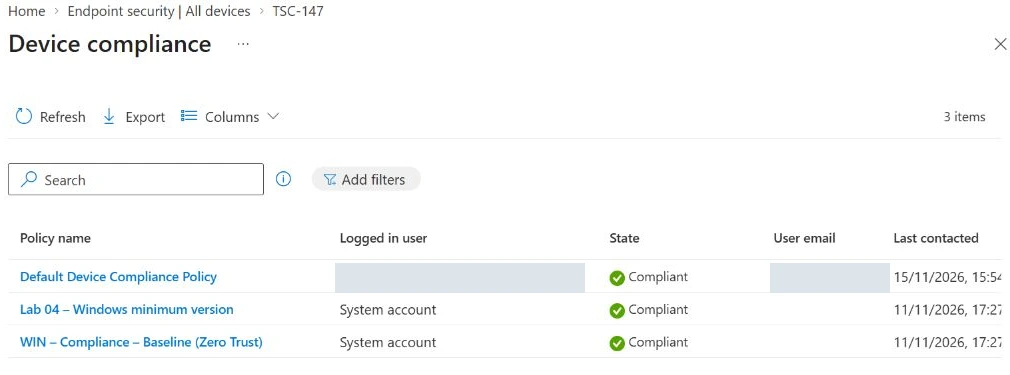
After the one-device onboarding described below, Defender matched the exact Entra device ID and reported Active, Onboarded, risk None and exposure Medium. At 14:35 UTC, the first populated API collection returned the same 640 distinct CVEs shown by the portal. A second collection using corrected candidate rc.4 at 14:41 UTC on 17 November 2026 returned the same totals.
| Measure | Observed result | How to interpret it |
|---|---|---|
| Distinct CVEs | 640 | Matches the Defender portal total |
| CVE/software/version rows | 715 | A CVE can affect more than one product or version |
| Critical findings | 15 rows, 13 distinct CVEs | Row and unique-CVE counts answer different questions |
| Software action groups | 6 | Grouped by device, vendor, product and version |
| Collection coverage | 5 completed sections, 0 incomplete | Both Intune and Defender reads completed |
We compared selected records as well as totals. For example, CVE-2026-111497 appeared for Windows 11 version 10.0.26200.9911 with Critical severity and CVSS 9.2 in both the portal and the report. CVE-2026-88218 and CVE-2026-119958 matched Critical severity and CVSS 9.8. This is a sampled comparison, not a manual audit of every row.
Why the first runs had no vulnerability data
Initially, the tenant connector was enabled but the pilot was not onboarded. A local check found Sense stopped and no OnboardingState registry value. An enabled connector alone does not prove that a device is sending Defender telemetry.
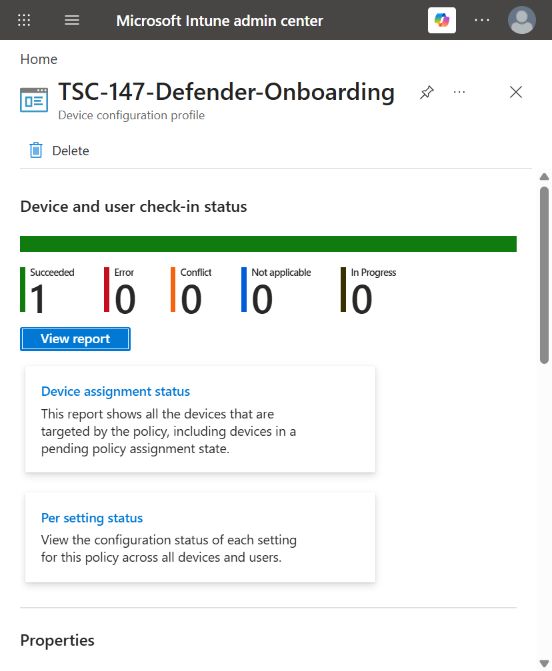
We separately approved an EDR policy with Auto from connector, assigned only to a static group containing TSC-147 and no users. Its assignment and exact membership were independently verified. After synchronization, Intune showed Succeeded: 1 and Defender reported the pilot Active and Onboarded. The collector did not create that policy.
At 14:01 UTC, the APIs still returned no CVE/software rows and the portal showed No data available, even though exposure had become Medium. The report correctly required assessment review. Populated findings were observed later; we do not infer a universal availability deadline from that delay.
For a similar case, check the exact device identity, onboarding, sensor health, connectivity and assessment availability. A missing registry value needs investigation; it is not a measured state of zero. Do not install vulnerable software to manufacture a test result.
5. Build the team's action list
Start with missing coverage and stale data. Then work through Critical findings, High findings with a reported exploit indicator and devices reporting High risk. The software queue groups related findings so the team can investigate a product/version once instead of receiving a separate task for every CVE.
| Priority | Meaning in this tool |
|---|---|
| UrgentReview | Critical severity, High severity with a reported exploit indicator, or a separate High device-risk action |
| High | High severity, or a separate action for encryption reported as false |
| ReviewUnknownSeverity | Missing or unrecognized severity needs confirmation; it must not become routine simply because a value is absent |
| RoutineReview | Known Medium or Low findings without a higher-priority finding in the software group |
If unknown severity shares a group with High or Critical findings, the higher urgency stays in place and the action still explicitly asks the administrator to confirm the unknown severity. Candidate rc.4 fixes the earlier inconsistency between the detailed finding and its grouped action. The local regression tests cover missing values, unrecognized values and mixed-priority groups.
The team field starts as Unassigned. Agree ownership in the team's workflow; the device's primary user is not automatically responsible for patching it. A fixing KB is a value returned by the API, not a verified deployment instruction. Check vendor applicability, dependencies and the supported update path before acting.
These priorities are local triage rules. They do not alter Microsoft's severity, establish exploitation or impose a Microsoft response deadline. The interactive demo uses labelled synthetic fixtures so readers can explore the layout without receiving the tenant's inventory.
6. Compare snapshots carefully
On the next certificate run, pass the previous report's private snapshot explicitly:
pwsh -NoProfile -File ./Invoke-WeeklyEndpointReport.ps1 -ConfigurationPath 'C:\PrivateReports\endpoint-config.json' -OutputRoot 'C:\PrivateReports\Runs' -PreviousSnapshot 'C:\PrivateReports\Runs\<previous-run>\snapshot.json'The tenant, device scope and schema must match, and the previous collection must be older. The runner does not guess which file should be your baseline.
- StillObserved: the row exists in both snapshots.
- NewlyObserved: it is present now after an earlier assessment that passed the tool's coverage checks.
- FirstObservedAfterGap: it is present now, but the earlier coverage was insufficient.
- NoLongerObserved: it is absent from a nonempty current assessment that passes the source, exposure and telemetry checks.
- PendingVerification: it is absent while the new assessment is incomplete, stale or entirely empty.
Comparing the real 14:01 gap with the populated 14:35 collection produced 715 FirstObservedAfterGap rows. It did not mean 715 vulnerabilities had just been introduced. Comparing collections minutes apart also does not demonstrate a weekly trend.
CollectedEmptyNeedsReview, leaves device counts blank and keeps earlier missing findings pending verification. There is no manual-completion override. Nonempty findings remain visible even when another coverage check fails.NoLongerObserved is not proof that a patch fixed a finding. Software removal, version changes and assessment changes can all alter the result. Confirm the actual change before closing the team's task.
7. Prepare weekly operation
The runner creates one dated report per invocation. Before adding a schedule, test it under the intended execution identity, plan certificate renewal and agree report storage, retention, recipients and response ownership.
Monitor all three exit codes: 0 means the stated collection and coverage checks passed; 2 means a report was produced with partial coverage; 1 means the run failed. Exit code 2 can occur with zero failed API sections when the device assessment still needs review.
Start with a small device list. The collector accepts up to 500 explicit IDs, but that is an input limit, not validated throughput. Per-device API calls can hit service rate limits. A 429 stops further requests to that source; this candidate does not implement a fleet-wide batching service or renew an expired supplied Defender token mid-run.
The application authentication, single-device collection and coverage recovery were tested here. A genuine weekly comparison, unattended scheduling and message delivery remain separate operational validation steps. No schedule or email component was enabled. For later delivery, use a concise summary and an access-controlled report link rather than sending detailed inventories widely.
8. Review what has been validated
| Check | Evidence | Status |
|---|---|---|
| Read-only collection | GET-only data calls; no remediation, consent or mail-send operation | Reviewed |
| Regression behavior | 97 local checks, including unknown-severity action grouping and conservative empty-result handling | Passed with synthetic fixtures |
| Intune reads | One Compliant device; six returned records folded into three policy summaries | Validated for returned fields; setting detail not returned |
| Defender correlation and findings | Exact Entra device-ID match; 640 distinct CVEs, 715 software rows; portal total and three selected CVEs compared | Live pilot validated |
| Certificate execution | rc.4 run at 14:41 UTC on 17 November; all five collection sections complete | Validated on one device |
| Recovery from missing coverage | 715 FirstObservedAfterGap rows when comparing saved real collections | Validated for this transition |
| Weekly production operation | No seven-day comparison, schedule or email delivery demonstrated | Still to validate in the deployment environment |
The application remains registered with the same four read permissions. Temporary authentication certificates, detailed tenant reports and private validation helpers are outside the download. The public GitHub preview contains the collector, runner, documentation, tests and checksums. The offline test workflow passed on Windows and Ubuntu.
The report reads CVE/software findings, not a complete installed-software inventory. Microsoft's separate inventory API requires Software.Read.All, which is outside the current four-permission design. It also does not perform a local vulnerability scan, retrieve recovery secrets or certify regulatory compliance.
Keep building your audit toolkit: pair endpoint evidence with the Entra MFA readiness audit, or use the Intune Admin Lab to work through device and policy troubleshooting cases.
Microsoft references
Reviewed against Microsoft documentation on 17 November 2026. The 48-hour threshold, action priorities and empty-response review rule are this tool's design decisions.
- Microsoft Graph: read a managed device and its required permissions
- Graph PowerShell: device compliance policy states
- Defender: list machines, filters, permissions and limits
- Defender: machine identity, risk, exposure and lastSeen semantics
- Defender: vulnerabilities by machine and software
- Defender: discovered vulnerabilities and exploit context
- Defender: separate installed-software API and permission
- Defender: application-only API authentication
- Microsoft Graph: certificate authentication
- Defender for Business: APIs and core vulnerability-management capabilities
- Intune: deploy an EDR policy and review onboarding
- Defender: troubleshoot onboarding
- Defender: distinguish sensor health and exposure