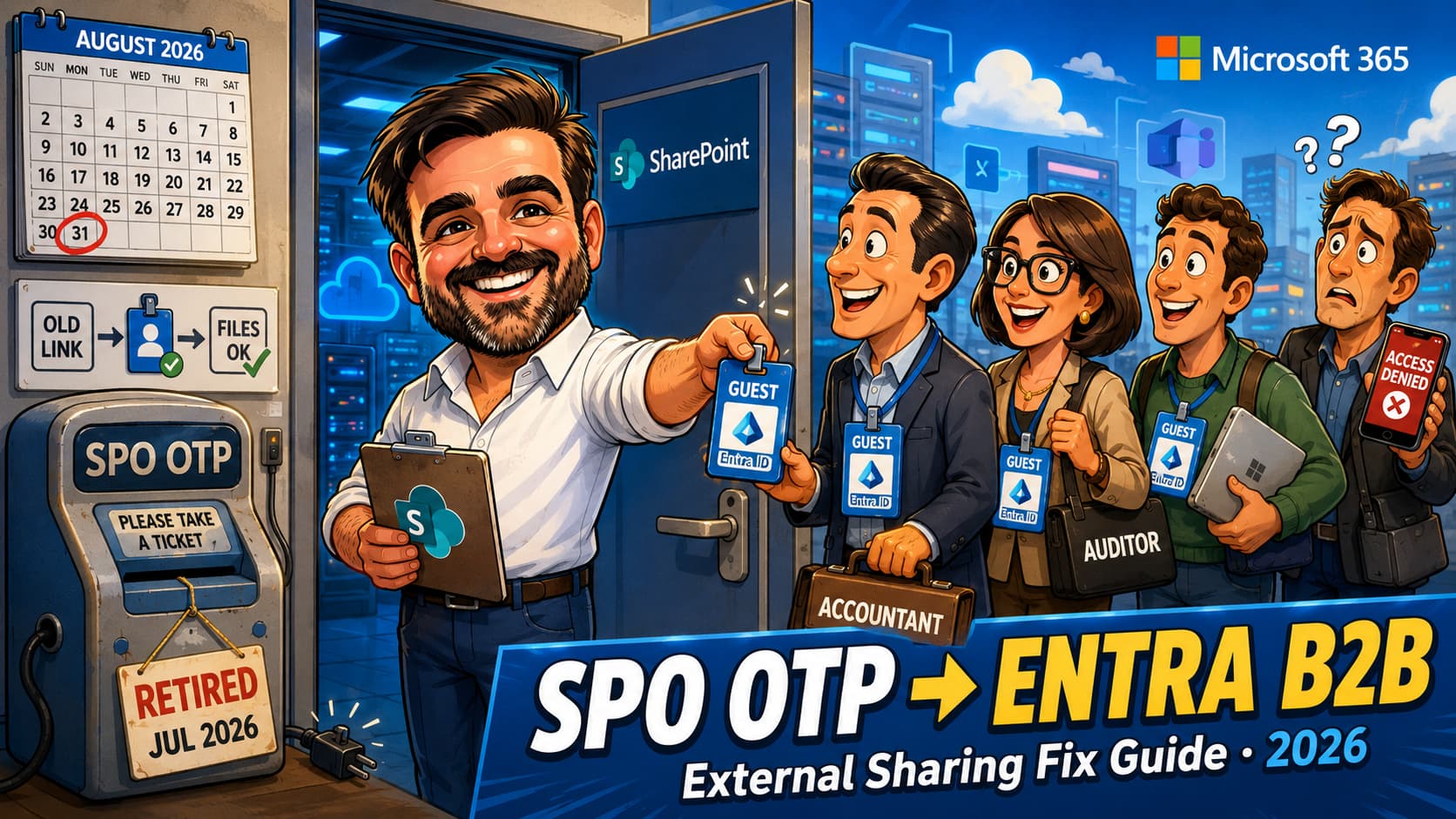
The support tickets have already started. An external accountant clicks a SharePoint link she has used every month for a year, and instead of the folder she gets access denied. Nothing was changed on your side. Nobody touched the sharing settings. What happened is Microsoft's retirement of SharePoint One-Time Passcode (SPO OTP) authentication, rolling out from July 2026 and completing by 31 August 2026, which moves all external authentication in OneDrive and SharePoint to Microsoft Entra B2B guest accounts. External collaborators who never got a guest account in your directory lose access to previously shared links, and they lose it mid-project, without warning, one tenant wave at a time. The fix is simple once you understand the mechanics. This article covers exactly that: what is changing and the nuance almost every summary gets wrong, who breaks and who does not, how to find your exposed guests before they call, the two ways to restore access (one of which you can do in bulk, today), and the Conditional Access review this change quietly forces on you. Validate the current rollout status against Microsoft Learn and Message Center MC1243549 before acting; dates and scope have already been updated more than once.
EnableAzureADB2BIntegration) no longer does anything.What is actually changing (and the nuance everyone misses)
For years, SharePoint and OneDrive ran their own private guest authentication. When you shared a file with an external person using a specific-people link, SharePoint itself emailed them a one-time passcode and verified it. No account was created in your directory. The person existed, as far as your tenant was concerned, only as an email address inside SharePoint's sharing machinery. Invisible to Entra ID, invisible to Conditional Access, invisible to access reviews. A whole population of people with access to your data and no identity in your identity system.
That arrangement ends now. From May 2026, new external sharing invitations go through the Entra B2B Invitation Manager, which creates a proper guest account in your directory at share time. From July 2026, the old SPO OTP authentication path is retired, and anyone still relying on it hits a wall.
Here is the nuance that almost every news summary mangles, so let me be precise. One-time passcodes are not going away. Entra B2B uses email OTP as the default authentication method for guests who have no Microsoft account of their own. Your external accountant will still receive a code by email and type it in. What changes is who runs that flow: Entra ID instead of SharePoint. Same user experience on the surface, completely different plumbing underneath, and the plumbing is the point. A B2B guest is a real directory object that Conditional Access can evaluate, Identity Protection can score, access reviews can expire, and audit logs can follow.
The timeline, as it stands
| Date | What happens | What it means |
|---|---|---|
| May and June 2026 | New external sharing invitations and authentication transition to Entra B2B. Sharing with a new external person auto-creates a guest account. Users who previously authenticated via SPO OTP keep their access for now. | The new world is already live in your tenant. Every share you make today creates a guest object. |
| July 2026 | SPO OTP authentication retirement begins, rolling out tenant by tenant. External users without a B2B guest account get access denied on previously shared specific-people links. | This is the breakage window. The calls start when your tenant's wave lands, not on a date you chose. |
| 31 August 2026 | Retirement expected to complete. | By September, every external user either has a guest account or has no access. GCC High is paused per the June update. |
EnableAzureADB2BIntegration setting stopped controlling the behaviour in May 2026. If your change-management process expects a choice here, save it the meeting: the only decisions left are how prepared you are when your wave arrives.Who breaks in July: the exact failure mode
The failure mode is narrow and completely predictable, which is what makes the preventable version of this incident so annoying to clean up after the fact. Four populations, four outcomes:
| External user situation | Before July 2026 | After the retirement hits your tenant |
|---|---|---|
| Already has an Entra B2B guest account in your directory (invited to a site, added by an admin, or shared with after May 2026) | Works | Works. No change in behaviour at all. |
| No guest account; link shared after the May/June transition | Works; a guest account was auto-created at share time by the Invitation Manager | Works. |
| No guest account; link shared before the transition (the classic SPO OTP guest) | Works via SPO OTP | Access denied. This is the entire blast radius. |
| Anyone / anonymous links | Works | Works. Explicitly unaffected by this change. |
Note what this means in practice: the people who break are precisely your longest-standing, quietest external collaborators. The auditor who has used the same folder link since 2024. The client contact from a project that went dormant. The board member who opens the pack quarterly. Nobody re-shared anything with them recently because nothing needed re-sharing. They are the last people whose access anyone is thinking about, and the first people the retirement hits.
Find your exposed guests before they call
Microsoft's documented path is the external sharing report, run at site level: it lists guests invited via SPO OTP who do not yet have an Entra B2B guest account (check the User E-mail column). That works, and for a handful of known collaboration sites it is honestly the fastest route. For a tenant with two hundred sites, you want to come at it from both ends: pull the external user population from SharePoint, pull the guest population from Entra, and diff them. Anyone in SharePoint's list without a matching guest object is exposed.
# Requires SharePoint Online Management Shell + Microsoft Graph PowerShell
Connect-SPOService -Url "https://<tenant>-admin.sharepoint.com"
Connect-MgGraph -Scopes "User.Read.All"

# 1. External users known to SharePoint (paged)
$spoExternal = @()
$pos = 0
do {
  $page = Get-SPOExternalUser -PageSize 50 -Position $pos
  $spoExternal += $page
  $pos += 50
} while ($page.Count -eq 50)

# 2. Guest accounts that exist in Entra ID
$guests = Get-MgUser -Filter "userType eq 'Guest'" -All `
          -Property mail,otherMails,userPrincipalName

$guestMails = $guests.ForEach{
  @($_.Mail; $_.OtherMails) } | Where-Object { $_ } |
  ForEach-Object { $_.ToLower() } | Sort-Object -Unique

# 3. The diff: in SharePoint, not in Entra = exposed
$exposed = $spoExternal | Where-Object {
  $_.Email -and ($guestMails -notcontains $_.Email.ToLower())
}
$exposed | Select-Object DisplayName, Email |
  Export-Csv .\exposed-otp-guests.csv -NoTypeInformation
# Requires Microsoft Graph PowerShell; User.Invite.All
Connect-MgGraph -Scopes "User.Invite.All"

$exposed = Import-Csv .\exposed-otp-guests.csv

foreach ($u in $exposed) {
  $params = @{
    InvitedUserEmailAddress = $u.Email
    InvitedUserDisplayName  = $u.DisplayName
    InviteRedirectUrl       = "https://myapps.microsoft.com"
    SendInvitationMessage   = $false   # silent: no email to the guest
  }
  try {
    New-MgInvitation @params | Out-Null
    Write-Host "Guest created: $($u.Email)"
  }
  catch {
    Write-Warning "Failed: $($u.Email) - $($_.Exception.Message)"
  }
}
# Pre-check before inviting: the Find script already diffs against
# existing guests, but review the CSV for #EXT# users, otherMails
# matches and shared mailboxes before running at scale.
Get-SPOExternalUser coverage has edge cases, and the definitive per-site view is Microsoft's external sharing report. Cross-check a sample against a site report before bulk-inviting anyone, and confirm the New-MgInvitation parameters against current Graph documentation. Silent invitations (SendInvitationMessage $false) create the account without emailing the guest, which is exactly what you want for restoring access without confusing people. On duplicates: the sharing flow is designed not to create duplicate guest accounts, but for scripted remediation, pre-check mail, otherMails, identities and existing #EXT# users before bulk-inviting rather than relying on that behaviour.The two fix paths (and when to use each)
Path 1: create the guest account proactively
The bulk approach above. An admin creates the B2B guest account, and per Microsoft's FAQ, the presence of that account restores the guest's access to all previously shared links. Nothing needs re-sharing. The sharing flow is designed not to create duplicate guest accounts when a matching B2B guest already exists, but scripted remediation still deserves a pre-check: review mail, otherMails, identities and existing #EXT# users before running this at scale. With that check done, this is the right path when the list is longer than a handful of people, and it is the only path that fixes access before anyone notices it broke.
Path 2: re-share anything with them
Any internal user with sharing permissions re-shares at least one file, folder or site with the affected external person. The Invitation Manager creates the guest account as a side effect, and access to everything previously shared comes back with it. This is the right path for the one-off: the helpdesk call from a single external user, resolved in two minutes by the site owner without any admin involvement. It is a terrible path for two hundred people, because you are outsourcing your remediation to whoever happens to answer the phone.
Conditional Access just inherited your guests
This is the second-order effect, and for security-conscious tenants it is the bigger one. SPO OTP guests lived outside Conditional Access entirely: they authenticated against SharePoint's own flow, so your carefully designed guest policies never saw them. From July, every external collaborator authenticates through Entra B2B and is fully subject to Conditional Access, Identity Protection and guest governance. Microsoft says this plainly in the compliance notes of MC1243549.
Three checks, in order:
- Email OTP must be enabled in Entra External ID settings. If someone disabled email one-time passcodes for guests at some point (it happens, usually during a hardening sprint that never got documented), guests without Microsoft accounts cannot authenticate at all after the transition. Check External Identities > All identity providers > Email one-time passcode before anything else.
- Review every Conditional Access policy that targets guest and external user types. Policies requiring MFA for guests, blocking guests from specific apps, or requiring compliant devices will now evaluate a population that never hit them before. A "require MFA for all guests" policy must be tested, not assumed safe: email OTP remains a supported authentication path for B2B guests, but authentication strength policies do not apply to email OTP users the same way they apply to external Microsoft Entra users. Use the Conditional Access Require multifactor authentication grant control where appropriate, validate the real sign-in flow with a test guest, and do not assume the email OTP step alone satisfies every MFA or authentication strength requirement. And a "require compliant device" policy scoped too broadly will lock every external accountant out permanently, and the access denied they see looks identical to the retirement breakage. Untangling those two failure modes over the phone is not how you want to spend August.
- Check cross-tenant access settings if you collaborate heavily with specific partner organisations. Inbound trust settings for MFA and device claims change what those guests experience at sign-in.
The governance upside nobody asked for
Here is the perspective I offer clients who are annoyed by this change: Microsoft just converted your invisible external access into auditable directory objects, for free. Every external person with access to your content is now, or will shortly be, a guest account you can see, review and expire. That was the single hardest part of every external-sharing audit I have ever run, and it just solved itself.
Take the win, and put ten minutes into each of these while you are in there:
- Access reviews for guests. Now that every collaborator is a directory object, an Entra access review (or a quarterly manual pass for smaller tenants) can actually cover all of them. Before this change, it structurally could not.
- Stale guest cleanup. The bulk invite you just ran also created accounts for people whose projects ended in 2024. My guest lifecycle PowerShell script identifies guests with no recent sign-in activity; run it a month after your remediation and prune.
- Sharing policy sanity check. While the reports are open: which sites allow external sharing that should not? The external sharing decision framework in my SharePoint sharing guide covers the tenant and site-level settings worth revisiting.
What is not affected
- Anyone/anonymous links. Explicitly out of scope for this retirement. If your tenant allows them, they keep working exactly as before (whether they should keep working is a policy question for another day).
- Existing Entra B2B guests. Anyone who already redeemed a B2B invitation, was added to a Teams team, or was invited to a site notices nothing.
- Guests who already have a B2B guest account, whether they authenticate with a Microsoft account, a work or school account, or a federated identity. The important test is not the identity provider; it is whether a matching B2B guest object exists in your directory.
- Internal sharing. Nothing changes for members of your tenant.
- Previously shared links themselves. The links are fine. It is the authentication behind them that moves. Once the guest account exists, the old links work again.
The helpdesk triage runbook
Give this to whoever answers the phone. An external user reports access denied on a SharePoint or OneDrive link:
- Check for a guest account: Entra admin center > Users > filter by the external email (check both mail and other emails). If none exists, this is the OTP retirement. Go to step 2. If one exists, this is something else (Conditional Access, expired link, permission change); check the sign-in logs for the guest instead.
- Fast fix, single user: ask the content owner to re-share any one file or folder with that email address. Account gets created, all previous access returns. Two minutes.
- Fast fix, admin path: create the guest via Entra admin center or
New-MgInvitationwith the silent flag. Same outcome, no content owner needed. - Verify: have the user reopen the original link (not a new one). They will get the email OTP flow from Entra and land in the content.
- Log the email address in the remediation list, because where there is one there are usually forty, and the bulk process in this article beats forty phone calls.
The mistakes I am already seeing
- Reading "no admin action required" as "nothing will break".Microsoft's message says no action is required for the transition to happen. True. It happens to you either way. The action is required if you would rather your external collaborators not discover the change as an access denied screen.
- Waiting for a date that does not exist.The rollout is wave-based and Microsoft picks your wave. Tenants that planned around "July 1st" got hit earlier or later and were surprised both ways. Treat it as live now.
- Bulk-inviting before reviewing guest Conditional Access.Sequence matters. A misconfigured guest policy turns your fix into a quieter, harder-to-diagnose failure. Review CA first, invite second.
- Sending invitation emails during bulk remediation.Two hundred unexpected "you've been invited" emails generate their own helpdesk wave and a few phishing reports. Use the silent flag; the guests never needed to know.
- Confusing the two access-denied failure modes.Missing guest account and Conditional Access block look identical to the end user. Check for the guest object first, then the sign-in logs. Guessing costs you the afternoon.
- Forgetting email OTP might be disabled in Entra.If a past hardening pass disabled email one-time passcodes for guests, your newly created guest accounts cannot authenticate either. It is one checkbox, and it invalidates every other fix in this article if it is wrong.
- Fixing access and skipping the cleanup.The bulk invite resurrects access for people whose engagement ended years ago. Schedule the stale-guest pass for thirty days later, while the context is still fresh, or you have traded a governance blind spot for governance debt.
SPO OTP retirement FAQ
Do previously shared links need to be re-shared?
No. Once a B2B guest account exists for the external user, all previously shared links work again. The account is the fix; the links were never the problem. This is confirmed in Microsoft's FAQ and it is what makes bulk remediation practical.
Will external users notice a difference when they authenticate?
Barely. Guests without Microsoft accounts still receive a one-time passcode by email; it now comes from the Entra B2B flow instead of SharePoint's. Guests with Microsoft or federated accounts sign in with their own credentials. The visible change is mostly cosmetic; the differences that matter (Conditional Access evaluation, sign-in logging) are behind the curtain.
Can I opt out or delay this for my tenant?
No. It applies to all tenants, Microsoft schedules the waves, and the previous control (EnableAzureADB2BIntegration) no longer affects the behaviour. The only variable you control is preparation.
Are Anyone links affected?
No. Anonymous links are explicitly out of scope. This retirement only affects specific-people links authenticated via the old SPO OTP flow. Whether Anyone links belong in your sharing policy at all is a separate conversation, and this project is a reasonable excuse to have it.
We are an MSP. How do we handle this across customer tenants?
Run the inventory diff per tenant now, before each tenant's wave lands; the script pattern in this article works per tenant with delegated or app-based Graph access. Prioritise tenants with heavy external collaboration (accounting, legal, construction and anyone with long-lived client portals). The remediation is identical everywhere, which makes this one of the rare changes that automates well across a customer base.
Does this change guest licensing or cost anything?
Entra B2B guest accounts for standard collaboration carry no direct licence cost at this scale; B2B billing models apply to premium External ID scenarios beyond ordinary file sharing. The remediation itself costs admin time, not money. As always, validate your specific scenario against current Microsoft licensing documentation rather than a blog post, mine included.
- FAQ: Improvements to external sharing in OneDrive and SharePoint (SPO OTP retirement)
- MC1243549: Retirement of SharePoint One-Time Passcode and transition to Entra B2B (archive)
- SharePoint and OneDrive integration with Microsoft Entra B2B
- Email one-time passcode authentication for B2B guest users
- Add and manage B2B collaboration users in the Entra admin center
- External sharing reports in SharePoint
- Overview: B2B collaboration with external guests
- Microsoft Graph: create invitation (New-MgInvitation)
Not sure how exposed your tenant is?
External sharing posture is one of the things I review with small IT teams: who has access, what they can reach, and whether the policies match reality. If this article raised questions about your setup, get in touch. The inventory usually takes less time than people fear.
Talk to me