Ask ten IT managers whether their Microsoft 365 data is backed up and eight will say yes. Ask what would actually happen if ransomware encrypted their SharePoint libraries on a Tuesday morning, and the answers get quieter. The uncomfortable truth this article starts from: the recycle bin is not a backup, versioning is not a backup, and Purview retention policies are compliance tools that were never designed to get a business running again. Microsoft's answer is Microsoft 365 Backup, a pay-as-you-go service with 10-minute restore points, restore speeds that embarrass every legacy backup product, and a pricing model that rewards small data and punishes large. It is genuinely good, and it is genuinely not the whole answer: retention caps at one year, Teams messages are not covered, the data never leaves Microsoft's boundary (which is either the best feature or the dealbreaker, depending on who is asking), and the restore semantics have sharp edges nobody reads until restore day. This is the decision guide I wish vendors published: what the native service covers, what it does not, the worked cost example, and the honest matrix for when a third party still earns its licence fee. As always, validate pricing and feature status against Microsoft Learn; this service ships changes quarterly.
Retention is not backup: the uncomfortable truth
Every Microsoft 365 tenant ships with things that feel like backup. The recycle bin (93 days, then gone). File versioning (lives inside the library; encrypt or delete the library and the versions go with it). Retention policies in Purview (excellent at proving to a regulator that an email existed; never designed to put 400 mailboxes back the way they were on Tuesday at 09:40). Shared responsibility has been in Microsoft's terms all along: they keep the service running, you are responsible for your data.
The reason this matters in 2026 rather than as an abstract slide: the attack that hurts is not deletion, it is encryption and overwrite at scale, synced helpfully to the cloud by the OneDrive client doing exactly its job. Versioning helps until the attacker floods version history or the library itself is gone. The recycle bin helps until day 94. What gets a business back to work is a point-in-time copy, isolated from the thing that just went wrong, restorable faster than the patience of whoever signs your invoices. That is the product category this article is about, and Microsoft finally built a native entry.
What Microsoft 365 Backup actually is
Microsoft 365 Backup backs up OneDrive accounts, SharePoint sites and Exchange Online mailboxes, managed from the Microsoft 365 admin center (or via partner applications built on the same Backup Storage platform, and via Graph API and PowerShell for automation). Three architectural facts define it:
- The data never leaves the Microsoft 365 trust boundary. Backups live inside the same service infrastructure, honouring your data residency; only billing metadata touches Azure. This is the design decision everything else flows from: it is why restores are fast, and it is why the air-gap conversation later in this article exists.
- Storage is append-only. The service can write new restore-point data but cannot modify existing backup blobs, which protects the backups themselves against the malware scenario they exist for. Exchange items are similarly write-once and unreachable by client protocols.
- It is pay-as-you-go, not per-user licensing. Billing runs through an Azure subscription at a per-GB rate. This is a different procurement conversation than most SMBs expect, and worth flagging to whoever owns the Azure bill before the first invoice surprises them.
What it covers, precisely
| Dimension | OneDrive / SharePoint | Exchange Online |
|---|---|---|
| Retention | 1 year | 1 year |
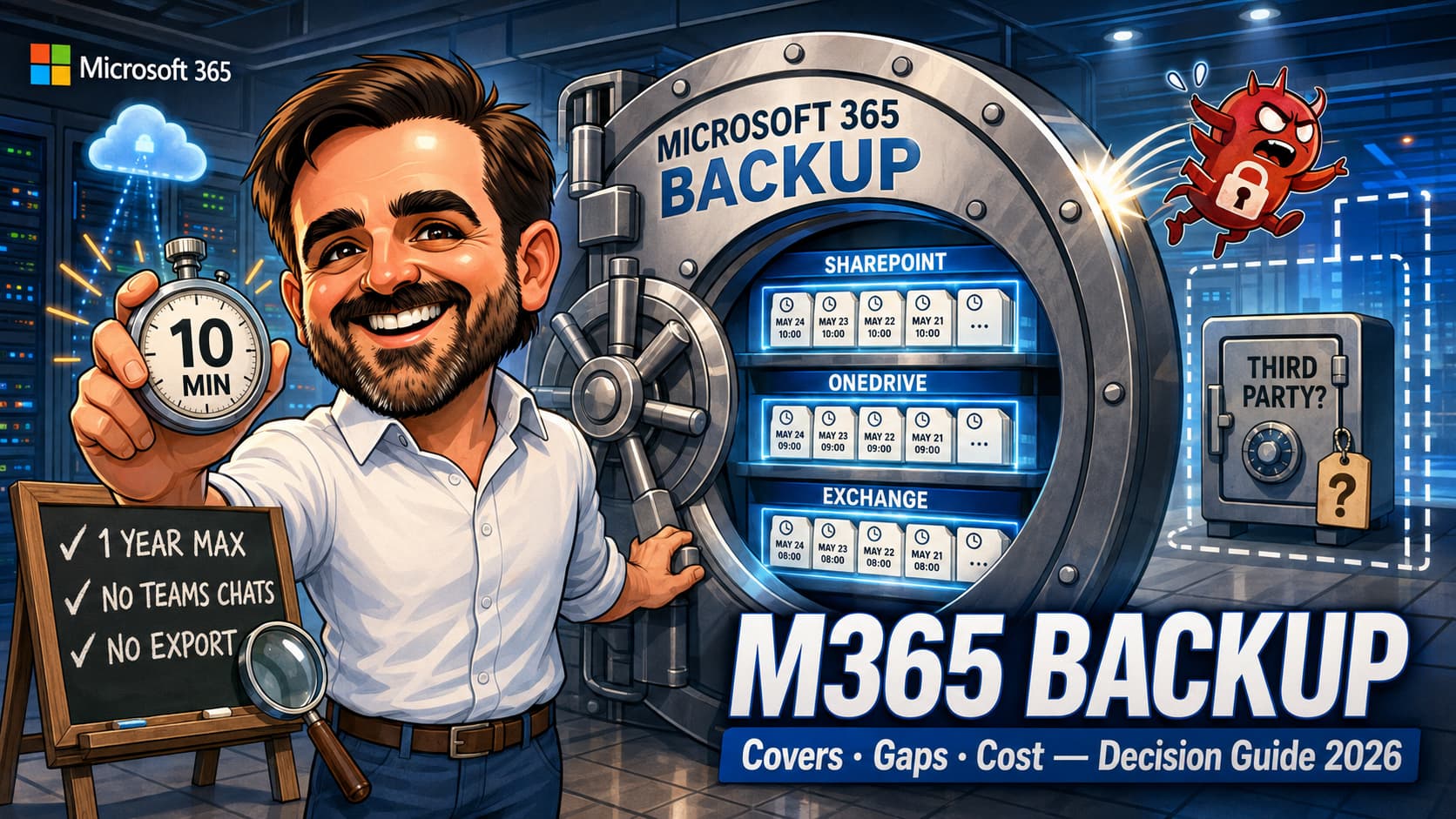
| Restore points | Every 10 minutes for the last 2 weeks; weekly snapshots from 2 to 52 weeks back | Every 10 minutes across the full 52 weeks |
| Backup granularity | Per OneDrive account / per site | Per mailbox |
| Restore granularity | Full account or site rollback; granular file and folder restore now documented as generally available for SharePoint and OneDrive; file-version restore still listed separately as coming soon in the overview documentation | Full mailbox or item-level (mail, contacts, calendar, tasks) via search, for modified or deleted items |
| Restore destination | Same URL (rollback, overwrites everything since the point in time) or a new URL | Same or new folder within the same user's mailbox |
| Speed (RTO) | Express restore of a small site in under ~20 minutes; bulk restores up to ~250 units and 1 to 3 TB per hour | Roughly 200 to 500 items per minute per mailbox; bulk comparable |
| Billing | 0.15 USD per GB per month of protected data; restores free; pay-as-you-go via Azure | |
| Protection of the backups | Append-only storage; in-boundary; residency honoured; fully audited actions; multi-admin email alerts on risky operations; 90-day recovery grace after offboarding | |
The speed story, and why it is the whole pitch
Here is the argument Microsoft is actually making with this product, and having watched traditional restores crawl, I think it lands: in a ransomware recovery, the metric that matters is not whether you have a copy, it is how many days your business stops while the copy comes back. Classic third-party backup copies your data out to the vendor's cloud, which is lovely until you need 8 TB copied back through the public internet and Microsoft's ingestion throttles. Recoveries measured in weeks are not war stories; they are the normal physics of moving data between clouds.
Because Microsoft 365 Backup restores inside the boundary, the physics change: express restore points bring a small site back in under twenty minutes, granular file and folder restores are now documented as generally available for SharePoint and OneDrive, and Microsoft states they should take only a couple of minutes in typical scenarios, and large multi-site recoveries run at up to 1 to 3 TB per hour once warmed up. Restore time correlates with the number of sites and the restore point chosen, not the volume of data, which is a sentence no traditional backup product can say.
If your threat model is dominated by the mass-encryption scenario, this speed difference is not a nice-to-have. It is the difference between an incident report and a news story.
The cost model, with a worked example
0.15 USD per GB per month of protected data, restores free. Simple rate, non-obvious consequences. A worked example for a typical 100-user tenant, using planning figures (pull your real ones from the SharePoint admin center and Exchange usage reports in about five minutes):
| Workload | Planning volume | Monthly cost |
|---|---|---|
| OneDrive (100 accounts, ~15 GB average) | 1.5 TB | ~230 USD |
| Exchange (100 mailboxes, ~10 GB average) | 1 TB | ~154 USD |
| SharePoint (active sites you choose to protect) | 0.5 TB | ~77 USD |
| Total | ~3 TB | ~460 USD/month, ~5,500 USD/year |
Now the comparison that matters: third-party M365 backup typically prices per user, commonly in the 2 to 5 USD per user per month band depending on vendor and retention. The same 100-user tenant lands at roughly 2,400 to 6,000 USD per year. In other words: at typical data volumes the two models overlap, and your storage profile decides the winner. A consultancy hoarding 40 TB of project files in SharePoint will find per-GB pricing brutal; a lean tenant with aggressive archiving may find it cheaper than any licence. Also note what the native model quietly rewards: the storage hygiene (archiving, version limits, stale site cleanup) you should be doing anyway.
What it does not cover: the list nobody reads
Every one of these is documented. None of them is hidden. All of them surface, in my experience, only after someone has already bought something.
- One year of retention, full stop. Restore points expire at 52 weeks. If a legal, regulatory or contractual requirement says three or seven years, this product is not that tool; that is Purview retention (for compliance) or a third party (for restorable long-term copies). Do not let anyone conflate the two requirements in one meeting.
- Teams messages are not covered. Files shared in Teams live in SharePoint and OneDrive, so they ride along. Chat and channel conversations do not. If message history matters to your business beyond compliance search, that gap needs a named answer.
- Nothing leaves the boundary. There is no export, no PST, no copy in a second cloud. Architecture section below; for now, just note that "restore-only, in-platform" is the deal you are accepting.
- In-place restores are rollbacks. A full site or OneDrive restore to the same URL overwrites all content and metadata written after the restore point. The Friday-afternoon work that happened after Tuesday's snapshot is gone unless you restore to a new URL and merge by hand. This is the sharpest operational edge in the product; brief every admin who holds the restore button.
- Exchange restores stay home. Items restore into the same user's mailbox (same or new folder), covering modified and deleted items. No cross-mailbox restores, no export of a leaver's mailbox to hand to legal. Different tools for those jobs.
- The backups can be deleted. Deliberately: offboarding the product deletes the backups, because full immutability would collide with GDPR erasure obligations. The mitigations are real (a fixed 90-day recovery grace period after offboarding, Purview retention policies cannot touch backup retention, and multi-admin email alerts fire on dangerous actions), but a sufficiently privileged and sufficiently malicious admin remains in your threat model. Which is an argument for my admin roles hygiene guide, not only for a second backup.
- Scope is three workloads. Planner, Forms, Loop workspaces and friends are out of scope. Usually acceptable; occasionally the thing a specific business actually runs on. Check before assuming.
The air-gap argument, argued both ways
This is where most native-versus-third-party decisions are actually made, so let us have the argument honestly instead of by slogan.
Microsoft's case (and it is a real case)
Keeping backups inside the service boundary is why restores run at terabytes per hour. The storage is append-only, physically redundant, geo-replicated, immune to client-protocol tampering, and your residency commitments hold because the data never travels. For the dominant threat (mass encryption by compromised user or malware), this design recovers you faster than any external copy possibly can. "Air-gapped but three weeks to restore" is not obviously safer than "in-boundary and back by lunch"; it is a different risk trade, and for many SMBs the wrong one.
The other case (and it is also real)
The scenario the in-boundary design cannot answer is the one where Microsoft 365 itself, or your tenant's control plane, is the failed component: catastrophic tenant compromise with admin-level destruction, a subscription or billing lockout, or simply an insurer, regulator or customer contract that requires a recoverable copy held outside the provider being recovered from. The 90-day offboarding grace and multi-admin alerts narrow the malicious-admin window; they do not close it. And no engineering argument has ever beaten a cyber-insurance questionnaire that asks, in writing, "do you hold backups with a separate provider?"
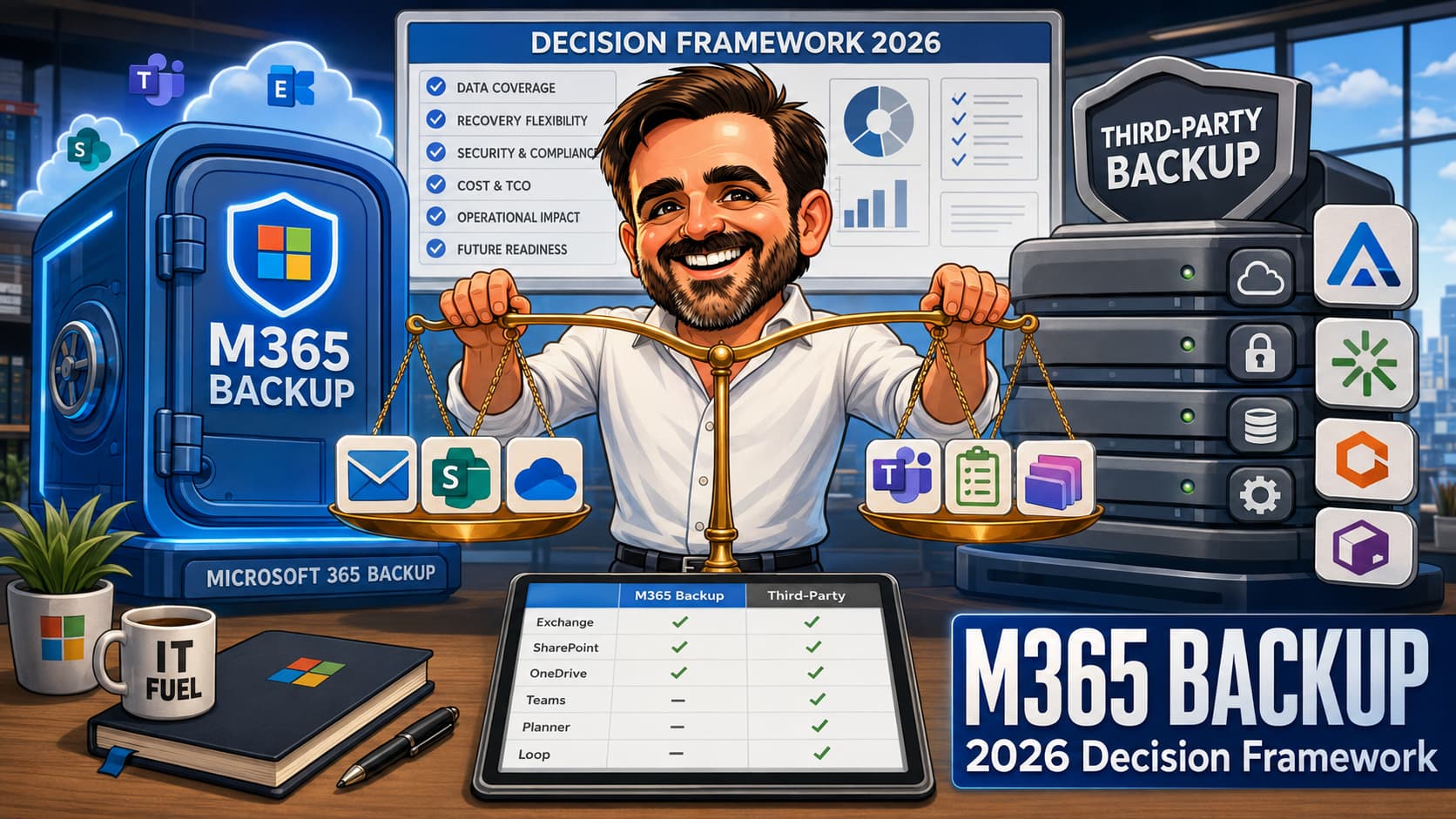
The decision matrix
| Your dominant requirement | Right answer | Why |
|---|---|---|
| Fast recovery from ransomware / mass deletion | Native Microsoft 365 Backup | 10-minute restore points and in-boundary speed are unmatched for this scenario. This is the product's home turf. |
| Multi-year restorable retention (legal, contractual) | Third party, or Purview retention if compliance-only | The 1-year ceiling is a hard stop. Decide first whether you need restorable copies or provable records; they are different purchases. |
| Off-boundary copy mandated (insurer, regulator, customer contract) | Third party (native optionally alongside) | The requirement is about provider separation, not features. Do not argue with a questionnaire. |
| Teams message history beyond compliance search | Third party with Teams coverage, or accept the gap in writing | Native covers Teams files (via SharePoint/OneDrive), not conversations. |
| Leaver mailbox preservation / cross-mailbox restores / PST handover | Third party, or shared-mailbox and licensing processes | Native Exchange restores land only in the same user's mailbox. |
| Tight budget, lean data, one admin | Native Backup, scoped to what you would actually restore | PAYG with free restores and zero infrastructure is hard to beat at small data volumes. |
| MSP managing many tenants | Partner application on Backup Storage, or third party | The partner platform gives multi-tenant panes over the same fast storage; classic vendors give cross-cloud consistency. Both defensible; pick per your stack. |
| Belt and braces (real ransomware exposure + real off-boundary mandate) | Both | Native for speed, third party for separation. Two problems, two tools, one line each in the DR plan. |
Three recovery scenarios, walked honestly
Scenario 1: ransomware encrypts 40 SharePoint sites on Tuesday 09:40
With native Backup: identify the last clean restore point (10-minute granularity makes 09:30 available), trigger in-place rollbacks, accept the loss of the handful of files written between 09:30 and containment. Small sites return in minutes, the bulk within hours at 1 to 3 TB per hour. The incident is a bad day, not a bad month. This is exactly the scenario the product was built for, and it shows.
Scenario 2: a user notices in November that a folder was mangled in May
Restore points from May exist (weekly snapshots between 2 and 52 weeks for SharePoint/OneDrive). But a full-site rollback to May would destroy six months of work, so you restore to a new URL and copy the folder across, or use the granular folder restore, now generally available for SharePoint and OneDrive. Workable, mildly annoying, and a reminder that restore-day options depend on choices made calmly beforehand.
Scenario 3: a malicious Global Admin offboards Backup, then goes to work on the tenant
Multi-admin alerts fire on the offboarding; the 90-day grace period means the backups themselves remain recoverable long after the attacker expects. Combined with break-glass hygiene and role restraint, the native service survives this better than its critics assume, but this is also the one scenario where an off-boundary copy is the only clean answer, and where my Conditional Access baseline and admin-role reviews stop being adjacent topics and become the actual backup strategy.
The mistakes I keep seeing
- Calling versioning and the recycle bin a backup strategy.They are conveniences with expiry dates, living inside the blast radius of the thing you are recovering from. Fine for oops, useless for incidents.
- Buying either option without pulling storage numbers first.The native-versus-per-user cost crossover is entirely determined by your GB-per-user profile, and it takes five minutes in the admin centers to know your side. Buying blind wastes four figures a year in either direction.
- Discovering the in-place rollback semantics during an incident.An in-place restore overwrites everything since the restore point. Whoever holds the restore button needs to know this on a calm Tuesday, in writing, before the loud one.
- Backing up everything because the checkbox was easy.Per-GB pricing makes scoping a financial control. The 2019 archive site does not need 10-minute restore points; it needs archiving, which I cover in my archiving guide.
- Treating the one-year ceiling as negotiable.It is not, and stacking hopes on "coming soon" roadmaps is not a retention strategy. If seven years is the requirement, buy the tool that does seven years.
- Answering the insurer's questionnaire with an architecture diagram.If the question is "separate provider, yes or no", append-only storage is not a yes. Argue the premium, or buy the copy; do not lecture the underwriter.
- Nobody tested a restore.Free restores remove the last excuse. A quarterly 15-minute test restore of one site and one mailbox turns your backup from a belief into a fact, and beliefs do not survive incident bridges.
Microsoft 365 Backup FAQ
Does Microsoft 365 Backup replace Purview retention policies?
No, and the confusion runs both ways. Retention proves and preserves content for compliance; Backup restores working state fast. Backup retention is also explicitly isolated from Purview policies, so a retention or deletion policy neither extends nor trims your restore points. Many tenants legitimately need both, for different sentences in different requirement documents.
What licence do I need?
None in the per-user sense. It is a pay-as-you-go service billed through an Azure subscription at 0.15 USD per GB per month of protected data, with restores free. The practical prerequisite is therefore an Azure subscription and someone who owns that bill; for Azure-less SMBs, that setup conversation comes first.
Are the backups really immutable?
The storage is append-only, so nothing (including malware and the service itself) can modify existing restore points. Deletion, however, is deliberately possible via offboarding, because full immutability would collide with erasure obligations. The compensating controls are the fixed 90-day post-offboarding recovery window and multi-admin alerts on dangerous actions. Precise answer for your auditor: immutable against modification, guarded but not impossible against deletion.
How fast are restores, really?
Documented figures: granular file and folder restores in minutes for SharePoint and OneDrive, now documented as generally available, small sites in under ~20 minutes on express restore points, bulk recoveries up to ~250 protection units and 1 to 3 TB per hour, Exchange items at roughly 200 to 500 per minute. The nuance worth remembering: speed correlates with the number of sites and the restore point type, not data volume. Validate current numbers on Learn; these move.
Can I restore one file from six months ago?
For SharePoint and OneDrive, restore points older than two weeks are weekly snapshots, and the clean path for a single item that old is a restore to a new URL plus a manual copy, or the granular restore, now generally available. For Exchange, 10-minute points span the full year and item-level restore via search is native. If single-item, long-ago recovery is your daily bread, test this workflow before you commit to it.
We already pay for a third-party backup. Should we switch?
Wrong first question. First: what requirement does the third party satisfy that native cannot (multi-year retention, off-boundary copy, Teams messages, cross-mailbox restores)? If the honest answer is "none, we bought it in 2022 because there was no alternative", price the switch. If the answer names a real requirement, the interesting question becomes whether native Backup is worth adding alongside for the restore-speed scenario your current tool handles slowly. Run the numbers; this one genuinely differs per tenant.
- Overview of Microsoft 365 Backup (features, performance, billing, append-only architecture)
- Set up Microsoft 365 Backup
- Microsoft 365 Backup pricing model
- Offboarding and the 90-day grace period
- Microsoft 365 Backup Storage Graph API (and PowerShell cmdlets)
- SharePoint and OneDrive data resiliency (append-only detail)
- Exchange Online data resiliency
Not sure what your real recovery posture is?
Backup and recovery reviews are part of what I do with small IT teams: what you have, what would actually happen on restore day, and whether the invoice matches the risk. If this article raised a question your DR plan cannot answer, get in touch. The gap analysis is quicker than the incident.
Talk to me