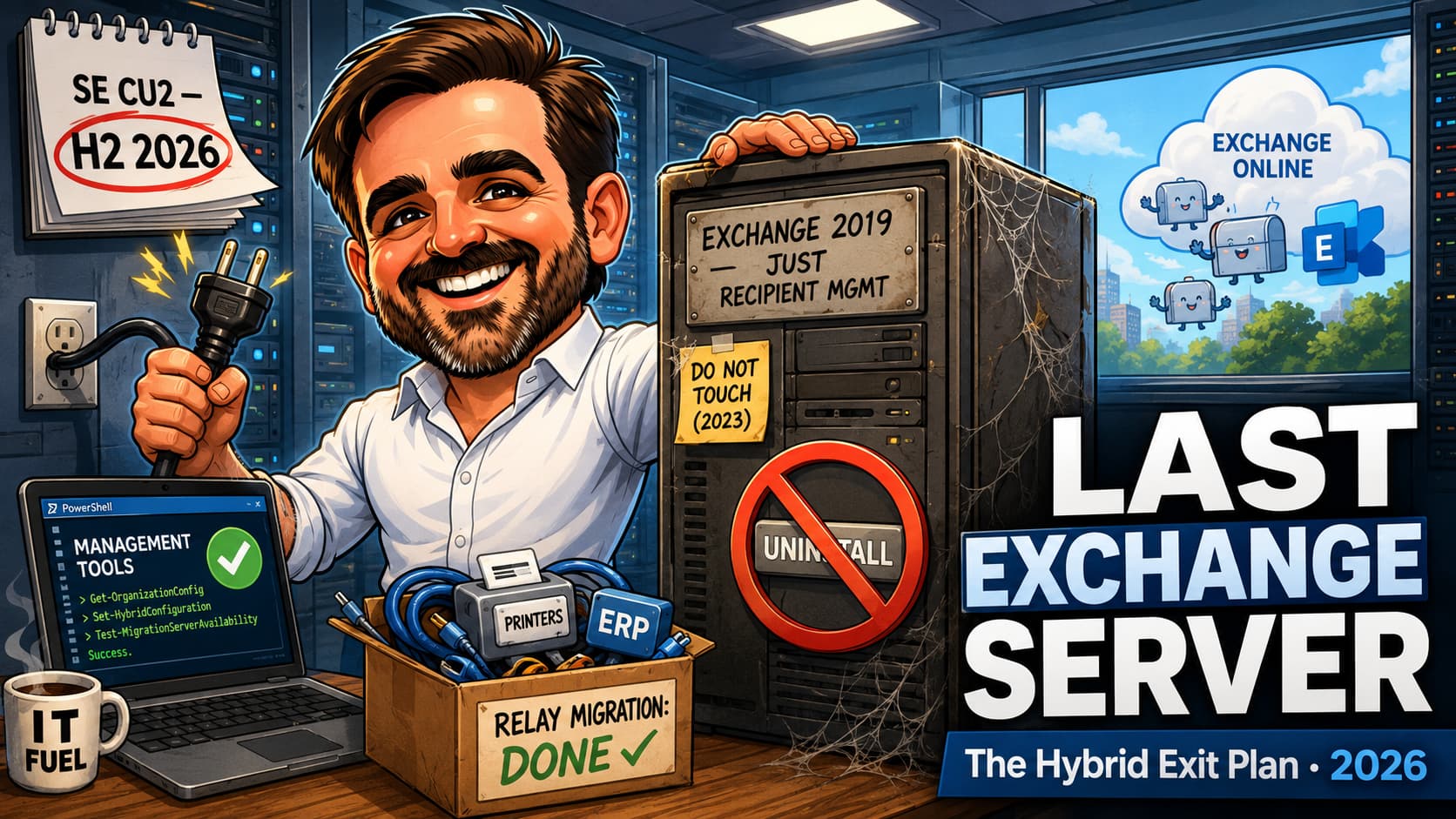
In a server room somewhere near you, there is an Exchange Server doing exactly one job: existing. All the mailboxes moved to Exchange Online years ago. The box stays powered on because it is the only supported place to manage recipient attributes in a hybrid directory, and because everyone is slightly afraid of it. That arrangement just ran out of road. Exchange 2016 and 2019 reached end of support on 14 October 2025; the original six-month ESU window closed on 14 April 2026, and Microsoft later opened a paid Period 2 ESU programme running from May through the end of October 2026 for eligible customers. A paid, temporary bridge is not a platform, and Exchange Server SE Cumulative Update 2, expected in the second half of 2026, blocks coexistence with both versions regardless. Every hybrid organisation now faces the same three-way choice: decommission the last server and manage recipients with the Management Tools alone, transfer the Source of Authority to the cloud and manage from there, or upgrade to SE and keep a supported server running on purpose. This article is the exit plan: the eligibility test that decides whether you can kill the server at all, the SMTP relay elephant that blocks most tenants, the step-by-step Management Tools path with its documented sharp edges (including the one warning that, ignored, breaks recipient management permanently), and the honest comparison with the SOA route. Validate the CU2 timing and every script against Microsoft Learn before you touch production; this is not an area that forgives improvisation.
Where we are in mid-2026
| Milestone | Date | What it means |
|---|---|---|
| Exchange 2016 / 2019 end of support | 14 October 2025 | Mainstream road ends; the ESU bridge programme begins. |
| Original ESU (Period 1) ends | 14 April 2026 | The six-month window closes. Servers not enrolled in what came next stop receiving security updates. |
| ESU Period 2 | May to end of October 2026 | Paid, temporary Critical/Important security update coverage for eligible customers. Not normal support, not a reason to pause the exit plan, but important enough that nobody should claim security updates are impossible. |
| Exchange SE CU2 | Expected H2 2026 (validate current timing) | Setup blocks coexistence with out-of-support Exchange versions, which means 2016 and 2019. The upgrade door starts closing for mixed environments. |
Read those middle rows carefully, because they reframe the whole conversation. The last Exchange server in most hybrid tenants is not "a legacy inconvenience": it is either an unpatched Exchange server, a phrase that should raise the hair on the neck of anyone who lived through the last five years of Exchange CVEs, or a server whose patches you are now renting month to month on a bridge that ends in October. Either way, the decommission project you have been postponing since 2023 quietly became a security remediation with a deadline.
Your three options (and the fourth that is not one)
| Option | What it looks like | Right for |
|---|---|---|
| 1. Decommission with Management Tools | Shut down the last server; manage recipients via the EMT PowerShell snap-in on any domain-joined machine. AD stays master of recipient attributes; sync continues. | Tenants that pass the eligibility test below, keep AD as the identity master, and are at peace with PowerShell-only recipient work. |
| 2. Transfer Source of Authority to the cloud | Convert recipient objects so Exchange Online masters their attributes; manage everything in the cloud. My SOA conversion guide covers the mechanics. | Tenants heading cloud-first anyway, tired of the dual-write model, willing to do the conversion work per object type. |
| 3. Upgrade to Exchange SE | In-place upgrade from 2019 (effectively a CU); keep a supported, patched server running deliberately for relay, EAC, RBAC or auditing needs. | Tenants with real on-premises requirements, ideally identified by name rather than by habit. |
| 4. Keep running 2016/2019, unpatched or riding the Period 2 ESU bridge with no exit plan | Not an option. The paid bridge ends in October 2026 and exists to fund a transition, not to postpone one. It is the default outcome of not choosing, which is precisely what makes it dangerous. If this row describes you today, options 1 to 3 are your next quarter. | |
The eligibility test: can you actually kill the server?
Microsoft's documentation is refreshingly blunt about who the no-server model fits. Every statement below must be true; the list is short, and most failures are honesty failures rather than technical ones:
- All mailboxes and public folders are in Exchange Online. No on-premises recipients left. Verify it; do not remember it.
- AD remains your recipient master, synced via Microsoft Entra Connect or cloud sync.
- Nobody needs the on-premises EAC or Exchange RBAC. After shutdown, Exchange RBAC stops functioning: only Domain Admins and members of the script-created Recipient Management EMT group can manage recipients. If delegated, scoped recipient administration matters to you, this model removes it.
- PowerShell-only recipient management is acceptable. Every future mailbox attribute change happens in a console. For a two-person IT team this is Tuesday; for a helpdesk that lives in GUIs, it is a workflow change worth naming.
- You do not require auditing of recipient management activity. The admin audit log goes with the server. If your compliance regime needs "who changed this proxy address", that requirement points at option 2 or 3.
- The server does nothing else. No SMTP relay, no line-of-business connectors, nothing. This is where most tenants fail the test, so it gets its own section.
The SMTP relay elephant
Ask any hybrid tenant what their last Exchange server does and you will hear "just recipient management". Then you look at the SMTP logs, and there they are: the multifunction printers, the ERP invoice run, the backup notifications, the badge system from 2017. All relaying, all forgotten, all about to break the moment the server powers off. Microsoft's guidance is explicit: if the server does anything besides recipient management, do not shut it down, and they are right, in the least satisfying way possible.
So the relay migration is phase zero of the decommission, and you have written most of this playbook on this blog already: inventory the senders from the SMTP receive connector logs, then move each one to the right lane. Direct send or Microsoft 365 SMTP relay for the simple cases, High Volume Email for the internal notification floods, Azure Communication Services for the application-grade sending, and modern auth everywhere per my SMTP AUTH migration guide. The decision logic between those lanes is in the Mail Flow Decision Builder. Budget honestly: in most tenants the relay migration takes longer than the decommission itself, and discovering that in week one is far cheaper than in week six.
The Management Tools path, step by step
The mechanics, condensed from the documentation with the field notes attached. Install the updated Management Tools from Exchange 2019 CU12-or-later (or SE) Setup on any domain-joined machine, then:
# In the Exchange Management Shell, on the last server

# 1. Confirm NO on-premises mailboxes remain
Set-AdServerSettings -ViewEntireForest $true
Get-Mailbox
# Expect: nothing (disable leftover built-in admin
# mailboxes with Disable-Mailbox; they do not sync)

# 2. Confirm the coexistence domain is the
#    target delivery domain
Get-RemoteDomain Hybrid* |
  Format-List DomainName, TargetDeliveryDomain

# If missing, create and set it:
New-RemoteDomain -Name 'Hybrid Domain - contoso.mail.onmicrosoft.com' `
  -DomainName 'contoso.mail.onmicrosoft.com'
Set-RemoteDomain -TargetDeliveryDomain:$true `
  -Identity 'Hybrid Domain - contoso.mail.onmicrosoft.com'

# 3. Scripting Agent users: copy
#    ScriptingAgentConfig.xml from the server's
#    Bin\CmdletExtensionAgents to the tools machine
# On the Management Tools machine, every session:
Add-PSSnapin *RecipientManagement

# One-time: delegate without Domain Admin rights.
# Run as Domain Admin from $env:ExchangeInstallPath\Scripts
.\Add-PermissionForEMT.ps1
# Creates the "Recipient Management EMT" group;
# add your recipient admins to it.

# Then business as usual:
New-RemoteMailbox -Name "Ana Silva" `
  -UserPrincipalName ana.silva@contoso.com `
  -OnPremisesOrganizationalUnit "OU=Staff,DC=contoso,DC=local"

Set-RemoteMailbox ana.silva -EmailAddresses `
  @{add='smtp:a.silva@contoso.com'}

Get-DistributionGroup | Where-Object {
  $_.ManagedBy -eq $null }   # your orphan report

# Note: snap-in output types differ from remote
# PSSession types (ProxyAddressCollection vs
# ArrayList). Scripts that type-check need review.
New- and Set- cmdlet stalls for roughly 40 seconds: the admin audit log initialiser is trying to reach the powered-off server and timing out. It is documented, it is harmless, and it disappears after CleanupActiveDirectoryEMT.ps1 runs. Knowing this in advance saves you a very confusing afternoon of "did we break it?".Test every cmdlet your team actually uses while the server is still powered on, then shut it down (do not uninstall; next section) and test again. Only when day-2 operations are proven on the dead server do you move to cleanup.
Shut down, never uninstall
This deserves its own heading because it is the one mistake in this project that cannot be walked back. Uninstalling the last Exchange server removes objects from Active Directory that the Management Tools depend on. Run the uninstaller and recipient management breaks, permanently, for the whole model you just adopted.
The documented end state is deliberately counterintuitive, so say it out loud in the change meeting: clean up the hybrid configuration, shut the server down, and then erase and reformat the machine. The server dies by disk wipe, not by uninstaller. Every instinct of a tidy administrator says "remove programs properly"; this is the one place that instinct is wrong, and the reason this warning appears in bold in Microsoft's own documentation. Put it in the change ticket in capital letters, because the person who executes the final step may not be the person who read this article.
Hybrid cleanup and the point of no return
With day-2 operations proven, the teardown sequence (documented in full in the decommission guidance; highlights and traps here):
- Clean up the hybrid configuration per the decommission article's scenario for keeping directory sync (steps for connectors, organisation relationships and the Hybrid Configuration wizard artefacts).
- Remove the federation trust and its certificate (
Remove-FederationTrust, then find and remove the CN=Federation certificate). - Reset the OAuth service principal credentials with
ConfigureExchangeHybridApplication.ps1 -ResetFirstPartyServicePrincipalKeyCredentials: this clears the key credentials the dedicated hybrid app model relies on. - Uninstall the Hybrid Agent if you run Modern Hybrid: find the AppId from the organisation relationship or migration endpoint,
Remove-HybridApplication, then uninstall the agent itself. - Point MX and Autodiscover at Exchange Online if anything still references on-premises. In a tenant that migrated years ago this is usually done; verify rather than assume, because a stale Autodiscover record surfaces as mysterious Outlook profile weirdness weeks later.
- Shut down. Not uninstall. We covered this.
- AD cleanup, eyes open:
CleanupActiveDirectoryEMT.ps1removes system mailboxes, Exchange containers and the Exchange security groups, and kills the 40-second latency. It is also irreversible: run it only if you never intend to run an Exchange server again. If a future SE deployment is even remotely plausible, skip this step and live with the leftovers.
Setup /PrepareAD first, and if you ran the AD cleanup script, you must run it again after PrepareAD (which recreates some of what cleanup removed). Put a yearly reminder on the tools box; it is infrastructure now, however small.The SOA alternative: manage from the cloud instead
Everything above keeps Active Directory as the master of recipient attributes. The other exit, growing more capable every quarter, flips that: transfer the Source of Authority for mailboxes and recipient objects to Exchange Online and manage them in the cloud, no snap-in, no tools machine, no PowerShell-only constraint. I covered the mechanics and the strategic why in my SOA conversion guide; the short comparison:
| Management Tools path | SOA transfer path | |
|---|---|---|
| Recipient master | Active Directory (dual-write model continues) | Exchange Online / cloud |
| Admin experience | PowerShell snap-in on a domain-joined box | Cloud admin centers and Exchange Online PowerShell, same as everything else |
| Effort shape | One infrastructure project, then a workflow quirk forever | Per-object-type conversion work up front, then normality |
| Direction of travel | A supported bridge | Where Microsoft is plainly heading |
My honest read for a lean team: if you are keeping AD as your identity backbone for years to come, the Management Tools path is proven, quick and cheap. If your five-year picture is cloud-first identity, do the SOA work now and skip maintaining a tools box and its quirks entirely. The wrong answer is doing neither and keeping the unpatched server; both exits beat the status quo by a distance.
If you must keep a server: do SE properly
Some tenants genuinely need on-premises Exchange: heavy SMTP relay that cannot move yet, the EAC and RBAC delegation model, recipient management auditing, or regulatory constraints. Fine. Then run it properly:
- Upgrade to Exchange SE now: from 2019 it is effectively a cumulative update, and it is the only supported on-premises path. From 2016, the road goes through 2019 or a fresh SE deployment; start immediately, because CU2's coexistence block turns "we will get to it" into "we cannot get there from here".
- Mind the licensing model: SE is subscription-based (licences plus Software Assurance or equivalent subscription); budget it as opex. Validate the exact SE licensing and product-key requirements at the time of upgrade: Microsoft has already stated that SE changes servicing and licensing, and future CUs introduce additional product key requirements. Your licensing provider beats any blog here, mine included.
- Shrink the surface: one hardened, patched SE box doing named jobs, behind sensible mail flow (my mail flow architecture guide covers the connector patterns), with the same monthly patch discipline as anything internet-adjacent.
- Write down why it exists. A server with a documented purpose gets reviewed and eventually retired; a server without one gets inherited. The one-line justification in your architecture doc is what stops SE becoming the next "just recipient management" box in 2031.
The exit runbook
- Week 1: inventory and verdict. Run the eligibility test honestly. Pull SMTP receive connector logs for 30 days; every sender found is a relay migration line item. Decide: Management Tools, SOA, or SE. Write the decision down with the reasons.
- Weeks 2 to N: relay migration. Move every sender to its lane (direct send, M365 relay, HVE, ACS). This is the long pole; do not let the decommission date pretend otherwise.
- Week N+1: tools and permissions. Install the Management Tools on a domain-joined admin box, run
Add-PermissionForEMT.ps1, populate the EMT group, test every cmdlet your team uses, server still on. - Week N+2: the dark test. Shut the server down for a full week. Recipient operations continue via the snap-in (with the documented 40-second lag). Anything that screams in this week was a hidden dependency; power back on, fix, repeat.
- Week N+3: teardown. Power on one last time, hybrid cleanup (federation trust, certificate, OAuth credentials, hybrid agent), verify MX and Autodiscover, shut down.
- Week N+4: the end. AD cleanup script if (and only if) Exchange is never coming back; erase and reformat the machine; update the DR docs, the asset register and the architecture diagram. Then delete the calendar reminder that said "patch the Exchange box", and enjoy that more than you expect to.
The mistakes that break this project
- Uninstalling the last server.The unrecoverable one. Uninstall removes the AD objects the Management Tools need, permanently. Shut down, clean up, wipe the disk. Capital letters in the change ticket.
- Skipping the relay inventory.The badge system finds you two days after shutdown, at the worst possible hour. Thirty days of SMTP logs before any decommission date is non-negotiable.
- Running the AD cleanup script "to be thorough".It is irreversible and forecloses ever running Exchange on-premises again without heroics. If SE is even a remote future possibility, leave the leftovers alone; they are inert.
- Forgetting RBAC dies with the server.Delegated recipient admins lose access at shutdown unless they are in the Recipient Management EMT group. Populate it before the dark test, not after the helpdesk calls.
- Not testing with the server actually off.The dark-test week exists because dependencies hide. A decommission validated only with the server running has validated nothing.
- Treating the tools box as maintenance-free.CU upgrades of tools-only installs need /PrepareAD, and cleanup must re-run afterwards. One yearly calendar entry prevents one very weird future troubleshooting session.
- Choosing by inertia.Every option here, including keeping SE, is defensible when chosen. The only indefensible state is the current one continuing because nobody put a meeting in the calendar.
Last Exchange server FAQ
Is running the Management Tools without any Exchange server actually supported?
Yes, explicitly, since the Exchange 2019 CU12-era tooling and refined since: Microsoft documents the model, ships the permission and cleanup scripts, and maintains the guidance. What is not supported is arriving there by uninstalling the last server; the supported route is the shutdown-and-wipe sequence described above.
We still have a few on-premises mailboxes. Can we do this?
No. Every statement in the eligibility list must be true, and "all mailboxes and public folders in Exchange Online" is the first one. Finish the migration first; the decommission is the reward, not the shortcut.
What exactly stops working when the server goes off?
The on-premises EAC, Exchange RBAC (delegation now flows only through Domain Admins and the Recipient Management EMT group), recipient management auditing, and anything that was quietly relaying SMTP through the box. Recipient management itself continues via the snap-in, with a documented 40-second per-operation lag until the AD cleanup script runs.
Can we manage recipients from the cloud instead and skip the tools box entirely?
That is the Source of Authority transfer path: convert recipient objects so Exchange Online masters their attributes, then manage them like any cloud object. It is more up-front work per object type and it is the strategic direction; my SOA conversion guide covers when it beats the Management Tools bridge. Both are legitimate exits; pick based on where your identity architecture is going, not on which article you read first.
What does Exchange SE CU2 actually block?
Per Microsoft's SE guidance, CU2's Setup blocks coexistence with out-of-support Exchange versions, which means Exchange 2016 and 2019 (out of support since October 2025; the paid ESU bridges do not change that status). Practically: mixed environments must be gone before adopting CU2, so organisations planning an SE upgrade need 2016/2019 retired first, and the window for a calm, sequenced project is the current one. Validate the exact CU2 dates and behaviour against the Exchange Team's current announcements.
Is this a project for a two-person IT team or a consultant engagement?
The Management Tools mechanics are honestly within reach of any team comfortable in PowerShell; Microsoft's documentation is good and the scripts do the heavy lifting. The parts that reward experience are the relay inventory (knowing where relays hide), the dark-test discipline, and the judgement calls (EMT versus SOA versus SE). If you bring in help, bring it for the plan and the verdict; the execution is yours to keep.
- Manage recipients in Exchange hybrid environments using Management Tools (the no-server model)
- How and when to decommission your on-premises Exchange servers in a hybrid deployment
- Cloud-based management of Exchange attributes (SOA path)
- Install the Exchange Management Tools
- Upgrading your organization to Exchange Server SE (Exchange Team)
- Period 2 Exchange 2016/2019 Extended Security Update programme
- Hybrid Agent (including uninstall)
- ConfigureExchangeHybridApplication.ps1 (OAuth credential cleanup)
Staring at that one server nobody wants to touch?
Hybrid exits are work I do alongside small IT teams: the relay inventory, the eligibility verdict, the dark test and the teardown, in the right order. Zero-downtime Exchange migrations are literally the case study on my About page. If a second pair of eyes on the plan would help, get in touch.
Talk to me